Use the freakin’ debugger

This post is by a guy who does “not use a debugger“. That’s stupid. Using a friendly source-level debugger (Visual Studio, XCode, Eclipse) to step line-by-line through working code is what separates the 10x programmers from the wannabes. Yes, it’s a bit of a learning hurdle, and creating “project” files for small projects is a bit of a burden, but do it. It’ll vastly improve your coding skill.

That post quotes people like Rob Pike saying that stepping line-by-line is a crutch, that instead you should be able to reason about code. And that’s true, if you understand what you are doing completely.

But in the real world, you never do. Programmers are constantly forced to stretch and use unfamiliar languages. Worse yet, they are forced to use unfamiliar libraries. Documentation sucks, there’s no possible way to understand APIs than to step through code — either watching the returned values, or compiling their source and stepping into it.

As an experienced programmer, it’s true I often don’t step through every line. The lines I understand completely, the ones I can fully reason about, I don’t bother. But the programmer spends only a small percentage of their time on things they understand — most of the time spent coding is noodling on the things they don’t understand, and that’s where the debugger comes in.

And this doesn’t even take into account that in the real world, where programmers spend a lot of time working on other people’s code. Sometimes the only way to figure it out is to set a breakpoint and run the unit test until it reaches that point.

Programmers fetishize editors. Real programmers, those who produce a lot of code, fetishize debuggers, both the one built into the IDE for debugging working code, and also the specialized tools for diagnosing problems in buggy code.

Seriously, if you are learning to program, learn to use the debugger in the integrated IDE. Step line-by-line through every line of code, until you grok it.. Microsoft’s Visual Code is a good system for debugging JavaScript (which is a good starting language to learn). You’ll thank me later when you are pulling down seven figures as a 10x programmer.

I take the contrary position — aggressive use of a debugger gives you insight you won’t get by mere inspection. https://t.co/U81C80tR88

— John Carmack (@ID_AA_Carmack) June 22, 2016

Continue reading Use the freakin’ debugger

Posted in Uncategorized

Use the freakin’ debugger

This post is by a guy who does “not use a debugger“. That’s stupid. Using a friendly source-level debugger (Visual Studio, XCode, Eclipse) to step line-by-line through working code is what separates the 10x programmers from the wannabes. Yes, it’s a bit of a learning hurdle, and creating “project” files for small projects is a bit of a burden, but do it. It’ll vastly improve your coding skill.

That post quotes people like Rob Pike saying that stepping line-by-line is a crutch, that instead you should be able to reason about code. And that’s true, if you understand what you are doing completely.

But in the real world, you never do. Programmers are constantly forced to stretch and use unfamiliar languages. Worse yet, they are forced to use unfamiliar libraries. Documentation sucks, there’s no possible way to understand APIs than to step through code — either watching the returned values, or compiling their source and stepping into it.

As an experienced programmer, it’s true I often don’t step through every line. The lines I understand completely, the ones I can fully reason about, I don’t bother. But the programmer spends only a small percentage of their time on things they understand — most of the time spent coding is noodling on the things they don’t understand, and that’s where the debugger comes in.

And this doesn’t even take into account that in the real world, where programmers spend a lot of time working on other people’s code. Sometimes the only way to figure it out is to set a breakpoint and run the unit test until it reaches that point.

Programmers fetishize editors. Real programmers, those who produce a lot of code, fetishize debuggers, both the one built into the IDE for debugging working code, and also the specialized tools for diagnosing problems in buggy code.

Seriously, if you are learning to program, learn to use the debugger in the integrated IDE. Step line-by-line through every line of code, until you grok it.. Microsoft’s Visual Code is a good system for debugging JavaScript (which is a good starting language to learn). You’ll thank me later when you are pulling down seven figures as a 10x programmer.

I take the contrary position — aggressive use of a debugger gives you insight you won’t get by mere inspection. https://t.co/U81C80tR88

— John Carmack (@ID_AA_Carmack) June 22, 2016

Continue reading Use the freakin’ debugger

Posted in SBN

Tesla review: What you need to know about charging

Before you buy an electric car, you need to understand charging. It’s a huge deal. You think it works almost like filling the gas tank. It doesn’t. Before going on long trips, you first need to do math and a bit of planning.

The Math

Like BMW model numbers indicate engine size, Tesla model numbers indicate the size of the battery, so my “Tesla S P90D” has a 90kwh (killowatt-hour) battery, with a 286mile range. Their lowest end model is the “Tesla S 60”, which has a 60kwh hour battery, or a 208mile advertised range.

In the United States, a typical plug is a 120volt circuit with a maximum of 15amps. Doing the math, this is how long it’ll take for me to recharge the battery:

That’s right, 1.4 days (or 2.1 days for a 90kwh car). This is the absolute worse case scenario, mind you, but it demonstrates that you have to pay attention to charging. You can’t simply drive up to a station, fill up the tank in a couple minutes, and drive away.

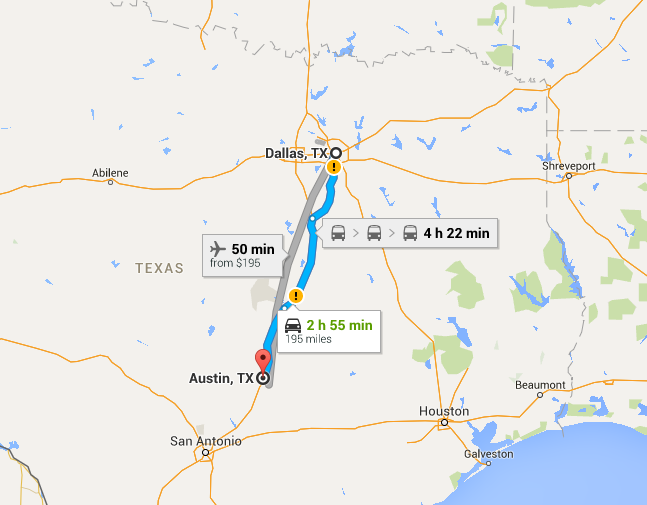
Let’s say you live in Austin, Texas, and you have a meeting in Dallas. You think that you can drive up to Dallas in your new Tesla S 60, let the car charge while you are in the meeting, and then drive home. Or, maybe you have dinner there, letting the car charge longer. Or maybe you even stay overnight.

Nope, even 24 hours later, you still might not have enough charge left to get home. At 195 miles, it’s at the range of the 60kwh battery, which would take more than a day to recharge using a normal electric circuit.

Faster Charging

That was a worst case scenario. Luckily, you probably won’t be charging using a normal 120volt/15amp circuit. That’s just the emergency backup if all else fails.

In your home, for high-watt devices like ovens, air conditioners, and clothes dryers, you have higher wattage circuits. The typical max in your home will be a 240volt/50amp circuit. It has a different power connector than a normal circuit, thicker wires, and so forth. Doing the math on this sucker, you get:

For our 190 mile drive, then, you can except to drive to Dallas, charge during the meeting and dinner for 5 hours, then you’ll have enough juice to get back home.

When you buy a Tesla, the first thing you’ll do is hire and electrician, and for $1000 to $5000, pay them to install this high-end circuit in your garage or car port. Since you garage is usually where the circuit breaker is located anyway, it’s usually the low-end of this range. You have to choose either the NEMA 14-50 plug, which can be used to power any electric car, or the Tesla HPWC (“High Power Wall Charger”) that just bundles the cord and everything together, making it easier to charge. Just back into your garage, get out of the car, pull off the cord, and plug it in. Real simple.

Standard NEMA 14-50 plug.
Different layout so you don’t accidentally plug the wrong thing into it and blow a circuit.
Tesla proprietary wall charger.

Now for our trip to Dallas, though, we have a problem. While we can get the right charging circuit at home, we might not be able to find one on the road. How common can they possibly be? They sound like they’ll be hard to find.

Well, no. Electric cars have become a thing. People are into them, unnaturally so. Even if you haven’t noticed they EV (electric vehicle) plugs around you, they are everywhere. People are way ahead of you one this.

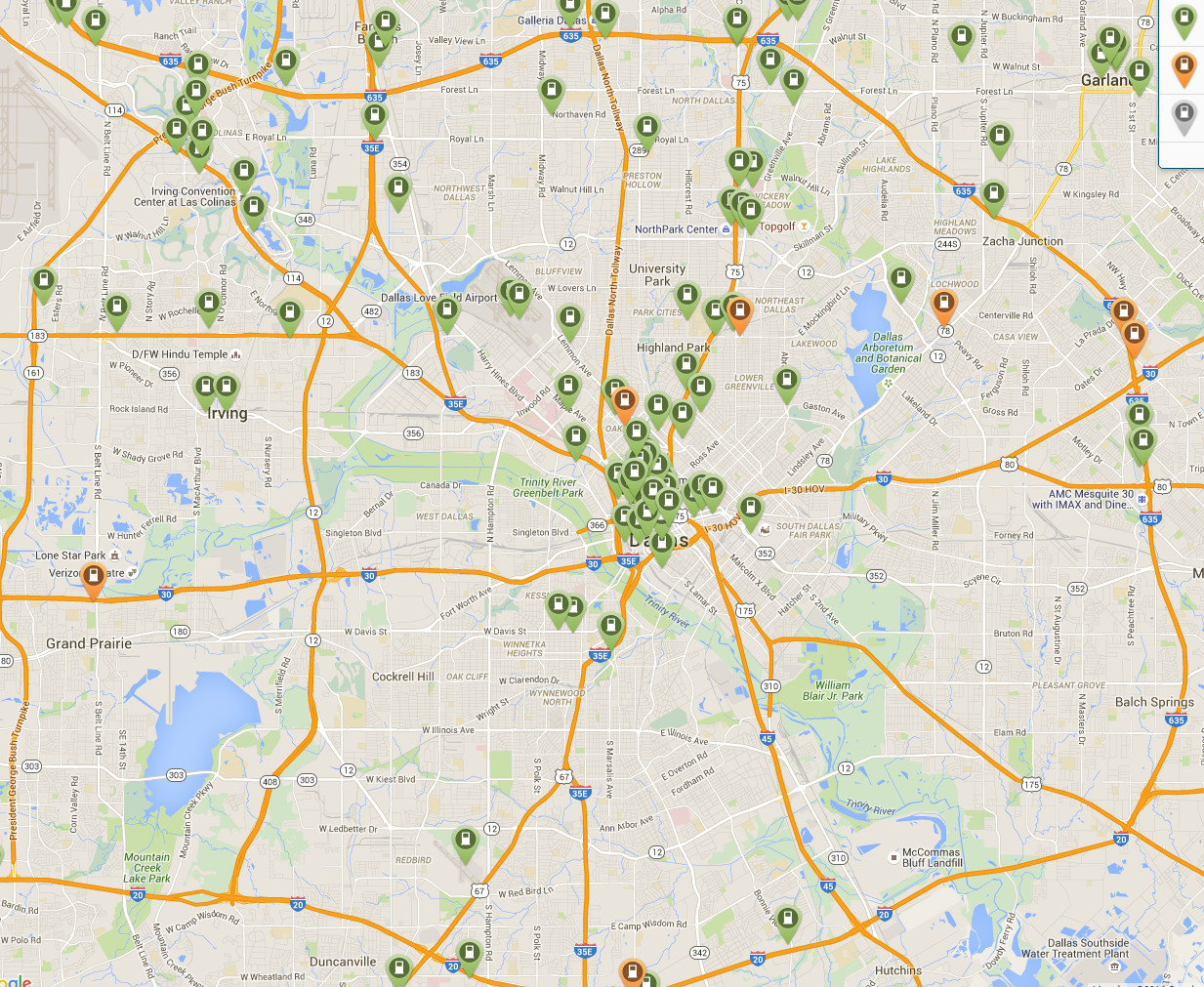
In our story of driving to Dallas, the first thing you’ll do is visit http://www.plugshare.com/, and lookup where to find charging stations. You’ll find a ton of them, even in oil-rich cities like Dallas:

On the left coast, like California, it’s insane. Chances are if you go to a business meeting, you’ll find one in the parking lot, if not that building, then one next door. Drive in, go to the meeting, have some drinks or dinner afterwards, and you’ll be able to drive home on a full charge.

Note that these charging stations primarily use the J1772 plug, a standard that all electric cars support. Your car comes with the standard electrical plug, the NEMA 14-050, and a J1772, so you can use any.

Also note that these charging stations are either run for profit, or part of a network. Even if the charging station is free, you still have to become a member. The most popular network nationwide is ChargePoint, but which one is most popular in a city varies. You may have to join a couple networks (I’ve just joined ChargePoint — they have a free one down the street in a park, so I drive there and go for a walk and suck free juice).

These are sort of a franchise network. Somebody owns the parking space. They sign up with a network like ChargePoint, buy their unit and pay for installation, then get payments back from ChargePoint when they use the parking space. Since some businesses want to encourage you to visit, they don’t charge you.

Ideally, all these charging stations should deliver max power. In practice, they are usually a bit weaker. Luckily, you can read people’s reviews online and figure that out before you go.

One thing I want to stress is there is that charging is parking. The cost of electricity is negligible, that’s not what they are charging your for. Instead, they charge your for time. Almost always, you’ll be charge for how much time you leave your car parked there, not how much power you use.

As a Tesla owner, you can use these plugs, but also special Tesla plugs. Tesla makes up to two HPWC chargers available for free to business owners, especially hotels. They call this “destination charging“, because you charge once you reach your destination. This is rather awesome as a Tesla owner, that you get vastly more options to charge than normal electric cars.

Level 1 and Level 2 charging

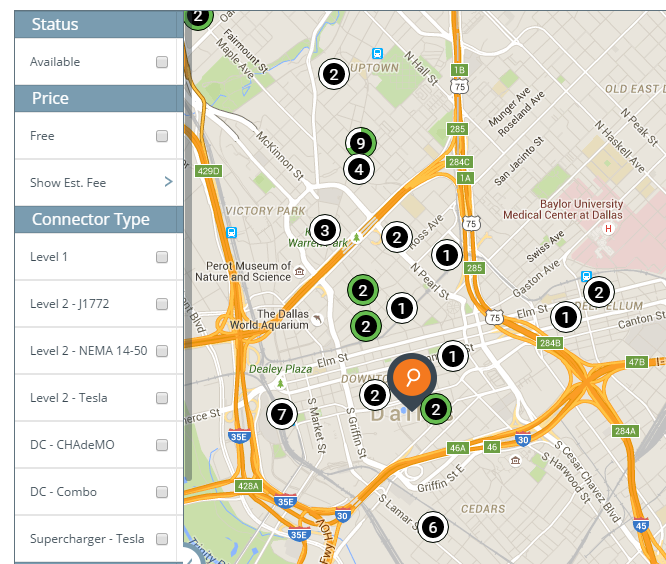
When you look at a charging map, like this one from ChargePoint, you’ll see it mentions different “levels” of charging. What does this mean?

Level 1 means the standard 120volt/15amp, 1.8kw plug that you have for all electrical devices. Business (or even homes) that have an external plug will often put themselves on the map, but you don’t care, since the charging at this level is so slow.

Level 2 means anything faster than Level 1, using the J1772 connector usually. There are a wide range of charging speeds. Original Nissan Leaf could only charge at 3.3kw, so a lot are in that range. More cars can deal with 6.6kw, so some are in that range. Only the Tesla and a Mercedes model go to the full 10kw, so many chargers don’t support that much juice.

“Level 2 Tesla”, in the map above means the HPWC mentioned above. They have appeared in the last 6 months as Tesla has aggressively pushed them to businesses, though it’s usually just hotels. These may be 10kw (40amp), but may go up to 20kw (80amp). Note your car can only handle the 10kw/40amp speeds unless you upgrade to 20kw/80amp dual-charger.

“Level 2 NEMA” didn’t use to be on the charging maps 6 months ago, but have appeared now. From what I can tell, a big reason is that when businesses put in a Tesla HPWC, they also put in the NEMA plug because it’s really cheap, and allows them to attract more cars than just Teslas (though many don’t come standard with that plug). Another reason this exists is because camping parks usually have the plug. You drive in with your campter/trailer, then hook up to the local electricity with this plug. You can also drive in with your Tesla. Indeed, the back of your car is big enough to sleep in.

The next options I’m going to describe below.

DC Fast Charging

Electricity from our walls is AC, or alternating current. Batteries, however, deal only with DC, or direct current. When you plug in your car, a device inside called the charger must convert the current. That’s why cars have limitations on how much juice they consume, they are limited by the charger’s capacity.

An alternative is to place the charger outside the car, where it can be much bigger, and feed DC direct current to the car. There is a lot of complexity here, because the car’s computers need to talk to the external charger many times a second in order to adjust the flow of current. It’s as much as a computer networking protocol as it is a copper connection for power.

If you look at your car, you’ll see that the regenerative braking often charges the battery at 50kw, which is already many times faster than the AC Level 2 chargers mentioned above. We know the battery pack can handle it. Indeed, according to Tesla, SuperChargers can charge at a rate of 120kw, or 170 miles driving range in 30 minutes of charging.

Tesla has a network of SuperChargers placed along freeways in the United States so that you can drive across country. The idea is that every couple hours, you stop for 30 minutes, relax, drink some coffee, take a pee, and charge your car for the next stage.

In our driving scenario above, there’s a SuperCharger in Waco, halfway between Austin and Dallas with 8 stalls available:

From Waco, it’s 76 miles to Dallas, meaning if you fully charge there, you can make it to Dallas and back to Waco without recharging – though it’s cutting it a bit close with the 60kwh model. Though, if your destination is the east side of Dallas, then maybe going through Corsicana and using their SuperCharger would be easier.

The SuperCharger is Tesla’s solution to the problem but there are two other standards. There is the Asian standard known as CHAdeMO, and the European standard often called the COMBO adapter, as the DC component is combined with the J1772 AC standard. The CHAdeMO was the early standard coming with Japanese cars, but the COMBO adapter appears to be the winning standard in the long run. Tesla doesn’t support either of these standards. These other standards are also far behind the Tesla in charging speed, maxing out around 60kw (and usually less), whereas the Tesla does 120kw.

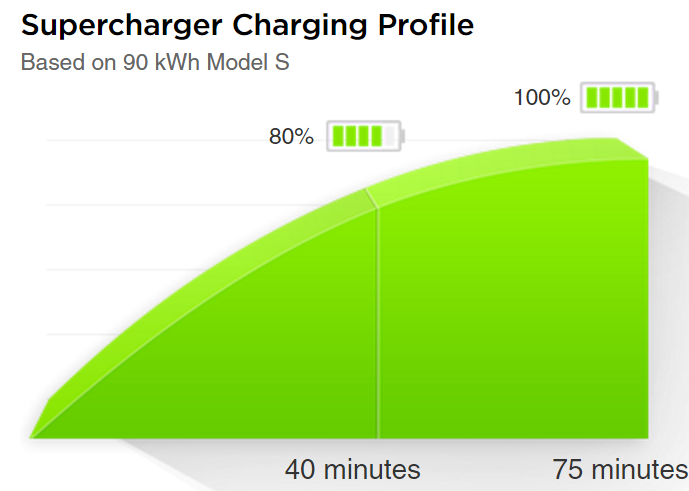
As I mentioned, the direct DC charging dumps power into the battery as fast as the battery can take it — which means it’s the battery that now becomes the bottleneck. As you know from experience charging phones and laptops, charging to 50% full, but it seems to take forever to get from 90% to 100%. The same is true of your Tesla.

So here’s a trick. The 60kwh car actually ships with the 75kwh battery. Tesla is allows you to “upgrade” your car later to the higher range for $9k, which will consist of just Tesla turning on a switch enabling the entire battery. But, for SuperCharging, it’s still a 75kwh battery. 60 is 80% of 75. That means, you can charge to 100% full in 40minutes rather than 75minutes.

Charging to 100% lowers the lifetime of the battery, to Tesla recommends you only charge to 80% anyway. Again, with the 60kwh battery, charging to 100% means only 80% anyway. Thus, you get most of the benefits of a larger battery without paying for it. If you truly want extra range, you might consider the 90kwh upgrade instead of going from 60kwh to 75kwh.

The new Model 3s that come out in a few years won’t have free SuperCharger access. That may also be true of the cheapest Model S (they keep changing this). You should check on this.

Off-peak Charging

Among the many revolutions recently has been smart electrical meters. They can now bill you by time-of-day when you consume power, charging you more during peak hours, and less during off-peak. If you haven’t been paying attention to this, you are still probably on the old billing plan. You might want to look into changing.
Where I live, they charge $0.01 (one cent) per kilowatt-hour during off-off-peak, between 11pm and 7am. That’s insane, compared to $0.20 elsewhere in the country.
Your Tesla can be configured to when it charges, so you get home, plug it in, and it won’t start charging right away, but wait until off-peak or off-off-peak to start charging.

Conclusion

Electric charging math has given me a new appreciation for the power of gasoline. Filling up your gas tank is the equivalent of charging at multiple megawatt speeds – something electric cars will never get close to. Driving at the range limits of the car requires planning – you just can’t do it without doing some math.

Continue reading Tesla review: What you need to know about charging

Posted in Uncategorized

Tesla review: What you need to know about charging

Before you buy an electric car, you need to understand charging. It’s a huge deal. You think it works almost like filling the gas tank. It doesn’t. Before going on long trips, you first need to do math and a bit of planning.

The Math

Like BMW model numbers indicate engine size, Tesla model numbers indicate the size of the battery, so my “Tesla S P90D” has a 90kwh (killowatt-hour) battery, with a 286nile range. Their lowest end model is the “Tesla S 60”, which has a 60kwh hour battery, or a 208mile advertised range.

In the United States, a typical plug is a 120volt circuit with a maximum of 15amps. Doing the math, this is how long it’ll take for me to recharge the battery:

That’s right, 1.4 days (or 2.1 days for a 90kwh car). This is the absolute worse case scenario, mind you, but it demonstrates that you have to pay attention to charging. You can’t simply drive up to a station, fill up the tank in a couple minutes, and drive away.

Let’s say you live in Austin, Texas, and you have a meeting in Dallas. You think that you can drive up to Dallas in your new Tesla S 60, let the car charge while you are in the meeting, and then drive home. Or, maybe you have dinner there, letting the car charge longer. Or maybe you even stay overnight.

Nope, even 24 hours later, you still might not have enough charge left to get home. At 195 miles, it’s at the range of the 60kwh battery, which would take more than a day to recharge using a normal electric circuit.

Faster Charging

That was a worst case scenario. Luckily, you probably won’t be charging using a normal 120volt/15amp circuit. That’s just the emergency backup if all else fails.

In your home, for high-watt devices like ovens, air conditioners, and clothes dryers, you have higher wattage circuits. The typical max in your home will be a 240volt/50amp circuit. It has a different power connector than a normal circuit, thicker wires, and so forth. Doing the math on this sucker, you get:

For our 190 mile drive, then, you can except to drive to Dallas, charge during the meeting and dinner for 5 hours, then you’ll have enough juice to get back home.

When you buy a Tesla, the first thing you’ll do is hire and electrician, and for $1000 to $5000, pay them to install this high-end circuit in your garage or car port. Since you garage is usually where the circuit breaker is located anyway, it’s usually the low-end of this range. You have to choose either the NEMA 14-50 plug, which can be used to power any electric car, or the Tesla HPWC (“High Power Wall Charger”) that just bundles the cord and everything together, making it easier to charge. Just back into your garage, get out of the call, pull off the cord, and plug it in. Real simple.
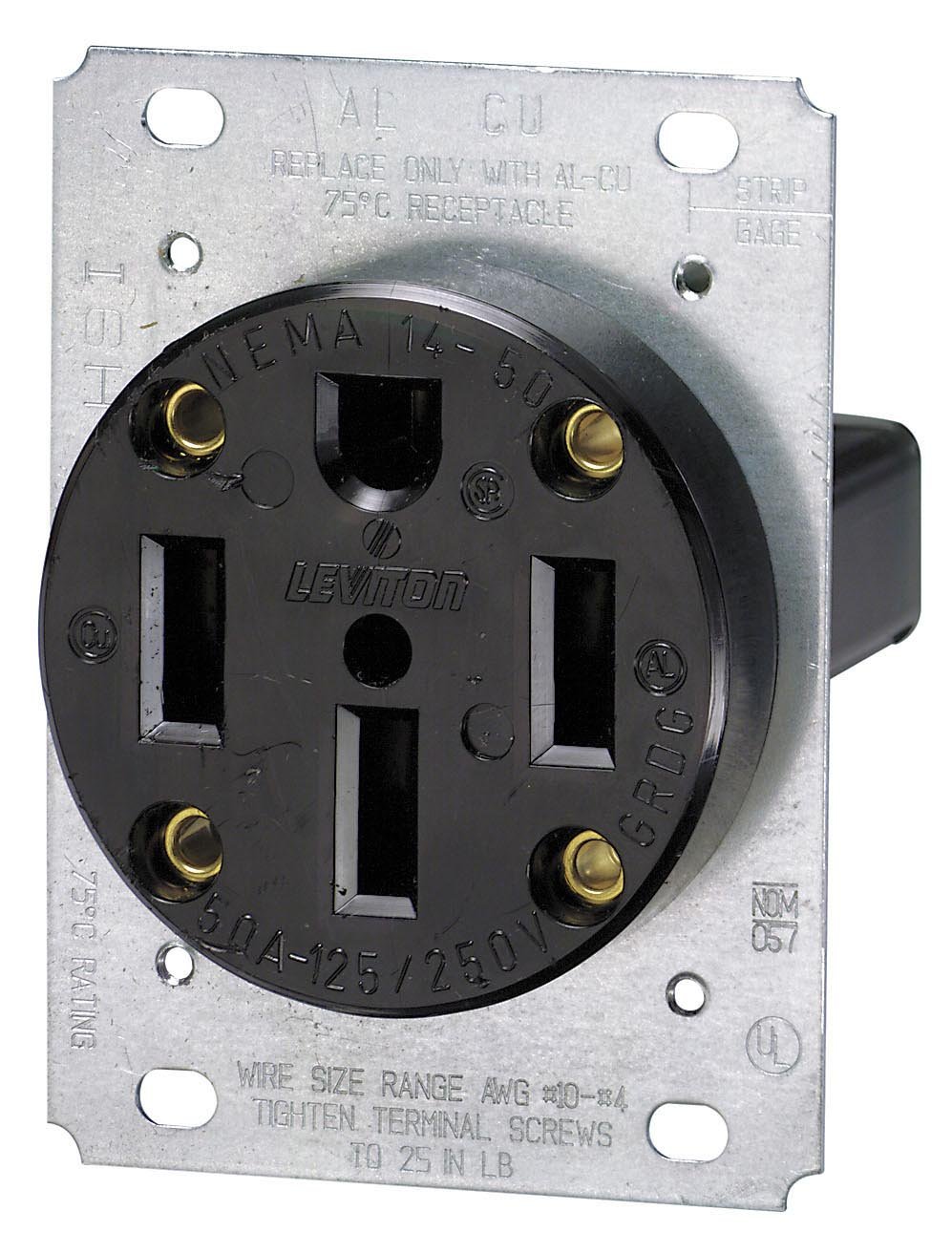
Standard NEMA 14-50 plug.
Different layout so you don’t accidentally plug the wrong thing into it and blow a circuit.
Tesla proprietary wall charger.

Now for our trip to Dallas, though, we have a problem. While we can get the right charging circuit at home, we might not be able to find one on the road. How common can they possibly be? They sound like they’ll be hard to find.

Well, no. Electric cars have become a thing. People are into them, unnaturally so. Even if you haven’t noticed they EV (electric vehicle) plugs around you, they are everywhere. People are way ahead of you one this.

In our story of driving to Dallas, the first thing you’ll do is visit http://www.plugshare.com/, and lookup where to find charging stations. You’ll find a ton of them, even in oil-rich cities like Dallas:

On the left coast, like California, it’s insane. Chances are if you go to a business meeting, you’ll find one in the parking lot, if not that building, then one next door. Drive in, go to the meeting, have some drinks or dinner afterwards, and you’ll be able to drive home on a full charge.

Note that these charging stations primarily use the J1772 plug, a standard that all electric cars support. Your car comes with the standard electrical plug, the NEMA 14-050, and a J1772, so you can use any.

Also note that these charging stations are either run for profit, or part of a network. Even if the charging station is free, you still have to become a member. The most popular network nationwide is ChargePoint, but which one is most popular in a city varies. You may have to join a couple networks (I’ve just joined ChargePoint — they have a free one down the street in a park, so I drive there and go for a walk and suck free juice).

These are sort of a franchise network. Somebody owns the parking space. They sign up with a network like ChargePoint, buy their unit and pay for installation, then get payments back from ChargePoint when they use the parking space. Since some businesses want to encourage you to visit, they don’t charge you.

Ideally, all these charging stations should deliver max power. In practice, they are usually a bit weaker. Luckily, you can read people’s reviews online and figure that out before you go.

One thing I want to stress is there is that charging is parking. The cost of electricity is negligible, that’s not what they are charging your for. Instead, they charge your for time. Almost always, you’ll be charge for how much time you leave your car parked there, not how much power you use.

As a Tesla owner, you can use these plugs, but also special Tesla plugs. Tesla makes up to two HPWC chargers available for free to business owners, especially hotels. They call this “destination charging“, because you charge once you reach your destination. This is rather awesome as a Tesla owner, that you get vastly more options to charge than normal electric cars.

Level 1 and Level 2 charging

When you look at a charging map, like this one from ChargePoint, you’ll see it mentions different “levels” of charging. What does this mean?

Level 1 means the standard 120volt/15amp, 1.8kw plug that you have for all electrical devices. Business (or even homes) that have an external plug will often put themselves on the map, but you don’t care, since the charging at this level is so slow.

Level 2 means anything faster than Level 1, using the J1772 connector usually. There are a wide range of charging speeds. Original Nissan Leaf could only charge at 3.3kw, so a lot are in that range. More cars can deal with 6.6kw, so some are in that range. Only the Tesla and a Mercedes model go to the full 10kw, so many chargers don’t support that much juice.

“Level 2 Tesla”, in the map above means the HPWC mentioned above. They have appeared in the last 6 months as Tesla has aggressively pushed them to businesses, though it’s usually just hotels. These may be 10kw (40amp), but may go up to 20kw (80amp). Note your car can only handle the 10kw/40amp speeds unless you upgrade to 20kw/80amp dual-charger.

“Level 2 NEMA” didn’t use to be on the charging maps 6 months ago, but have appeared now. From what I can tell, a big reason is that when businesses put in a Tesla HPWC, they also put in the NEMA plug because it’s really cheap, and allows them to attract more cars than just Teslas (though many don’t come standard with that plug). Another reason this exists is because camping parks usually have the plug. You drive in with your campter/trailer, then hook up to the local electricity with this plug. You can also drive in with your Tesla. Indeed, the back of your car is big enough to sleep in.

The next options I’m going to describe below.

DC Fast Charging

Electricity from our walls is AC, or alternating current. Batteries, however, deal only with DC, or direct current. When you plug in your car, a device inside called the charger must convert the current. That’s why cars have limitations on how much juice they consume, they are limited by the charger’s capacity.

An alternative is to place the charger outside the car, where it can be much bigger, and feed DC direct current to the car. There is a lot of complexity here, because the car’s computers need to talk to the external charger many times a second in order to adjust the flow of current. It’s as much as a computer networking protocol as it is a copper connection for power.

If you look at your car, you’ll see that the regenerative braking often charges the battery at 50kw, which is already many times faster than the AC Level 2 chargers mentioned above. We know the battery pack can handle it. Indeed, according to Tesla, SuperChargers can charge at a rate of 120kw, or 170 miles driving range in 30 minutes of charging.

Tesla has a network of SuperChargers placed along freeways in the United States so that you can drive across country. The idea is that every couple hours, you stop for 30 minutes, relax, drink some coffee, take a pee, and charge your car for the next stage.

In our driving scenario above, there’s a SuperCharger in Waco, halfway between Austin and Dallas with 8 stalls available:

From Waco, it’s 76 miles to Dallas, meaning if you fully charge there, you can make it to Dallas and back to Waco without recharging – though it’s cutting it a bit close with the 60kwh model. Though, if your destination is the east side of Dallas, then maybe going through Corsicana and using their SuperCharger would be easier.

The SuperCharger is Tesla’s solution to the problem but there are two other standards. There is the Asian standard known as CHAdeMO, and the European standard often called the COMBO adapter, as the DC component is combined with the J1772 AC standard. The CHAdeMO was the early standard coming with Japanese cars, but the COMBO adapter appears to be the winning standard in the long run. Tesla doesn’t support either of these standards. These other standards are also far behind the Tesla in charging speed, maxing out around 60kw (and usually less), whereas the Tesla does 120kw.

As I mentioned, the direct DC charging dumps power into the battery as fast as the battery can take it — which means it’s the battery that now becomes the bottleneck. As you know from experience charging phones and laptops, charging to 50% is full, but it seems to take forever to get from 90% to 100%. The same is true of your Tesla.

So here’s a trick. The 60kwh car actually ships with the 75kwh battery. Tesla is allows you to “upgrade” your car later to the higher range for $9k, which will consist of just Tesla turning on a switch enabling the entire battery. But, for SuperCharging, it’s still a 75kwh battery. 60 is 80% of 75. That means, you can charge to 100% full in 40minutes rather than 75minutes.

Charging to 100% lowers the lifetime of the battery, to Tesla recommends you only charge to 80% anyway. Again, with the 60kwh battery, charging to 100% means only 80% anyway. Thus, you get most of the benefits of a larger battery without paying for it. If you truly want extra range, you might consider the 90kwh upgrade instead of going from 60kwh to 75kwh.

The new Model 3s that come out in a few years won’t have free SuperCharger access. That may also be true of the cheapest Model S (they keep changing this). You should check on this.

Off-peak Charging

Among the many revolutions recently has been smart electrical meters. They can now bill you by time-of-day when you consume power, charging you more during peak hours, and less during off-peak. If you haven’t been paying attention to this, you are still probably on the old billing plan. You might want to look into changing.
Where I live, they charge $0.01 (one cent) per kilowatt-hour during off-off-peak, between 11pm and 7am. That’s insane, compared to $0.20 elsewhere in the country.
Your Tesla can be configured to when it charges, so you get home, plug it in, and it won’t start charging right away, but wait until off-peak or off-off-peak to start charging.

Conclusion

Electric charging math has given me a new appreciation for the power of gasoline. Filling up your gas tank is the equivalent of charging at multiple megawatt speeds – something electric cars will never get close to. Driving at the range limits of the car requires planning – you just can’t do it without doing some math.

Continue reading Tesla review: What you need to know about charging

Posted in SBN

Scanning for ClamAV 0day

Last week an 0day was released for ClamAV. Well, not really an 0day so much as somebody noticed idiotic features in ClamAV. So I scanned the Internet for the problem.

The feature is that the daemon listens for commands that tell it to do things like scan files. Normally, it listens only locally for such commands, but can be reconfigured to listen remotely on TCP port 3310. Some packages that include ClamAV sometimes default to this.

It’s a simple protocol that consists of sending a command in clear text, like “PING”, “VERSION”, “SHUTDOWN”, or “SCAN
So I ran masscan with the following command:

masscan 0.0.0.0/0 -p3310 –banners –hello-string[3310] VkVSU0lPTg==

Normally when you scan an address range (/0) and port (3310), you’d just see which ports are open/closed. That’s not useful in this case, because it finds 2.7 million machines. Instead, you want to establish a full TCP connection. That’s what the –banners option does, giving us only 38 thousand machines that successfully establish a connection. The remaining machines are large ranges on the Internet where firewalls are configured to respond with SYN-ACK, with the express purpose of frustrating port scanners.

But of those 38k machines, most are actually things like web servers running on odd ports. 51 machines running VNC, 641 machines running SSH, and so on.

To find specifically ClamAV, I send a command using the –hello-string feature. I send the text “VERSION“, which must be encoded with base64 on the command-line for masscan (in case you need to also send binary).

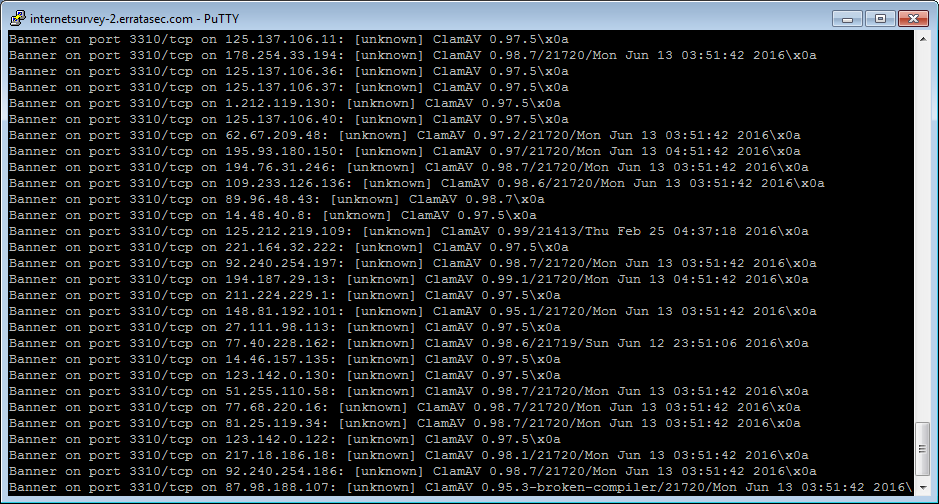
This finds 5950 machines (i.e. 6k) that respond back with a ClamAV signature. typical examples of this response are:

At first I thought the date was when they last updated the software, maybe as a page. Roughly half had dates of either this morning or the day before. But no, it’s actually the dates when they last updated their signatures.

From this we can conclude that roughly half of ClamAV installations are configured to auto-update their signatures.

Roughly 2400 machines (nearly half) had the version 0.97.5. This was released in June 2012 (four years old). I’m thinking some appliance maker like Barracuda bundled the software — appliances are notorious for not getting updated software. That hints at why this non-default configuration is so common — it’s not users who made this decision, but the software that bundles ClamAV with other things. Scanning other ports gives me no clues — they appear all over the map, with different versions of SSH, different services running, different SSL versions, and so on. I thought maybe “mail server” (since that’d be a common task for ClamAV), but there were only a few servers, and they ran different mail server software. So it’s a mystery why this specific version is so popular.

I manually tested various machines with “SCAN foo”. They all replied “file not found”, which hints that all the units I found are vulnerable to this 0day.

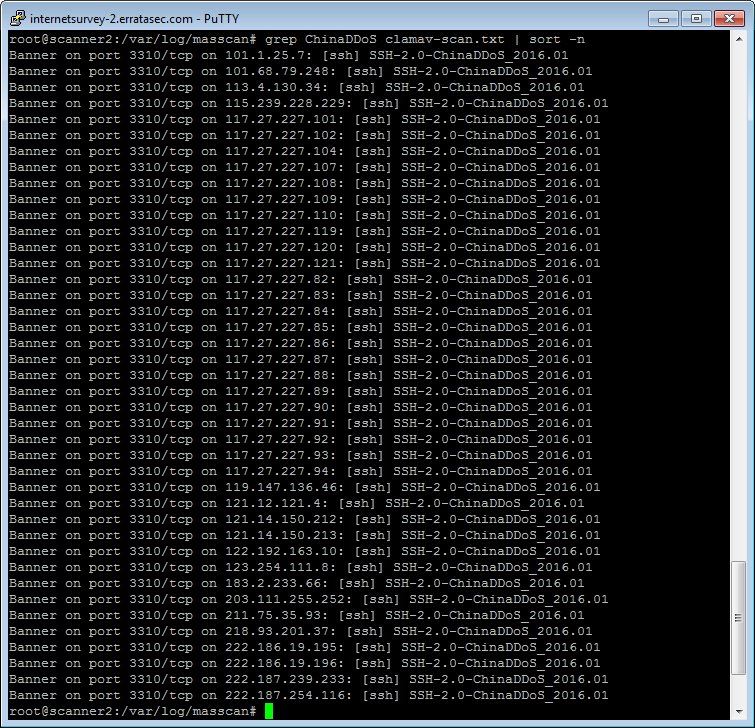
As for other things, I came across a bunch of systems claiming to be ChinaDDoS systems:

Conclusion

This sort of stuff shouldn’t exist. The number of ClamAV systems available on the public Internet should be zero.

Even inside a corporate network, the number should be 0. If that stuff is turned on, then it should be firewalled (such as with iptables) so that only specific machines can access it.

Two important results are that half the systems are really old (EOLed, no longer supported), and only half the systems have the latest updates. There’s some overlap — systems with latest signature but out-of-date software.

…and then connects all the computers together.

— Rob Graham ❄️ (@ErrataRob) June 14, 2016

Continue reading Scanning for ClamAV 0day

Posted in Uncategorized