Skillz: editing a web page

So one of the skillz you ought to have in cybersec is messing with web-pages client-side using Chrome’s Developer Tools. Web-servers give you a bunch of HTML and JavaScript code which, once it reaches your browser, is yours to change and play with. You can do a lot with web-sites that they don’t intend by changing that code.

Let me give you an example. It’s only an example — touching briefly on steps to give you an impression what’s going on. It’s not a ground up explanation of everything, which you may find off-putting. Click on the images to expand them so you can see fully what’s going on.

Today is the American holiday called “Presidents Day”. It’s actually not a federal holiday, but a holiday in all 50 states. Originally it was just Washington’s birthday (February 22), but some states choose to honor other presidents as well, hence “Presidents Day”.
Thus of us who donated to Donald Trump’s campaign (note: I donated to all candidates campaigns back in 2015) received an email today suggesting that to honor Presidents Day, we should “sign a card” for Trump. It’s a gross dis-honoring of the Presidents the day is supposed to commemorate, but whatever, it’s the 21st century.
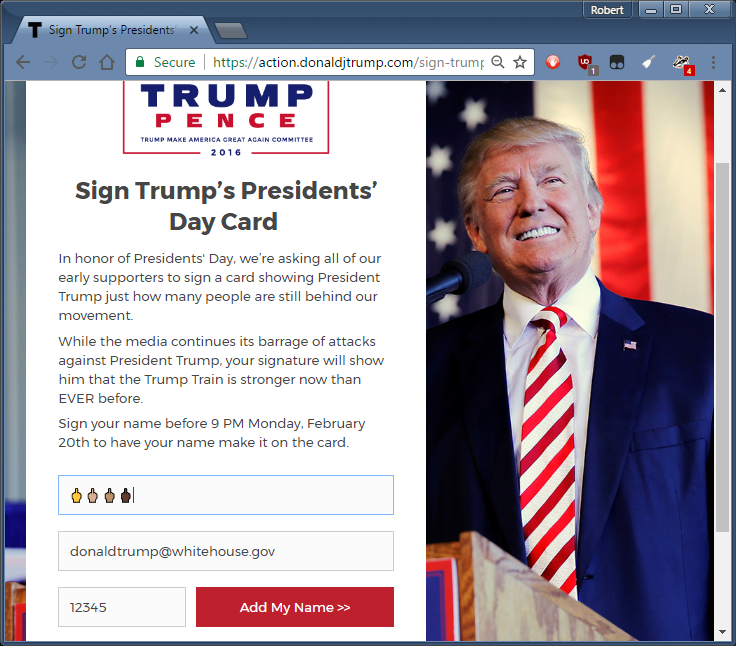
Okay, let’s say we want to honor the current President with a bunch of 🖕🖕🖕🖕 in order to point out his crassness of exploiting this holiday, and clicked on the URL [*], and filled it in as such (with multiple skin tones for the middle finger, just so he knows its from all of us):
Okay, now we hit the submit button “Add My Name” in order to send this to his campaign. The only problem is, the web page rejects us, telling us “Please enter a valid name” (note, I’m changing font sizes in these screen shots so you can see the message):
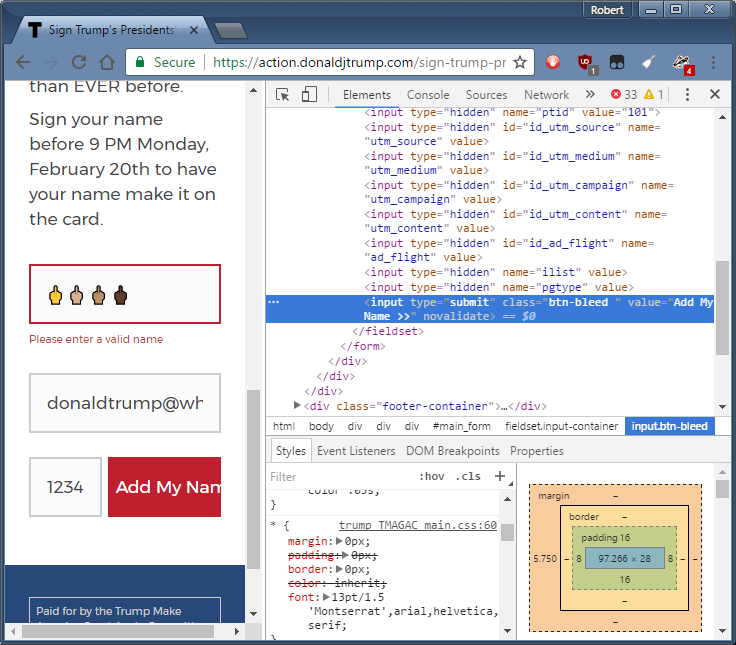
This is obviously client side validation of the field. It’s at this point that we go into Developer Tools in order to turn it off. One way is to [right-click] on that button, and from the popup menu, select “Inspect”, which gets you this screen (yes, the original page is squashed to the left-hand side):
We can edit the HTML right there and add the “novalidate” flag, as shown below, then hit the “Add My Name” button again:
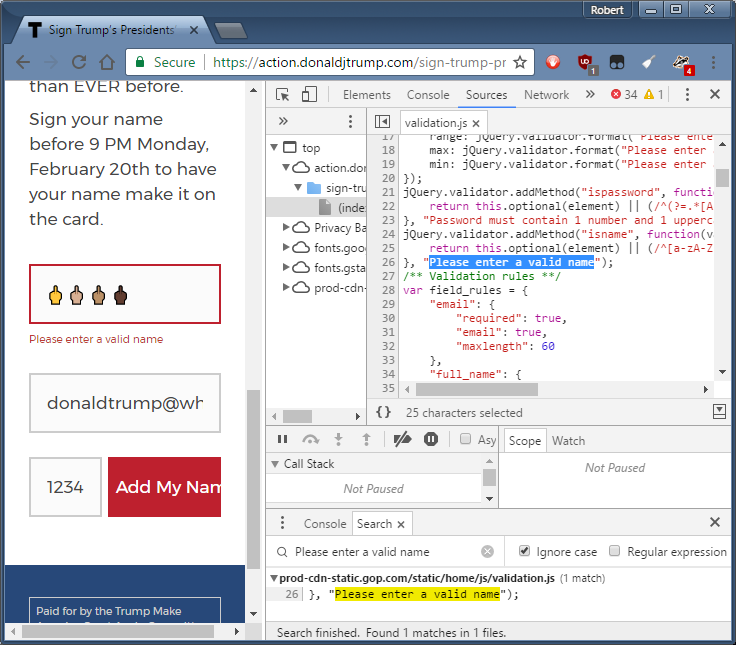
This doesn’t work. The scripts on the webpage aren’t honoring the HTML5 “novalidate” flag. Therefore, we’ll have to go edit those scripts. We do that by clicking on the Sources tab, then press [ctrl-shift-f] to open the ‘find’ window in the sources, and type “Please enter a valid name”, and you’ll find the JavaScript source file (validation.js) where the validation function is located:
If at this point you find all these windows bewildering, then yes, you are on the right track. We typed in the search there near the bottom next to the classic search icon 🔍. Then right below that we got the search results. We clicked on the search results, then up above popped up the source file (validation.js) among all the possible source files with the line selected that contains our search term. Remember: when you pull down a single HTML page, like the one from donaldtrump.com, it can pull in a zillion JavaScript files as well.
Unlike the HTML, we can’t change the JavaScript on the fly (at least, I don’t know how to). Instead, we have to run more JavaScript. Specifically, we need to run a script that registers a new validation function. If you look in the original source, it contains a function that validates the input by making sure it matches a regular expression:
  1. jQuery.validator.addMethod(“isname”, function(value, element) {
  2.     return this.optional(element) || (/^[a-zA-Z]+[ ]+(([‘,. -][a-zA-Z ])?[a-zA-Z]*)+.?$/.test(value.trim()));
  3. }, “Please enter a valid name”);
From the console, we are going to call the addMethod function ourselves to register a different validation function for isname, specifically a validation function that always returns true, meaning the input is valid. This will override the previously registered function. As the Founders of our country say, the solution to bad JavaScript is not to censor it, but to add more JavaScript.
  1. jQuery.validator.addMethod(“isname”, function () {
  2.     return true});
We just type that in the Console as shown below (in the bottom window where Search used to be) and hit [enter]. It gives us the response “undefined”, but that’s OK. (Note: in the screenshot I misspelled it as isName, it should instead be all lowercase isname).
Now we can close Developer Tools and press the “Add My Name” button, and we get the following response:
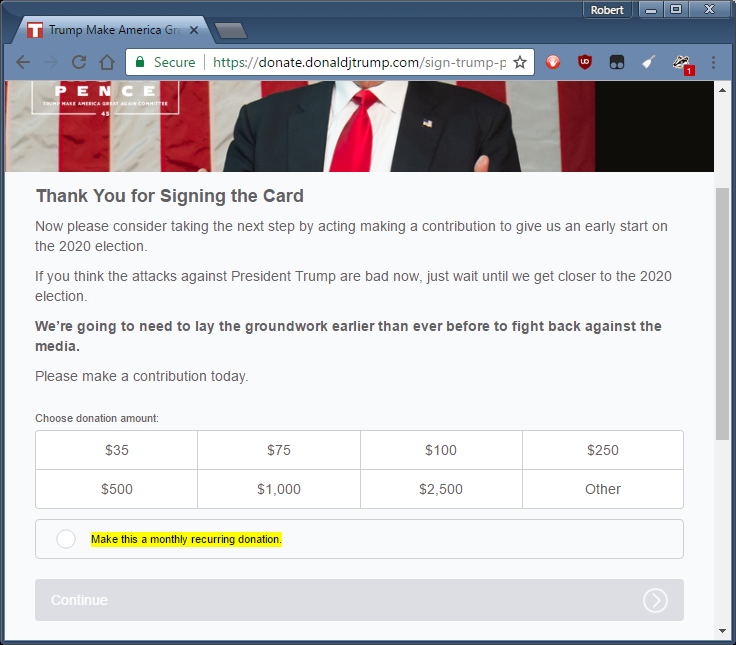
Darn, foiled again. But at least this time, our request went to the server. It was on the server side that the request was rejected. We successfully turned off client-side checking. Had the server accepted our Unicode emoji, we would’ve reached the next step, where it asks for donations. (By the way, the entire purpose of “sign this card” is to get users to donate, nothing else).

Conclusion

So we didn’t actually succeed at doing anything here, but I thought I’d write it up anyway. Editing the web-page client-side, or mucking around with JavaScript client-side, is a skill that every cybersec professional should have. Hopefully, this is an amusing enough example that people will follow the steps to see how this is done.

Continue reading Skillz: editing a web page

Posted in Uncategorized

Skillz: editing a web page

So one of the skillz you ought to have in cybersec is messing with web-pages client-side using Chrome’s Developer Tools. Web-servers give you a bunch of HTML and JavaScript code which, once it reaches your browser, is yours to change and play with. You can do a lot with web-sites that they don’t intend by changing that code.

Let me give you an example. It’s only an example — touching briefly on steps to give you an impression what’s going on. It’s not a ground up explanation of everything, which you may find off-putting. Click on the images to expand them so you can see fully what’s going on.

Today is the American holiday called “Presidents Day”. It’s actually not a federal holiday, but a holiday in all 50 states. Originally it was just Washington’s birthday (February 22), but some states choose to honor other presidents as well, hence “Presidents Day”.
Thus of us who donated to Donald Trump’s campaign (note: I donated to all candidates campaigns back in 2015) received an email today suggesting that to honor Presidents Day, we should “sign a card” for Trump. It’s a gross dis-honoring of the Presidents the day is supposed to commemorate, but whatever, it’s the 21st century.
Okay, let’s say we want to honor the current President with a bunch of 🖕🖕🖕🖕 in order to point out his crassness of exploiting this holiday, and clicked on the URL [*], and filled it in as such (with multiple skin tones for the middle finger, just so he knows its from all of us):
Okay, now we hit the submit button “Add My Name” in order to send this to his campaign. The only problem is, the web page rejects us, telling us “Please enter a valid name” (note, I’m changing font sizes in these screen shots so you can see the message):
This is obviously client side validation of the field. It’s at this point that we go into Developer Tools in order to turn it off. One way is to [right-click] on that button, and from the popup menu, select “Inspect”, which gets you this screen (yes, the original page is squashed to the left-hand side):
We can edit the HTML right there and add the “novalidate” flag, as shown below, then hit the “Add My Name” button again:
This doesn’t work. The scripts on the webpage aren’t honoring the HTML5 “novalidate” flag. Therefore, we’ll have to go edit those scripts. We do that by clicking on the Sources tab, then press [ctrl-shift-f] to open the ‘find’ window in the sources, and type “Please enter a valid name”, and you’ll find the JavaScript source file (validation.js) where the validation function is located:
If at this point you find all these windows bewildering, then yes, you are on the right track. We typed in the search there near the bottom next to the classic search icon 🔍. Then right below that we got the search results. We clicked on the search results, then up above popped up the source file (validation.js) among all the possible source files with the line selected that contains our search term. Remember: when you pull down a single HTML page, like the one from donaldtrump.com, it can pull in a zillion JavaScript files as well.
Unlike the HTML, we can’t change the JavaScript on the fly (at least, I don’t know how to). Instead, we have to run more JavaScript. Specifically, we need to run a script that registers a new validation function. If you look in the original source, it contains a function that validates the input by making sure it matches a regular expression:
  1. jQuery.validator.addMethod(“isname”, function(value, element) {
  2.     return this.optional(element) || (/^[a-zA-Z]+[ ]+(([‘,. -][a-zA-Z ])?[a-zA-Z]*)+.?$/.test(value.trim()));
  3. }, “Please enter a valid name”);
From the console, we are going to call the addMethod function ourselves to register a different validation function for isname, specifically a validation function that always returns true, meaning the input is valid. This will override the previously registered function. As the Founders of our country say, the solution to bad JavaScript is not to censor it, but to add more JavaScript.
  1. jQuery.validator.addMethod(“isname”, function () {
  2.     return true});
We just type that in the Console as shown below (in the bottom window where Search used to be) and hit [enter]. It gives us the response “undefined”, but that’s OK. (Note: in the screenshot I misspelled it as isName, it should instead be all lowercase isname).
Now we can close Developer Tools and press the “Add My Name” button, and we get the following response:
Darn, foiled again. But at least this time, our request went to the server. It was on the server side that the request was rejected. We successfully turned off client-side checking. Had the server accepted our Unicode emoji, we would’ve reached the next step, where it asks for donations. (By the way, the entire purpose of “sign this card” is to get users to donate, nothing else).

Conclusion

So we didn’t actually succeed at doing anything here, but I thought I’d write it up anyway. Editing the web-page client-side, or mucking around with JavaScript client-side, is a skill that every cybersec professional should have. Hopefully, this is an amusing enough example that people will follow the steps to see how this is done.

Continue reading Skillz: editing a web page

Posted in Uncategorized

Skillz: editing a web page

So one of the skillz you ought to have in cybersec is messing with web-pages using Chrome’s Developer Tools (select from menu, or type [ctrl-shift-i]). Let me give you an example. Click on the images to expand them so you can see fully what’s going on.

Today is the American holiday called “Presidents Day”. It’s actually not a federal holiday, but a holiday in all 50 states. Originally it was just Washington’s birthday (February 22), but some states choose to honor other presidents as well, hence “Presidents Day”.
Thus of us who donated to Donald Trump’s campaign (note: I donated to all candidates campaigns back in 2015) received an email today suggesting that to honor Presidents Day, we should “sign a card” for Trump. It’s a gross dis-honoring of the Presidents the day is supposed to commemorate, but whatever, it’s the 21st century.
Okay, let’s say we want to honor the current President with a bunch of 🖕🖕🖕🖕 in order to point out his crassness of exploiting this holiday, and clicked on the URL [*], and filled it in as such (with multiple skin tones for the middle finger, just so he knows its from all of us):
Okay, now we hit the submit button “Add My Name” in order to send this to his campaign. The only problem is, the web page rejects us, telling us “Please enter a valid name” (note, I’m changing font sizes in these screen shots so you can see the message):
This is obviously client side validation of the field. It’s at this point that we go into Developer Tools in order to turn it off. One way is to [right-click] on that button, and from the popup menu, select “Inspect”, which gets you this screen (yes, the original page is squashed to the left-hand side):
We can edit the HTML right there and add the “novalidate” flag, as shown below, then hit the “Add My Name” button again:
This doesn’t work. The scripts on the webpage aren’t honoring the HTML5 “novalidate” flag. Therefore, we’ll have to go edit those scripts. We do that by clicking on the Sources tab, then press [ctrl-shift-f] to open the ‘find’ window in the sources, and type “Please enter a valid name”, and you’ll find the JavaScript source file (validation.js) where the validation function is located:
If at this point you find all these windows bewildering, then yes, you are on the right track. We typed in the search there near the bottom next to the classic search icon 🔍. Then right below that we got the search results. We clicked on the search results, then up above popped up the source file (validation.js) among all the possible source files with the line selected that contains our search term. Remember: when you pull down a single HTML page, like the one from donaldtrump.com, it can pull in a zillion JavaScript files as well.
Unlike the HTML, we can’t change the JavaScript on the fly (at least, I don’t know how to). Instead, we have to run more JavaScript. Specifically, we need to run a script that registers a new validation function. If you look in the original source, it contains a function that validates the input by making sure it matches a regular expression:
  1. jQuery.validator.addMethod(“isname”, function(value, element) {
  2.     return this.optional(element) || (/^[a-zA-Z]+[ ]+(([‘,. -][a-zA-Z ])?[a-zA-Z]*)+.?$/.test(value.trim()));
  3. }, “Please enter a valid name”);
From the console, we are going to call the addMethod function ourselves to register a different validation function for isname, specifically a validation function that always returns true, meaning the input is valid. This will override the previously registered function. As the Founders of our country say, the solution to bad JavaScript is not to censor it, but to add more JavaScript.
  1. jQuery.validator.addMethod(“isname”, function () {
  2.     return true});
We just type that in the Console as shown below (in the bottom window where Search used to be) and hit [enter]. It gives us the response “undefined”, but that’s OK. (Note: in the screenshot I misspelled it as isName, it should instead be all lowercase isname).
Now we can close Developer Tools and press the “Add My Name” button, and we get the following response:
Darn, foiled again. But at least this time, our request went to the server. It was on the server side that the request was rejected. We successfully turned off client-side checking. Had the server accepted our Unicode emoji, we would’ve reached the next step, where it asks for donations. (By the way, the entire purpose of “sign this card” is to get users to donate, nothing else).

Conclusion

So we didn’t actually succeed at doing anything here, but I thought I’d write it up anyway. Editing the web-page client-side, or mucking around with JavaScript client-side, is a skill that every cybersec professional should have. Hopefully, this is an amusing enough example that people will follow the steps to see how this is done.

Continue reading Skillz: editing a web page

Posted in SBN

You don’t need printer security

So there’s this tweet:

The guy at the HP printer security booth seriously told a customer that he needs print security “because stuxnet exploits the print spooler” pic.twitter.com/WRyfEGj9hR

— Jake Williams (@MalwareJake) February 15, 2017

What it’s probably refering to is this:

This is an obviously bad idea.

Well, not so “obvious”, so some people have ask me to clarify the situation. After all, without “security”, couldn’t a printer just be added to a botnet of IoT devices?

The answer is this:

Fixing insecurity is almost always better than adding a layer of security.

Adding security is notoriously problematic, for three reasons

  1. Hackers are active attackers. When presented with a barrier in front of an insecurity, they’ll often find ways around that barrier. It’s a common problem with “web application firewalls”, for example.
  2. The security software itself can become a source of vulnerabilities hackers can attack, which has happened frequently in anti-virus and intrusion prevention systems.
  3. Security features are usually snake-oil, sounding great on paper, with with no details, and no independent evaluation, provided to the public.

It’s the last one that’s most important. HP markets features, but there’s no guarantee they work. In particular, similar features in other products have proven not to work in the past.

HP describes its three special features in a brief whitepaper [*]. They aren’t bad, but at the same time, they aren’t particularly good. Windows already offers all these features. Indeed, as far as I know, they are just using Windows as their firmware operating system, and are just slapping an “HP” marketing name onto existing Windows functionality.

HP Sure Start: This refers to the standard feature in almost all devices these days of having a secure boot process. Windows supports this in UEFI boot. Apple’s iPhones work this way, which is why the FBI needed Apple’s help to break into a captured terrorist’s phone. It’s a feature built into most IoT hardware, though most don’t enable it in software.

Whitelisting: Their description sounds like “signed firmware updates”, but if that was they case, they’d call it that. Traditionally, “whitelisting” referred to a different feature, containing a list of hashes for programs that can run on the device. Either way, it’s a pretty common functionality.

Run-time intrusion detection: They have numerous, conflicting descriptions on their website. It may mean scanning memory for signatures of known viruses. It may mean stack cookies. It may mean double-checking kernel modules. Windows does all these things, and it has a tiny benefit on stopping security threats.

As for traditional threats for attacks against printers, none of these really are important. What you need to secure a printer is the ability to disable services you aren’t using (close ports), enable passwords and other access control, and delete files of old print jobs so hackers can’t grab them from the printer. HP has features to address these security problems, but then, so do its competitors.

Lastly, printers should be behind firewalls, not only protected from the Internet, but also segmented from the corporate network, so that only those designed ports, or flows between the printer and print servers, are enabled.

Conclusion

The features HP describes are snake oil. If they worked well, they’d still only address a small part of the spectrum of attacks against printers. And, since there’s no technical details or independent evaluation of the features, they are almost certainly lies.

If HP really cared about security, they’d make their software more secure. They use fuzzing tools like AFL to secure it. They’d enable ASLR and stack cookies. They’d compile C code with run-time buffer overflow checks. Thety’d have a bug bounty program. It’s not something they can easily market, but at least it’d be real.

If you cared about printer security, then do the steps I outline above, especially firewalling printers from the traditional network. Seriously, putting $100 firewall between a VLAN for your printers and the rest of the network is cheap and easy way to do a vast amount of security. If you can’t secure printers this way, buying snake oil features like HP describes won’t help you.

Continue reading You don’t need printer security

Posted in Uncategorized