Some notes on the KRACK attack

This is my interpretation of the KRACK attacks paper that describes a way of decrypting encrypted WiFi traffic with an active attack.

tl;dr: Wow. Everyone needs to be afraid. It means in practice, attackers can decrypt a lot of wifi traffic, with varying levels of difficulty depending on your precise network setup. My post last July about the DEF CON network being safe was in error.

Details

This is not a crypto bug but a protocol bug (a pretty obvious and trivial protocol bug).
When a client connects to the network, the access-point will at some point send a random key to use for encryption. Because this packet may be lost in transmission, it can be repeated many times.
What the hacker does is just repeatedly sends this packet, potentially hours later. Each time it does so, it resets the “keystream” back to the starting conditions. The obvious patch that device vendors will make is to only accept the first such packet it receives, ignore all the duplicates.
At this point, the protocol bug becomes a crypto bug. We know how to break crypto when we have two keystreams from the same starting position. It’s not always reliable, but reliable enough that people need to be afraid.
Android, though, is the biggest danger. Rather than simply replaying the packet, a packet with a key of all zeroes can be sent. This allows attackers to setup a fake WiFi access-point and man-in-the-middle all traffic.
In a related case, the access-point/base-station can sometimes also be attacked, affecting the stream sent to the client.
Not only is sniffing possible, but in some limited cases, injection. This allows the traditional attack of adding bad code to the end of HTML pages in order to trick users into installing a virus.

This is an active attack, not a passive attack, so in theory, it’s detectable.

Who is vulnerable?

Everyone, pretty much.
The hacker only needs to be within range of your WiFi. Your neighbor’s teenage kid is going to be downloading and running the tool in order to eavesdrop on your packets.
The hacker doesn’t need to be logged into your network.
It affects all WPA1/WPA2, the personal one with passwords that we use in home, and the enterprise version with certificates we use in enterprises.
It can’t defeat SSL/TLS or VPNs. Thus, if you feel your laptop is safe surfing the public WiFi at airports, then your laptop is still safe from this attack. With, with Android, it does allow running tools like sslstrip, which can fool many users.
Your home network is vulnerable. Many devices will be using SSL/TLS, so are fine, like your Amazon echo, which you can continue to use without worrying about this attack. Other devices, like your Phillips lightbulbs, may not be so protected.

How can I defend myself?

Patch.
More to the point, measure you current vendors by how long it takes them to patch. Throw away gear by those vendors that took a long time to patch and replace it with vendors that took a short time.
High-end access-points that contains “WIPS” (WiFi Intrusion Prevention Systems) features should be able to detect this and block vulnerable clients from connecting to the network (once the vendor upgrades the systems, of course).
At some point, you’ll need to run the attack against yourself, to make sure all your devices are secure. Since you’ll be constantly allowing random phones to connect to your network, you’ll need to check their vulnerability status before connecting them. You’ll need to continue doing this for several years.
Of course, if you are using SSL/TLS for everything, then your danger is mitigated. This is yet another reason why you should be using SSL/TLS for internal communications.
Most security vendors will add things to their products/services to defend you. While valuable in some cases, it’s not a defense. The defense is patching the devices you know about, and preventing vulnerable devices from attaching to your network.
If I remember correctly, DEF CON uses Aruba. Aruba contains WIPS functionality, which means by the time DEF CON roles around again next year, they should have the feature to deny vulnerable devices from connecting, and specifically to detect an attack in progress and prevent further communication.
However, for an attacker near an Android device using a low-powered WiFi, it’s likely they will be able to conduct man-in-the-middle without any WIPS preventing them.

The post Some notes on the KRACK attack appeared first on Security Boulevard.

Continue reading Some notes on the KRACK attack

Posted in SBN

"Responsible encryption" fallacies

Deputy Attorney General Rod Rosenstein gave a speech recently calling for “Responsible Encryption” (aka. “Crypto Backdoors”). It’s full of dangerous ideas that need to be debunked.

The importance of law enforcement

The first third of the speech talks about the importance of law enforcement, as if it’s the only thing standing between us and chaos. It cites the 2016 Mirai attacks as an example of the chaos that will only get worse without stricter law enforcement.

But the Mira case demonstrated the opposite, how law enforcement is not needed. They made no arrests in the case. A year later, they still haven’t a clue who did it.

Conversely, we technologists have fixed the major infrastructure issues. Specifically, those affected by the DNS outage have moved to multiple DNS providers, including a high-capacity DNS provider like Google and Amazon who can handle such large attacks easily.

In other words, we the people fixed the major Mirai problem, and law-enforcement didn’t.

Moreover, instead being a solution to cyber threats, law enforcement has become a threat itself. The DNC didn’t have the FBI investigate the attacks from Russia likely because they didn’t want the FBI reading all their files, finding wrongdoing by the DNC. It’s not that they did anything actually wrong, but it’s more like that famous quote from Richelieu “Give me six words written by the most honest of men and I’ll find something to hang him by”. Give all your internal emails over to the FBI and I’m certain they’ll find something to hang you by, if they want.
Or consider the case of Andrew Auernheimer. He found AT&T’s website made public user accounts of the first iPad, so he copied some down and posted them to a news site. AT&T had denied the problem, so making the problem public was the only way to force them to fix it. Such access to the website was legal, because AT&T had made the data public. However, prosecutors disagreed. In order to protect the powerful, they twisted and perverted the law to put Auernheimer in jail.

It’s not that law enforcement is bad, it’s that it’s not the unalloyed good Rosenstein imagines. When law enforcement becomes the thing Rosenstein describes, it means we live in a police state.

Where law enforcement can’t go

Rosenstein repeats the frequent claim in the encryption debate:

Our society has never had a system where evidence of criminal wrongdoing was totally impervious to detection

Of course our society has places “impervious to detection”, protected by both legal and natural barriers.

An example of a legal barrier is how spouses can’t be forced to testify against each other. This barrier is impervious.

A better example, though, is how so much of government, intelligence, the military, and law enforcement itself is impervious. If prosecutors could gather evidence everywhere, then why isn’t Rosenstein prosecuting those guilty of CIA torture?

Oh, you say, government is a special exception. If that were the case, then why did Rosenstein dedicate a precious third of his speech discussing the “rule of law” and how it applies to everyone, “protecting people from abuse by the government”. It obviously doesn’t, there’s one rule of government and a different rule for the people, and the rule for government means there’s lots of places law enforcement can’t go to gather evidence.

Likewise, the crypto backdoor Rosenstein is demanding for citizens doesn’t apply to the President, Congress, the NSA, the Army, or Rosenstein himself.

Then there are the natural barriers. The police can’t read your mind. They can only get the evidence that is there, like partial fingerprints, which are far less reliable than full fingerprints. They can’t go backwards in time.

I mention this because encryption is a natural barrier. It’s their job to overcome this barrier if they can, to crack crypto and so forth. It’s not our job to do it for them.

It’s like the camera that increasingly comes with TVs for video conferencing, or the microphone on Alexa-style devices that are always recording. This suddenly creates evidence that the police want our help in gathering, such as having the camera turned on all the time, recording to disk, in case the police later gets a warrant, to peer backward in time what happened in our living rooms. The “nothing is impervious” argument applies here as well. And it’s equally bogus here. By not helping police by not recording our activities, we aren’t somehow breaking some long standing tradit

And this is the scary part. It’s not that we are breaking some ancient tradition that there’s no place the police can’t go (with a warrant). Instead, crypto backdoors breaking the tradition that never before have I been forced to help them eavesdrop on me, even before I’m a suspect, even before any crime has been committed. Sure, laws like CALEA force the phone companies to help the police against wrongdoers — but here Rosenstein is insisting I help the police against myself.

Balance between privacy and public safety

Rosenstein repeats the frequent claim that encryption upsets the balance between privacy/safety:

Warrant-proof encryption defeats the constitutional balance by elevating privacy above public safety.

This is laughable, because technology has swung the balance alarmingly in favor of law enforcement. Far from “Going Dark” as his side claims, the problem we are confronted with is “Going Light”, where the police state monitors our every action.

You are surrounded by recording devices. If you walk down the street in town, outdoor surveillance cameras feed police facial recognition systems. If you drive, automated license plate readers can track your route. If you make a phone call or use a credit card, the police get a record of the transaction. If you stay in a hotel, they demand your ID, for law enforcement purposes.

And that’s their stuff, which is nothing compared to your stuff. You are never far from a recording device you own, such as your mobile phone, TV, Alexa/Siri/OkGoogle device, laptop. Modern cars from the last few years increasingly have always-on cell connections and data recorders that record your every action (and location).

Even if you hike out into the country, when you get back, the FBI can subpoena your GPS device to track down your hidden weapon’s cache, or grab the photos from your camera.

And this is all offline. So much of what we do is now online. Of the photographs you own, fewer than 1% are printed out, the rest are on your computer or backed up to the cloud.

Your phone is also a GPS recorder of your exact position all the time, which if the government wins the Carpenter case, they police can grab without a warrant. Tagging all citizens with a recording device of their position is not “balance” but the premise for a novel more dystopic than 1984.

If suspected of a crime, which would you rather the police searched? Your person, houses, papers, and physical effects? Or your mobile phone, computer, email, and online/cloud accounts?

The balance of privacy and safety has swung so far in favor of law enforcement that rather than debating whether they should have crypto backdoors, we should be debating how to add more privacy protections.

“But it’s not conclusive”

Rosenstein defends the “going light” (“Golden Age of Surveillance”) by pointing out it’s not always enough for conviction. Nothing gives a conviction better than a person’s own words admitting to the crime that were captured by surveillance. This other data, while copious, often fails to convince a jury beyond a reasonable doubt.
This is nonsense. Police got along well enough before the digital age, before such widespread messaging. They solved terrorist and child abduction cases just fine in the 1980s. Sure, somebody’s GPS location isn’t by itself enough — until you go there and find all the buried bodies, which leads to a conviction. “Going dark” imagines that somehow, the evidence they’ve been gathering for centuries is going away. It isn’t. It’s still here, and matches up with even more digital evidence.
Conversely, a person’s own words are not as conclusive as you think. There’s always missing context. We quickly get back to the Richelieu “six words” problem, where captured communications are twisted to convict people, with defense lawyers trying to untwist them.

Rosenstein’s claim may be true, that a lot of criminals will go free because the other electronic data isn’t convincing enough. But I’d need to see that claim backed up with hard studies, not thrown out for emotional impact.

Terrorists and child molesters

You can always tell the lack of seriousness of law enforcement when they bring up terrorists and child molesters.
To be fair, sometimes we do need to talk about terrorists. There are things unique to terrorism where me may need to give government explicit powers to address those unique concerns. For example, the NSA buys mobile phone 0day exploits in order to hack terrorist leaders in tribal areas. This is a good thing.
But when terrorists use encryption the same way everyone else does, then it’s not a unique reason to sacrifice our freedoms to give the police extra powers. Either it’s a good idea for all crimes or no crimes — there’s nothing particular about terrorism that makes it an exceptional crime. Dead people are dead. Any rational view of the problem relegates terrorism to be a minor problem. More citizens have died since September 8, 2001 from their own furniture than from terrorism. According to studies, the hot water from the tap is more of a threat to you than terrorists.
Yes, government should do what they can to protect us from terrorists, but no, it’s not so bad of a threat that requires the imposition of a military/police state. When people use terrorism to justify their actions, it’s because they trying to form a military/police state.
A similar argument works with child porn. Here’s the thing: the pervs aren’t exchanging child porn using the services Rosenstein wants to backdoor, like Apple’s Facetime or Facebook’s WhatsApp. Instead, they are exchanging child porn using custom services they build themselves.
Again, I’m (mostly) on the side of the FBI. I support their idea of buying 0day exploits in order to hack the web browsers of visitors to the secret “PlayPen” site. This is something that’s narrow to this problem and doesn’t endanger the innocent. On the other hand, their calls for crypto backdoors endangers the innocent while doing effectively nothing to address child porn.
Terrorists and child molesters are a clichéd, non-serious excuse to appeal to our emotions to give up our rights. We should not give in to such emotions.

Definition of “backdoor”

Rosenstein claims that we shouldn’t call backdoors “backdoors”:

No one calls any of those functions [like key recovery] a “back door.”  In fact, those capabilities are marketed and sought out by many users.

He’s partly right in that we rarely refer to PGP’s key escrow feature as a “backdoor”.

But that’s because the term “backdoor” refers less to how it’s done and more to who is doing it. If I set up a recovery password with Apple, I’m the one doing it to myself, so we don’t call it a backdoor. If it’s the police, spies, hackers, or criminals, then we call it a “backdoor” — even it’s identical technology.

Wikipedia uses the key escrow feature of the 1990s Clipper Chip as a prime example of what everyone means by “backdoor“. By “no one”, Rosenstein is including Wikipedia, which is obviously incorrect.

Though in truth, it’s not going to be the same technology. The needs of law enforcement are different than my personal key escrow/backup needs. In particular, there are unsolvable problems, such as a backdoor that works for the “legitimate” law enforcement in the United States but not for the “illegitimate” police states like Russia and China.

I feel for Rosenstein, because the term “backdoor” does have a pejorative connotation, which can be considered unfair. But that’s like saying the word “murder” is a pejorative term for killing people, or “torture” is a pejorative term for torture. The bad connotation exists because we don’t like government surveillance. I mean, honestly calling this feature “government surveillance feature” is likewise pejorative, and likewise exactly what it is that we are talking about.

Providers

Rosenstein focuses his arguments on “providers”, like Snapchat or Apple. But this isn’t the question.

The question is whether a “provider” like Telegram, a Russian company beyond US law, provides this feature. Or, by extension, whether individuals should be free to install whatever software they want, regardless of provider.

Telegram is a Russian company that provides end-to-end encryption. Anybody can download their software in order to communicate so that American law enforcement can’t eavesdrop. They aren’t going to put in a backdoor for the U.S. If we succeed in putting backdoors in Apple and WhatsApp, all this means is that criminals are going to install Telegram.

If the, for some reason, the US is able to convince all such providers (including Telegram) to install a backdoor, then it still doesn’t solve the problem, as uses can just build their own end-to-end encryption app that has no provider. It’s like email: some use the major providers like GMail, others setup their own email server.

Ultimately, this means that any law mandating “crypto backdoors” is going to target users not providers. Rosenstein tries to make a comparison with what plain-old telephone companies have to do under old laws like CALEA, but that’s not what’s happening here. Instead, for such rules to have any effect, they have to punish users for what they install, not providers.

This continues the argument I made above. Government backdoors is not something that forces Internet services to eavesdrop on us — it forces us to help the government spy on ourselves.
Rosenstein tries to address this by pointing out that it’s still a win if major providers like Apple and Facetime are forced to add backdoors, because they are the most popular, and some terrorists/criminals won’t move to alternate platforms. This is false. People with good intentions, who are unfairly targeted by a police state, the ones where police abuse is rampant, are the ones who use the backdoored products. Those with bad intentions, who know they are guilty, will move to the safe products. Indeed, Telegram is already popular among terrorists because they believe American services are already all backdoored. 
Rosenstein is essentially demanding the innocent get backdoored while the guilty don’t. This seems backwards. This is backwards.

Apple is morally weak

The reason I’m writing this post is because Rosenstein makes a few claims that cannot be ignored. One of them is how he describes Apple’s response to government insistence on weakening encryption doing the opposite, strengthening encryption. He reasons this happens because:

Of course they [Apple] do. They are in the business of selling products and making money. 

We [the DoJ] use a different measure of success. We are in the business of preventing crime and saving lives. 

He swells in importance. His condescending tone ennobles himself while debasing others. But this isn’t how things work. He’s not some white knight above the peasantry, protecting us. He’s a beat cop, a civil servant, who serves us.

A better phrasing would have been:

They are in the business of giving customers what they want.

We are in the business of giving voters what they want.

Both sides are doing the same, giving people what they want. Yes, voters want safety, but they also want privacy. Rosenstein imagines that he’s free to ignore our demands for privacy as long has he’s fulfilling his duty to protect us. He has explicitly rejected what people want, “we use a different measure of success”. He imagines it’s his job to tell us where the balance between privacy and safety lies. That’s not his job, that’s our job. We, the people (and our representatives), make that decision, and it’s his job is to do what he’s told. His measure of success is how well he fulfills our wishes, not how well he satisfies his imagined criteria.

That’s why those of us on this side of the debate doubt the good intentions of those like Rosenstein. He criticizes Apple for wanting to protect our rights/freedoms, and declare they measure success differently.

They are willing to be vile

Rosenstein makes this argument:

Companies are willing to make accommodations when required by the government. Recent media reports suggest that a major American technology company developed a tool to suppress online posts in certain geographic areas in order to embrace a foreign government’s censorship policies. 

Let me translate this for you:

Companies are willing to acquiesce to vile requests made by police-states. Therefore, they should acquiesce to our vile police-state requests.

It’s Rosenstein who is admitting here is that his requests are those of a police-state.

Constitutional Rights

Rosenstein says:

There is no constitutional right to sell warrant-proof encryption.

Maybe. It’s something the courts will have to decide. There are many 1st, 2nd, 3rd, 4th, and 5th Amendment issues here.
The reason we have the Bill of Rights is because of the abuses of the British Government. For example, they quartered troops in our homes, as a way of punishing us, and as a way of forcing us to help in our own oppression. The troops weren’t there to defend us against the French, but to defend us against ourselves, to shoot us if we got out of line.

And that’s what crypto backdoors do. We are forced to be agents of our own oppression. The principles enumerated by Rosenstein apply to a wide range of even additional surveillance. With little change to his speech, it can equally argue why the constant TV video surveillance from 1984 should be made law.

Let’s go back and look at Apple. It is not some base company exploiting consumers for profit. Apple doesn’t have guns, they cannot make people buy their product. If Apple doesn’t provide customers what they want, then customers vote with their feet, and go buy an Android phone. Apple isn’t providing encryption/security in order to make a profit — it’s giving customers what they want in order to stay in business.
Conversely, if we citizens don’t like what the government does, tough luck, they’ve got the guns to enforce their edicts. We can’t easily vote with our feet and walk to another country. A “democracy” is far less democratic than capitalism. Apple is a minority, selling phones to 45% of the population, and that’s fine, the minority get the phones they want. In a Democracy, where citizens vote on the issue, those 45% are screwed, as the 55% impose their will unwanted onto the remainder.

That’s why we have the Bill of Rights, to protect the 49% against abuse by the 51%. Regardless whether the Supreme Court agrees the current Constitution, it is the sort right that might exist regardless of what the Constitution says. 

Obliged to speak the truth

Here is the another part of his speech that I feel cannot be ignored. We have to discuss this:

Those of us who swear to protect the rule of law have a different motivation.  We are obliged to speak the truth.

The truth is that “going dark” threatens to disable law enforcement and enable criminals and terrorists to operate with impunity.

This is not true. Sure, he’s obliged to say the absolute truth, in court. He’s also obliged to be truthful in general about facts in his personal life, such as not lying on his tax return (the sort of thing that can get lawyers disbarred).

But he’s not obliged to tell his spouse his honest opinion whether that new outfit makes them look fat. Likewise, Rosenstein knows his opinion on public policy doesn’t fall into this category. He can say with impunity that either global warming doesn’t exist, or that it’ll cause a biblical deluge within 5 years. Both are factually untrue, but it’s not going to get him fired.

And this particular claim is also exaggerated bunk. While everyone agrees encryption makes law enforcement’s job harder than with backdoors, nobody honestly believes it can “disable” law enforcement. While everyone agrees that encryption helps terrorists, nobody believes it can enable them to act with “impunity”.

I feel bad here. It’s a terrible thing to question your opponent’s character this way. But Rosenstein made this unavoidable when he clearly, with no ambiguity, put his integrity as Deputy Attorney General on the line behind the statement that “going dark threatens to disable law enforcement and enable criminals and terrorists to operate with impunity”. I feel it’s a bald face lie, but you don’t need to take my word for it. Read his own words yourself and judge his integrity.

Conclusion

Rosenstein’s speech includes repeated references to ideas like “oath”, “honor”, and “duty”. It reminds me of Col. Jessup’s speech in the movie “A Few Good Men”.

If you’ll recall, it was rousing speech, “you want me on that wall” and “you use words like honor as a punchline”. Of course, since he was violating his oath and sending two privates to death row in order to avoid being held accountable, it was Jessup himself who was crapping on the concepts of “honor”, “oath”, and “duty”.

And so is Rosenstein. He imagines himself on that wall, doing albeit terrible things, justified by his duty to protect citizens. He imagines that it’s he who is honorable, while the rest of us not, even has he utters bald faced lies to further his own power and authority.

We activists oppose crypto backdoors not because we lack honor, or because we are criminals, or because we support terrorists and child molesters. It’s because we value privacy and government officials who get corrupted by power. It’s not that we fear Trump becoming a dictator, it’s that we fear bureaucrats at Rosenstein’s level becoming drunk on authority — which Rosenstein demonstrably has. His speech is a long train of corrupt ideas pursuing the same object of despotism — a despotism we oppose.

In other words, we oppose crypto backdoors because it’s not a tool of law enforcement, but a tool of despotism.

Continue reading "Responsible encryption" fallacies

Browser hacking for 280 character tweets

Twitter has raised the limit to 280 characters for a select number of people. However, they left open a hole, allowing anybody to make large tweets with a little bit of hacking. The hacking skills needed are basic hacking skills, which I thought I’d write up in a blog post.


Specifically, the skills you will exercise are:

  • basic command-line shell
  • basic HTTP requests
  • basic browser DOM editing

The short instructions

The basic instructions were found in tweets like the following:
Click ‘Tweet’ in the web ui
F12 Remove ‘disable’ on the tweet button
Click it, and go to ‘network’, right click on the request and copy as cURL
Then, add &weighted_character_count=true as a param to the end of the url
Then, resubmit the tweet with curl.
Enjoy your 280 characters.

— Christien Rioux ⚛ (@dildog) September 27, 2017

These instructions are clear to the average hacker, but of course, a bit difficult for those learning hacking, hence this post.

The command-line

The basics of most hacking start with knowledge of the command-line. This is the “Terminal” app under macOS or cmd.exe under Windows. Almost always when you see hacking dramatized in the movies, they are using the command-line.
In the beginning, the command-line is all computers had. To do anything on a computer, you had to type a “command” telling it what to do. What we see as the modern graphical screen is a layer on top of the command-line, one that translates clicks of the mouse into the raw commands.
On most systems, the command-line is known as “bash”. This is what you’ll find on Linux and macOS. Windows historically has had a different command-line that uses slightly different syntax, though in the last couple years, they’ve also supported “bash”. You’ll have to install it first, such as by following these instructions.
You’ll see me use command that may not be yet installed on your “bash” command-line, like nc and curl. You’ll need to run a command to install them, such as:
sudo apt-get install nc curl
The thing to remember about the command-line is that the mouse doesn’t work. You can’t click to move the cursor as you normally do in applications. That’s because the command-line predates the mouse by decades. Instead, you have to use arrow keys.
I’m not going to spend much effort discussing the command-line, as a complete explanation is beyond the scope of this document. Instead, I’m assuming the reader either already knows it, or will learn-from-example as we go along.

Web requests

The basics of how the web works are really simple. A request to a web server is just a small packet of text, such as the following, which does a search on Google for the search-term “penguin” (presumably, you are interested in knowing more about penguins):
GET /search?q=penguin HTTP/1.0
Host: www.google.com
User-Agent: human
The command we are sending to the server is GET, meaning get a page. We are accessing the URL /search, which on Google’s website, is how you do a search. We are then sending the parameter q with the value penguin. We also declare that we are using version 1.0 of the HTTP (hyper-text transfer protocol).
Following the first line there are a number of additional headers. In one header, we declare the Host name that we are accessing. Web servers can contain many different websites, with different names, so this header is usually imporant.
We also add the User-Agent header. The “user-agent” means the “browser” that you use, like Edge, Chrome, Firefox, or Safari. It allows servers to send content optimized for different browsers. Since we are sending web requests without a browser here, we are joking around saying human.
Here’s what happens when we use the nc program to send this to a google web server:
The first part is us typing, until we hit the [enter] key to create a blank line. After that point is the response from the Google server. We get back a result code (OK), followed by more headers from the server, and finally the contents of the webpage, which goes on from many screens. (We’ll talk about what web pages look like below).
Note that a lot of HTTP headers are optional and really have little influence on what’s going on. They are just junk added to web requests. For example, we see Google report a P3P header is some relic of 2002 that nobody uses anymore, as far as I can tell. Indeed, if you follow the URL in the P3P header, Google pretty much says exactly that.
I point this out because the request I show above is a simplified one. In practice, most requests contain a lot more headers, especially Cookie headers. We’ll see that later when making requests.

Using cURL instead

Sending the raw HTTP request to the server, and getting raw HTTP/HTML back, is annoying. The better way of doing this is with the tool known as cURL, or plainly, just curl. You may be familiar with the older command-line tools wget. cURL is similar, but more flexible.
To use curl for the experiment above, we’d do something like the following. We are saving the web page to “penguin.html” instead of just spewing it on the screen.
Underneath, cURL builds an HTTP header just like the one we showed above, and sends it to the server, getting the response back.

Web-pages

Now let’s talk about web pages. When you look at the web page we got back from Google while searching for “penguin”, you’ll see that it’s intimidatingly complex. I mean, it intimidates me. But it all starts from some basic principles, so we’ll look at some simpler examples.
The following is text of a simple web page:
<html>
<body>
<h1>Test</h1>
<p>This is a simple web page</p>
</body>
</html>
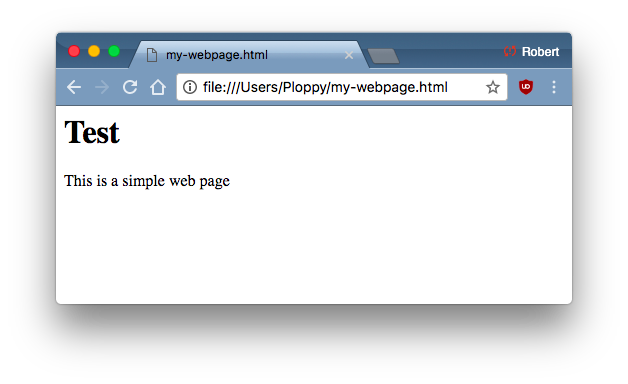
This is HTML, “hyper-text markup language”. As it’s name implies, we “markup” text, such as declaring the first text as a level-1 header (H1), and the following text as a paragraph (P).
In a web browser, this gets rendered as something that looks like the following. Notice how a header is formatted differently from a paragraph. Also notice that web browsers can use local files as well as make remote requests to web servers:
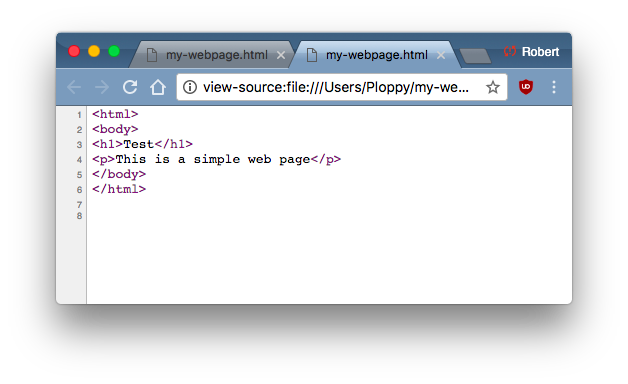
You can right-mouse click on the page and do a “View Source”. This will show the raw source behind the web page:
Web pages don’t just contain marked-up text. They contain two other important features, style information that dictates how things appear, and script that does all the live things that web pages do, from which we build web apps.
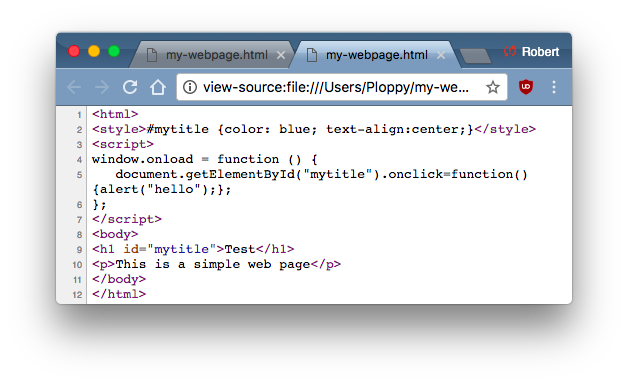
So let’s add a little bit of style and scripting to our web page. First, let’s view the source we’ll be adding:
In our header (H1) field, we’ve added the attribute to the markup giving this an id of mytitle. In the style section above, we give that element a color of blue, and tell it to align to the center.
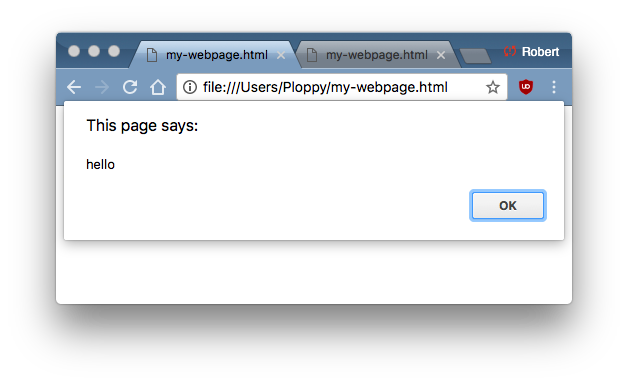
Then, in our script section, we’ve told it that when somebody clicks on the element “mytitle”, it should send an “alert” message of “hello”.
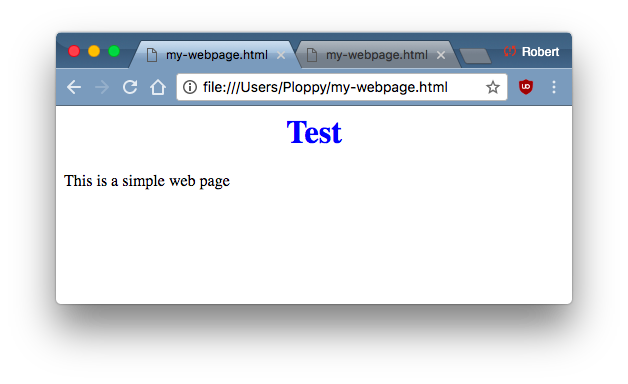
This is what our web page now looks like, with the center blue title:
When we click on the title, we get a popup alert:
Thus, we see an example of the three components of a webpage: markup, style, and scripting.

Chrome developer tools

Now we go off the deep end. Right-mouse click on “Test” (not normal click, but right-button click, to pull up a menu). Select “Inspect”.
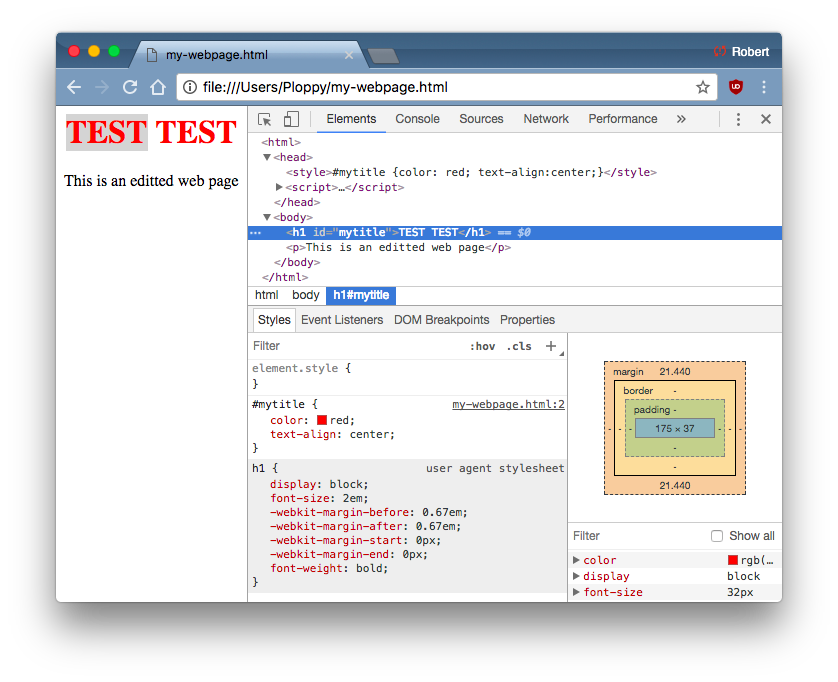
You should now get a window that looks something like the following. Chrome splits the screen in half, showing the web page on the left, and it’s debug tools on the right.
This looks similar to what “View Source” shows, but it isn’t. Instead, it’s showing how Chrome interpreted the source HTML. For example, our style/script tags should’ve been marked up with a head (header) tag. We forgot it, but Chrome adds it in anyway.
What Google is showing us is called the DOM, or document object model. It shows us all the objects that make up a web page, and how they fit together.
For example, it shows us how the style information for #mytitle is created. It first starts with the default style information for an h1 tag, and then how we’ve changed it with our style specifications.
We can edit the DOM manually. Just double click on things you want to change. For example, in this screen shot, I’ve changed the style spec from blue to red, and I’ve changed the header and paragraph test. The original file on disk hasn’t changed, but I’ve changed the DOM in memory.
This is a classic hacking technique. If you don’t like things like paywalls, for example, just right-click on the element blocking your view of the text, “Inspect” it, then delete it. (This works for some paywalls).
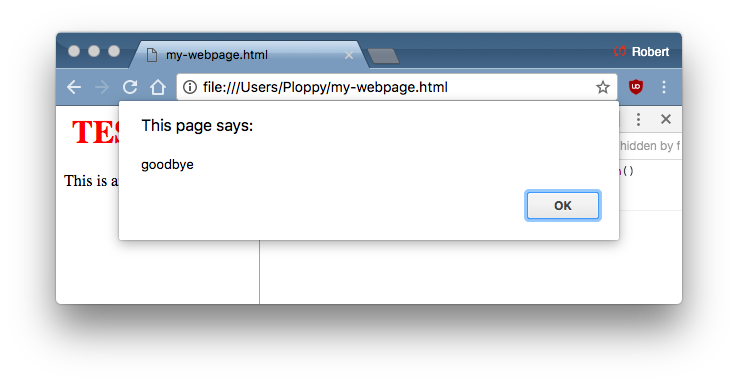
This edits the markup and style info, but changing the scripting stuff is a bit more complicated. To do that, click on the [Console] tab. This is the scripting console, and allows you to run code directly as part of the webpage. We are going to run code that resets what happens when we click on the title. In this case, we are simply going to change the message to “goodbye”.
Now when we click on the title, we indeed get the message:
Again, a common way to get around paywalls is to run some code like that that change which functions will be called.

Putting it all together

Now let’s put this all together in order to hack Twitter to allow us (the non-chosen) to tweet 280 characters. Review Dildog’s instructions above.
The first step is to get to Chrome Developer Tools. Dildog suggests F12. I suggest right-clicking on the Tweet button (or Reply button, as I use in my example) and doing “Inspect”, as I describe above.
You’ll now see your screen split in half, with the DOM toward the right, similar to how I describe above. However, Twitter’s app is really complex. Well, not really complex, it’s all basic stuff when you come right down to it. It’s just so much stuff — it’s a large web app with lots of parts. So we have to dive in without understanding everything that’s going on.
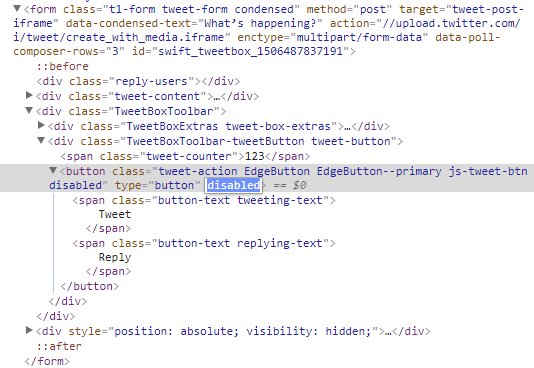
The Tweet/Reply button we are inspecting is going to look like this in the DOM:
The Tweet/Reply button is currently greyed out because it has the “disabled” attribute. You need to double click on it and remove that attribute. Also, in the class attribute, there is also a “disabled” part. Double-click, then click on that and removed just that disabled as well, without impacting the stuff around it. This should change the button from disabled to enabled. It won’t be greyed out, and it’ll respond when you click on it.
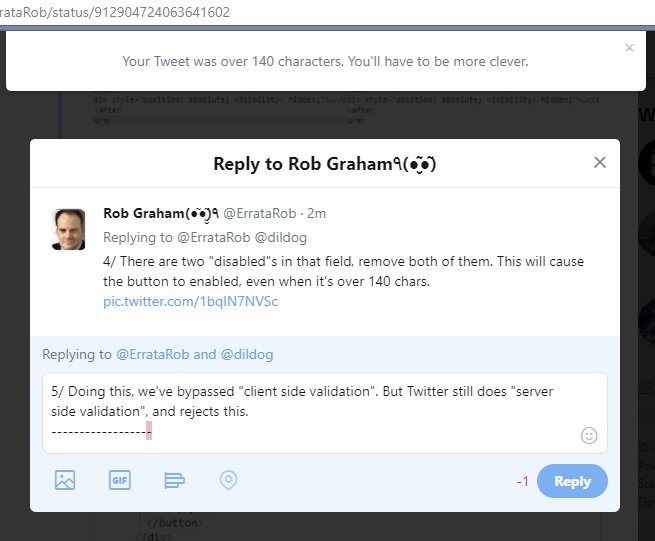
Now click on it. You’ll get an error message, as shown below:
What we’ve done here is bypass what’s known as client-side validation. The script in the web page prevented sending Tweets longer than 140 characters. Our editing of the DOM changed that, allowing us to send a bad request to the server. Bypassing client-side validation this way is the source of a lot of hacking.
But Twitter still does server-side validation as well. They know any client-side validation can be bypassed, and are in on the joke. They tell us hackers “You’ll have to be more clever”. So let’s be more clever.
In order to make longer 280 characters tweets work for select customers, they had to change something on the server-side. The thing they added was adding a “weighted_character_count=true” to the HTTP request. We just need to repeat the request we generated above, adding this parameter.
In theory, we can do this by fiddling with the scripting. The way Dildog describes does it a different way. He copies the request out of the browser, edits it, then send it via the command-line using curl.
We’ve used the [Elements] and [Console] tabs in Chrome’s DevTools. Now we are going to use the [Network] tab. This lists all the requests the web page has made to the server. The twitter app is constantly making requests to refresh the content of the web page. The request we made trying to do a long tweet is called “create”, and is red, because it failed.
Google Chrome gives us a number of ways to duplicate the request. The most useful is that it copies it as a full cURL command we can just paste onto the command-line. We don’t even need to know cURL, it takes care of everything for us. On Windows, since you have two command-lines, it gives you a choice to use the older Windows cmd.exe, or the newer bash.exe. I use the bash version, since I don’t know where to get the Windows command-line version of cURL.exe.
There’s a lot of going on here. The first thing to notice is the long xxxxxx strings. That’s actually not in the original screenshot. I edited the picture. That’s because these are session-cookies. If inserted them into your browser, you’d hijack my Twitter session, and be able to tweet as me (such as making Carlos Danger style tweets). Therefore, I have to remove them from the example.
At the top of the screen is the URL that we are accessing, which is https://twitter.com/i/tweet/create. Much of the rest of the screen uses the cURL -H option to add a header. These are all the HTTP headers that I describe above. Finally, at the bottom, is the –data section, which contains the data bits related to the tweet, especially the tweet itself.
We need to edit either the URL above to read https://twitter.com/i/tweet/create?weighted_character_count=true, or we need to add &weighted_character_count=true to the –data section at the bottom (either works). Remember: mouse doesn’t work on command-line, so you have to use the cursor-keys to navigate backwards in the line. Also, since the line is larger than the screen, it’s on several visual lines, even though it’s all a single line as far as the command-line is concerned.
Now just hit [return] on your keyboard, and the tweet will be sent to the server, which at the moment, works. Presto!
Twitter will either enable or disable the feature for everyone in a few weeks, at which point, this post won’t work. But the reason I’m writing this is to demonstrate the basic hacking skills. We manipulate the web pages we receive from servers, and we manipulate what’s sent back from our browser back to the server.

Easier: hack the scripting

Instead of messing with the DOM and editing the HTTP request, the better solution would be to change the scripting that does both DOM client-side validation and HTTP request generation. The only reason Dildog above didn’t do that is that it’s a lot more work trying to find where all this happens.
Others have, though. @Zemnmez did just that, though his technique works for the alternate TweetDeck client (https://tweetdeck.twitter.com) instead of the default client. Go copy his code from here, then paste it into the DevTools scripting [Console]. It’ll go in an replace some scripting functions, such like my simpler example above.
The console is showing a stream of error messages, because TweetDeck has bugs, ignore those.
Now you can effortlessly do long tweets as normal, without all the messing around I’ve spent so much text in this blog post describing.
Now, as I’ve mentioned this before, you are only editing what’s going on in the current web page. If you refresh this page, or close it, everything will be lost. You’ll have to re-open the DevTools scripting console and repaste the code. The easier way of doing this is to use the [Sources] tab instead of [Console] and use the “Snippets” feature to save this bit of code in your browser, to make it easier next time.
The even easier way is to use Chrome extensions like TamperMonkey and GreaseMonkey that’ll take care of this for you. They’ll save the script, and automatically run it when they see you open the TweetDeck webpage again.
An even easier way is to use one of the several Chrome extensions written in the past day specifically designed to bypass the 140 character limit. Since the purpose of this blog post is to show you how to tamper with your browser yourself, rather than help you with Twitter, I won’t list them.

Conclusion

Tampering with the web-page the server gives you, and the data you send back, is a basic hacker skill. In truth, there is a lot to this. You have to get comfortable with the command-line, using tools like cURL. You have to learn how HTTP requests work. You have to understand how web pages are built from markup, style, and scripting. You have to be comfortable using Chrome’s DevTools for messing around with web page elements, network requests, scripting console, and scripting sources.
So it’s rather a lot, actually.
My hope with this page is to show you a practical application of all this, without getting too bogged down in fully explaining how every bit works.

Continue reading Browser hacking for 280 character tweets

Posted in Uncategorized